Media Control
"Vehicle world"
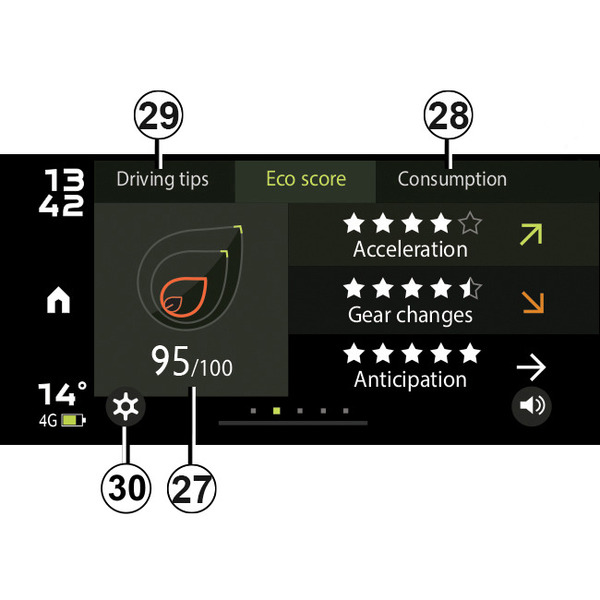
To access the "Vehicle world" from the "Dacia Media Control" app home screen, press the "Vehicle" button.
The "Vehicle world" consists of:
- 27.
the Eco-driving menu;
- 28.
depending on the vehicle, Average and Current Fuel Consumption Indicators;
- 29
access to the settings;
- 30.
access to the Driving Tips;
Note: to use all of the features available in the "Vehicle world", you must connect your Bluetooth® phone to the audio system.
"Eco-driving"
This function displays an overall score that reflects your driving style.
This score takes into account the following criteria:
- acceleration;
- the ability to anticipate braking;
- compliance with gear changes.
Personalised driving advice is offered.
You can also press the "Reset" button on the instrument panel to start a new journey.
A journey has to be more than 400 metres to be taken into account.
warning
For safety reasons, carry out any adjustments while the vehicle is stationary.
"Average and current fuel consumption indicators"

This function displays the current fuel consumption compared to the average consumption of your vehicle.
Note: the content may vary according to your phone, vehicle and country.
« Settings »
From the "Dacia Media Control" app settings menu, which can be accessed by pressing button 26, you can access the "Vehicle" settings.
"Driving Tips"
This function gives you access to the driving tips.
"Tyre pressure monitoring"
This function allows you to access the tyre pressure status. The pressure of each tyre can be displayed.
Note: the content may vary according to your phone, vehicle and country.