Media Control
"Phone world"
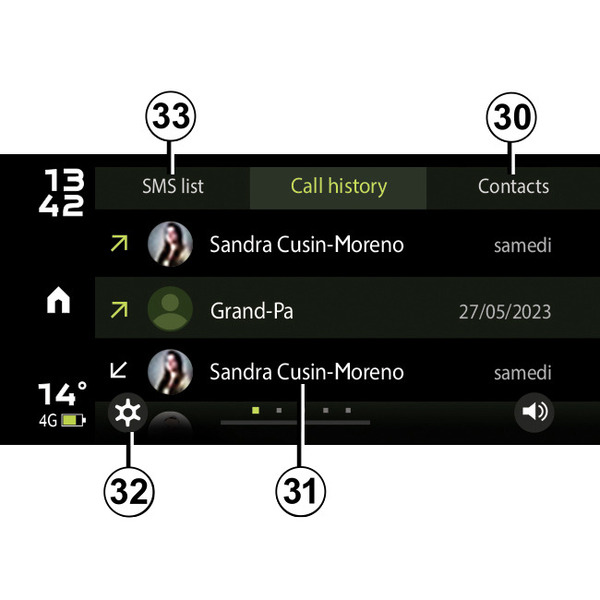
To access the "Telephone world" from the "Dacia Media Control" app home screen, press the "Phone" button.
The "Phone world" consists of:
- 30.
access the phonebook;
- 31.
access to your call log;
- 32.
access to the settings;
- 33.
access to the SMS received on your smartphone.
"Contacts"
This function allows you to access your phonebook contact list.
After connecting your audio system with your phone Bluetooth®, the numbers in your phonebook can be accessed via the "Dacia Media Control" app.
Select the contact (if the contact has more than one number, you will be requested to select the number to call). The call will be started automatically after you press the contact’s number.
Note: it is only possible to display the contacts if this option has been authorised on your smartphone.
"Call log"
Use the call log to see:
- outgoing calls;
- missed calls;
- incoming calls.
When you view the call history list, the contacts are displayed from the most recent to the oldest.
To make a call from the call history list, select the contact that you wish to call from the list.
" Phone settings"
From the "Dacia Media Control" app settings menu, which can be accessed by pressing button 33, you can access the Phone settings.
« SMS »
You can use the "SMS" function to listen to text messages received while using the "Dacia Media Control" app.