Media Control
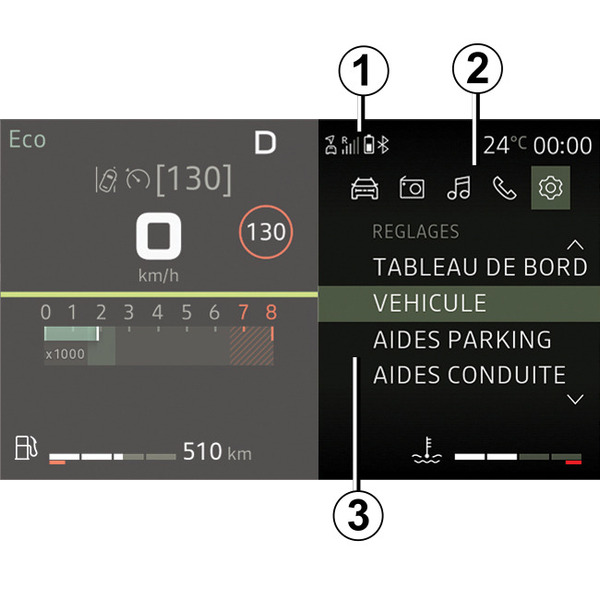
Analogue display
AUDIO/MEDIA function | TELEPHONE function | |
|---|---|---|
1 | Information zone: time, connectivity, telephone information, exterior temperature. | |
2 | Worlds display zone (Vehicle, Radio, Media, Phone, Settings). | |
3 | Vehicle trip computer point. | |
Steering column controls
Introduction to the steering column controls
AUDIO/MEDIA function | TELEPHONE function | ||
|---|---|---|---|
4 and 5 + 10 and 11 |
| Scroll through to select an audio source FM→ DR→ AM→ USB→ BT Audio. | |
6 |
| Steering column control knob: Rotate:
| Steering column control knob: Rotate:
|
7 and 8 + 13 and 15 |
| Progressively adjust the volume of the audio source currently playing. | |
7 + 8 |
| Mute the audio source currently playing. | |
9 + 16 |
| Change the mode for displaying and searching for radio stations FM - DR - AM:
With the audio media in USB/Bluetooth®:
| |
12 |
| Steering column control knob: Rotate:
| Steering column control knob: Rotate:
|
14 |
|
| When receiving a call:
During a call: end the call in progress. |
Steering column controls
Introduction to the steering wheel controls
AUDIO/MEDIA function | TELEPHONE function | ||
|---|---|---|---|
17 |
|
| |
18 |
|
| |
19 and 20 + 26 and 27 |
| Scroll through worlds/menus, lists and directories:
Media playing:
| |
AUDIO/MEDIA function | TELEPHONE function | ||
|---|---|---|---|
21 |
| To return to the previous level in the menus or cancel the current action, display the radio waveband selection screen, go up a level in the audio playlist directory (media). | |
22 + 24 |
|
| |
23 + 28 |
| Select/confirm a function or current playlist, select an item or confirm an action, store a radio station. | |
25 |
| Access/return to the main menu. | |
29 |
|
| |
Introduction to the display
- A.
Current time.
- B.
Bluetooth® telephone connection information.
- C.
Information on the telephone battery level.
- D.
Information on the telephone network status.
- E.
Exterior temperature.
- F.
Fuel level.
- G.
Audio information (audio source, song title etc.).
Your system contains several worlds:
- « Vehicle » ;
- « Radio » ;
- "Media";
- « Phone » ;
- « Settings » ;
- ...
Note: the availability of Worlds depends on the equipment.
You can access the different worlds at any time using the
button on the steering wheel.