Media Control
Voice recognition system
The audio system can be used to operate voice recognition via your smartphone (if compatible). This makes it possible to control the functions of your smartphone by voice, while keeping your hands on the steering wheel.
Note:
- your smartphone's voice recognition system only enables you to use the functions provided with your smartphone. It does not enable you to interact with the other audio system functions, such as the radio etc.
- when using voice recognition, the audio system will use the language set on your smartphone;
- if you try to use your vehicle's voice recognition system with a paired smartphone that is not equipped with voice recognition, a message will be displayed on the audio system screen to notify you.
Using voice recognition with your phone
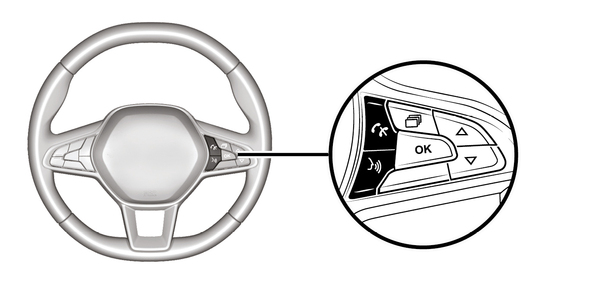
Activation
To activate the voice recognition system, you must:
- get a 3G, 4G or WIFI connection with your smartphone;
- activate the Bluetooth® function on your smartphone and make it visible to other devices (refer to your smartphone user manual);
- pair and connect your smartphone to the audio system Pairing/unpairing a phone;
- press briefly
 to activate the function, then speak (a beep indicates that voice recognition is activated).
Deactivation
Press and hold
.
An audible signal indicates that voice recognition is deactivated.