Dacia Striker

The system displays speed limits on the instrument panel according to road signs detected on the side of the road.
It primarily uses data from camera 1 mounted on the windscreen.
Depending on the country, the system also uses information from a map subscription to interpret certain signs (town entrance, etc.).
The sign displayed on the instrument panel changes when a road sign is detected by the system.
When the speed limiter or, depending on the vehicle, the adaptive cruise control Stop and Go is active, you can adjust the set speed to match the speed displayed on the instrument panel by the system (Speed limiterStop and Go adaptive cruise control).
If the detected speed limit is exceeded, the road sign displayed on the instrument panel is modified to inform the driver.
Location of the camera 1
Make sure the windscreen is not obscured (by dirt, mud, snow, condensation etc.).
Special features
For vehicles with a map subscription:
- if the vehicle is travelling in a country where the speed units differ from those of the vehicle, the system displays the speed limit sign in the unit of the country, alongside the speed limit converted to the unit used by the vehicle’s instrument panel;
- for countries where the speed limit is reduced during rainy weather on some types of roads, the system may alter the detected speed limit after a few seconds of the windscreen wipers being activated.
For vehicles without a map subscription: when driving in a country where the speed units are different to those of your vehicle, you can manually select the relevant speed unit on the instrument panel (change from kilometres to miles, for example) to obtain the appropriate information Displays and indicators.
Note: the system does not take into account exceptional speed limit measures, such as on peak pollution days.
Operation
Warning lights
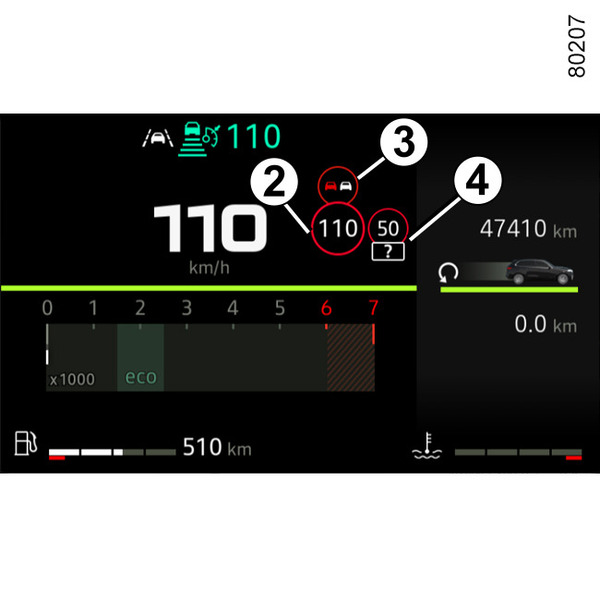
The function displays the following warning lights:
- 2.
Speed limit signs and additional speed limit signs (speed on exit ramp with arrow, speed with a caravan, speed limit with length of application, etc.)
- 3.
Additional road signs (start of no overtaking zone).
- 4.
Speed limit signs associated with a supplementary sign not recognised by the system (non-standard, partially obscured, damaged, complex, etc.).
If the detected speed limit is exceeded, a circle flashes around the road sign (warning light 2) accompanied, depending on the vehicle, by a beep emitted for a few seconds to warn you. It remains illuminated on the instrument panel as long as the vehicle is exceeding the detected speed limit.
Note: When indicator 4 is displayed, the speed on the supplementary sign is not taken into account by the system. The system then refers only to the speed displayed by indicator 2.
tip
Map subscription
Road sign detection is associated with a map subscription.
Depending on the equipment, it is necessary to update the maps regularly.
It the maps are not updated, system performance will be impaired (incorrect speed limit, etc.)
Note: if there is no map data for the country, a message will appear on the multimedia screen to notify you and to suggest downloading the map data for that country.
To manage and update the subscription, please refer to the multimedia instructions.
If there is no subscription, the system will be limited to taking into account the speed limit signs when they are detected by the camera.
The system will no longer take into account information related to the maps. The speed limit availability may be affected.
Activation/deactivation
warning
For safety reasons, carry out any adjustments while the vehicle is stationary.
tip
Depending on the vehicle and on the length of time following the last time the engine was stopped, the audible warning is reactivated::
- when the vehicle is unlocked;
or
- when a door is opened;
or
- when the engine is restarted.
Activation and deactivation of the audible overspeed warning using button 5 "My Safety"
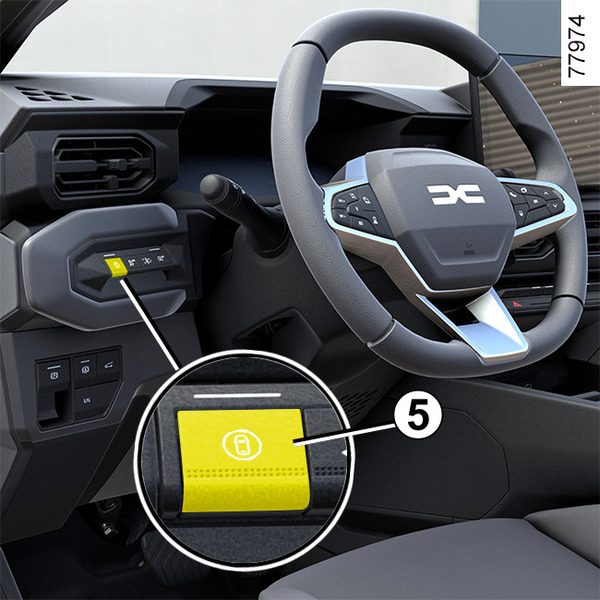
The audible warnings can be activated or deactivated from the "Perso" mode in the "My Safety" function My Safety.
If the audible warning has previously been deactivated using "Perso" mode:
- to deactivate the audible warning, press the button 5 twice. The indicator light on the button 5 goes out;
- to reactivate the audible warning, press the button 5 once. The indicator light on the button 5 lights up.
Activating, deactivating the audible overspeed warning from the multimedia screen 6
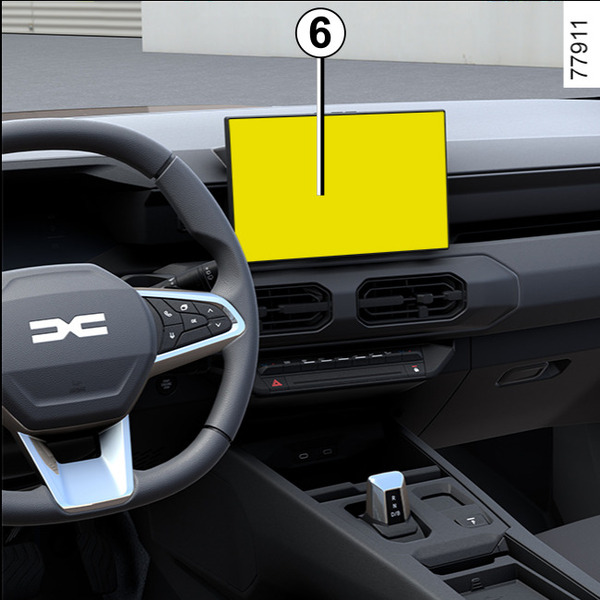
To activate or deactivate the audible warning, please refer to the multimedia instructions.
Select "ON" or "OFF".
Variation of the limited speed or cruising speed
(depending on the vehicle)
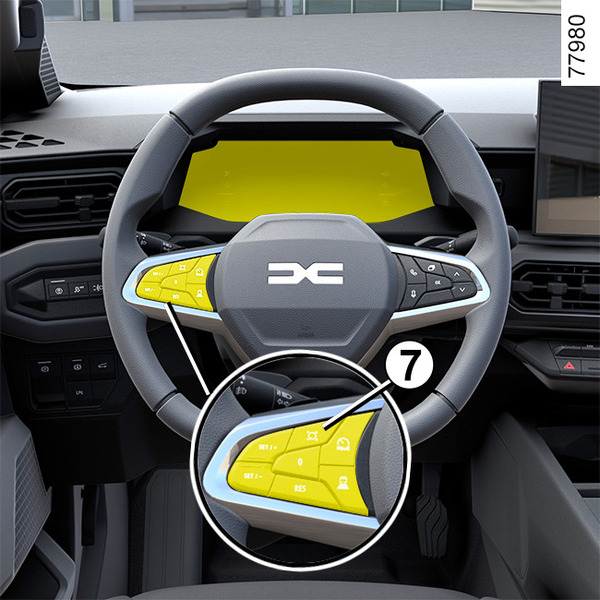
To adjust the setpoint of the speed limiter or adaptive cruise control Stop and Go to the detected speed limits: briefly press the switch 7 to adapt the vehicle speed to the speed limit indicated on the last detected speed limit sign.
Note: depending on the vehicle, you can automatically adjust the vehicle's speed to each new limit indicated on the detected speed limit signs. To do this, press and hold switch 7 for approximately two seconds.
Temporary unavailability
If the system is unavailable for reasons related to the camera or map data, the
 symbol or, depending on the vehicle, the yellow
 symbol is displayed on the instrument panel. If there is still a problem, contact an approved Dealer.
The system may not detect the speed limit in the following cases:
- the windscreen is not clean;
- the camera is blinded by the sun;
- there is insufficient visibility (fog, etc.);
- the signs are not legible (snow, etc.) or are hidden (by another vehicle or by trees);
- map data is not up to date or is unavailable (private roads, unmapped areas, etc.).
Note: when the front camera is obscured, the "Front camera no visibility" message is displayed on the instrument panel. Clean the windscreen area in front of the camera.
Operating faults
When the system detects an operating fault, the
or, depending on the vehicle, the yellow
is displayed on the instrument panel.
In some cases, they are accompanied by the following message:
- « Driving assist unavailable » ;
or
- « Check Front camera » ;
or
- « Check Driving assist ». Consult an approved Dealer.
Warnings
warning
Detection of road signs
This function is an additional driving aid. This function is not under any circumstances intended to replace the due care and attention of the driver, who should at all times be in control of the vehicle.
The driver must always adapt their speed to the highway code and traffic conditions, regardless of system indications.
The system may not detect all speed limit signs or may interpret them incorrectly.
The driver must not ignore road signs undetected by the system and should give priority to complying with the actual road signs and the highway code.
In the event of poor visibility (fog, snow, frost, etc.), it is possible that the system may not indicate the correct speed to the driver.