Dacia Duster
Depending on the vehicle equipment, this function allows you to activate/deactivate and adjust some of the vehicle's functions.
Vehicles fitted with a multimedia screen 1
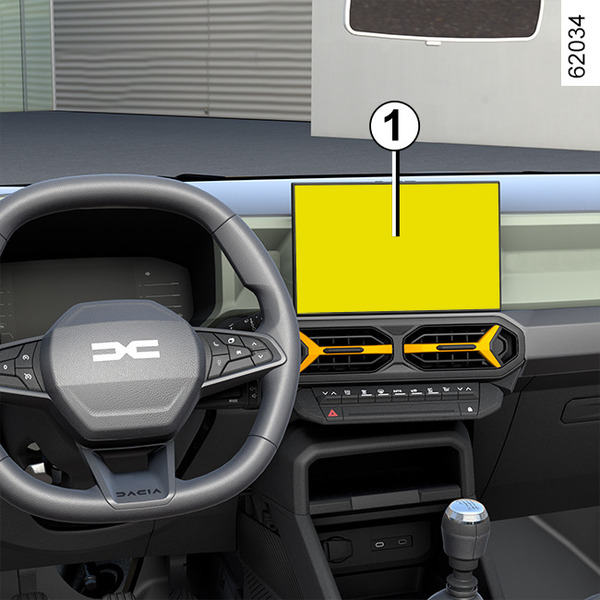
Accessing the settings menu
Refer to the various multimedia instructions for information on accessing the settings.
Adjusting the settings
Select a menu then the function to be modified (the display depends on the vehicle equipment and country):
a) "DRIVING ASSIST":
- Indicator volume.
b) "ACCESS":
- Release driver's door;
- Lock doors during driving;
- Opening/closing in hands-free mode;
- Remote locking/approach unlocking;
- Remote locking sound;
- Silent mode;
- Automatic locking;
c) "WIPING and LIGHTING":
- Follow-me-home lighting;
- Wiping in reverse;
- Automatic front wiping;
- Wipe after wash;
d) "Welcome":
- Exterior welcome;
- Automatic deployment of door mirrors;
- Interior welcome;
- Courtesy light auto mode
Depending on the function, select:
- "ON" or "OFF" to activate or deactivate it,
or
- a setting for the time the lights are switched on (e.g. for the "Follow-me-home lighting" function).
Please refer to the multimedia instructions for further information.
warning
For safety reasons, carry out any adjustments while the vehicle is stationary.
Vehicles not fitted with a multimedia screen
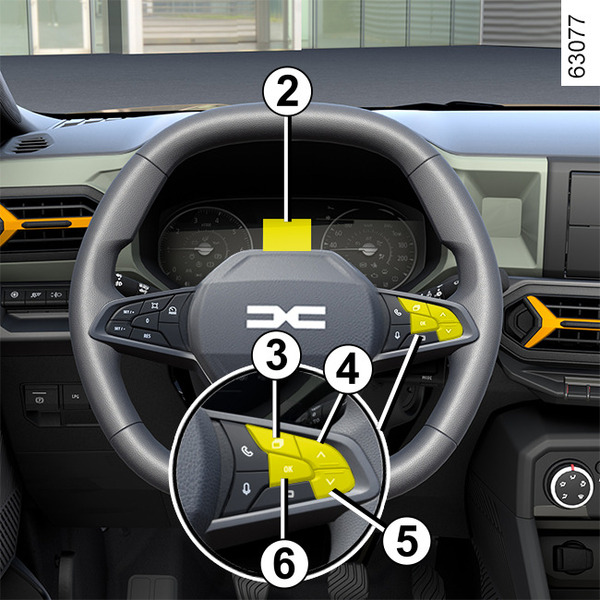
Accessing the settings menu on display 2
(depending on the vehicle)
- With the vehicle stationary, press the switch 3 as many times as required to reach the
 tab;
tab;
or
- depending on the vehicle, press switch 3 and repeatedly press control 4 or 5 to reach the
 tab;
tab; - press switch 6 "OK";
- repeatedly press control 4 or 5 to reach the
 menu, then press the 6 "OK" switch.
Adjusting the settings
Navigate using control 4 or 5 to select the function to be modified and press control 6 "OK" to confirm (display may vary according to vehicle equipment and country):
a) "DASHBOARD":
- Language;
- Unit;
b) "VEHICLE":
- Rear windscreen wiping in reverse gear;
- Automatic windscreen wiping;
- Front-rear drip wiping function;
- Exterior welcome;
c) "PARKING ASSIST":
- Beep volume;
d) "DRIVING ASSIST":
- Lane departure warning sound volume;
- Lane departure warning sensitivity;
- Lane departure warning vibration;
- Lane Keep Assist sensitivity;
- Blind spot;
- Active braking;
- Speed warning;
- Distance warning;
- ...
e) "LIGHTING":
- Courtesy light auto mode;
- Automatic follow-me-home lighting;
- Follow-me-home lighting: XX seconds.
f) "ACCESS":
- Lock doors during driving;
- Opening/Closing in hands-free mode;
- Unlock the driver's door only;
- Automatic re-locking;
- Silent locking;
- Automatic opening/closing;
- Automatic Deployment of Door Mirrors;
g) "RESET".
 function activated
 function deactivated
Once a line has been selected, press the switch 6 "OK" to modify the function.
If you select either "PARKING ASSIST" then "VOLUME" or "DASHBOARD" then "LANGUAGE", you will have to make a further selection (Park Assist sound volume or instrument panel language). In this case, make your selection and confirm it by pressing the switch 6 "OK", the selected value is shown by a
in front of the line.
To exit the menu, press 4 or 5 to access "BACK" and confirm by pressing 6 "OK". It may be necessary to carry out this operation more than once.
tip
The vehicle settings personalisation menu cannot be used when driving. At a speed exceeding 12 mph (20 km/h), the instrument panel display switches automatically back to trip computer and warning system mode.