Dacia Duster
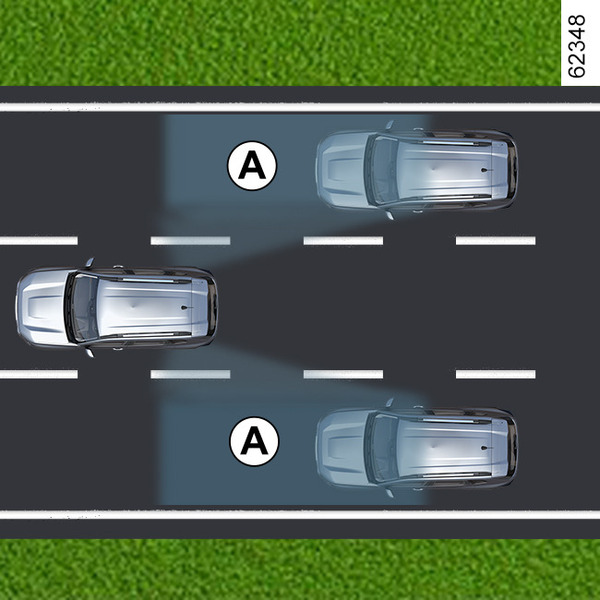
This system alerts the driver to other vehicles in the detection zone A.
The system is activated when the vehicle's speed is between approximately 19 mph (30 km/h) and 87 mph (140 km/h).

This function uses sensors 1 installed in the front and rear bumper of both sides.
Special feature
Make sure that the sensors are not obscured (by dirt, mud, snow, etc.).
If a sensor is obscured, the message "Blind spot clean sensor" is displayed on the instrument panel. Clean the sensors.
warning
This function is an additional aid which indicates other vehicles in the blind spot area.
It can never in any case be a substitute for care nor for the driver’s responsibility while in charge of his vehicle.
The driver should always be ready for sudden incidents while driving: always ensure that there are no moving obstacles (such as a child, animal, pushchair, bicycle, etc.) or small, narrow objects such as stones or posts in the blind spot when manoeuvring.
Activation/deactivation
Activating and deactivating the function from the multimedia screen 2
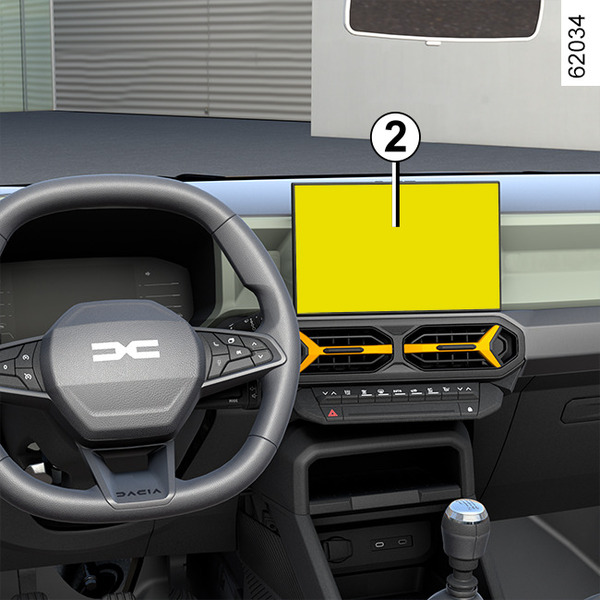
To activate or deactivate the function, please refer to the multimedia instructions.
Select "ON" or "OFF".
Activating, deactivating the function using the 3 "My Safety" button

The function can be deactivated or activated using "Perso" mode in the "My Safety" function My Safety.
If the function has previously been deactivated from "Perso" mode:
- to deactivate the alerts, press the button 3 twice. The indicator light on the button 3 goes out;
- to reactivate alerts, press the button 3 once. The indicator light on the button 3 lights up.
tip
The system’s detection range operates according to a standard lane width. If you are driving in narrow traffic lanes, it may detect vehicles in other lanes.
Warning light 4

An indicator light 4 is situated on both rear view mirrors 5.

Note: clean the door mirrors regularly 5 so that the warning lights 4 can be seen.
Operation
This function gives a warning:
- when the vehicle speed is between approximately 19 mph (30 km/h) and 87 mph (140 km/h);
- when another vehicle is in the blind spot area and travelling in the same direction as your vehicle.
If another vehicle is being overtaken, the indicator 4 will be activated only if that vehicle remains in the blind spot for more than one second.
Display B
The function is activated and has not detected any vehicles.
Display C
First warning: the warning light 4 signals that a vehicle has been detected in the blind spot area.
Display D
When the direction indicator is activated, the warning light 4 flashes when a vehicle is detected in the blind spot on the side towards which you are about to steer. If you cancel the direction indicator, the function will return to the initial warning (display C).
warning
Because sensors have been installed in the bumpers, any work (repairs, replacements, touching up of paintwork) must be carried out by a qualified professional.
Conditions for non-function
- If the object is not moving;
- if traffic is heavy;
- if the road is winding;
- if front and rear sensors both detect an object at the same time (e.g. when passing an articulated lorry);
Operating faults
If the system detects a fault, the message “Check blind spot alert” is displayed on the instrument panel. Call an approved dealer.
Note: when the engine is started, the warning light 4, display B, flashes four times. It is normal.
Warnings
warning
- The system’s detection range operates according to a standard lane width. If you are driving in wide traffic lanes, the system might not be able to detect a vehicle in the blind spot.
- In the event of very bad weather conditions (heavy rain, snow, etc.), the system may be temporarily disrupted. Remain aware of driving conditions.
There is a risk of accidents.
warning
This function is an additional driving aid. This function is not under any circumstances intended to replace the due care and attention of the driver, who should at all times be in control of the vehicle.
The driver should always adapt their speed to the traffic conditions, regardless of the system indications.
The system should under no circumstances be taken to be an obstacle detector or an anti-collision system.
System servicing/repairs
- In the event of an impact, radar alignment may be changed, and its operation will consequently be affected. Deactivate the function and consult an authorised dealer.
- Any work in the area where the radars are located (repairs, replacements, etc.) must be carried out by a qualified professional.
Only an authorised dealer is qualified to service the system.
System disturbance
Some conditions can disturb or damage the system's operation, such as:
- complex surroundings (metal bridges, tunnels, roads with barriers at the edge, etc.);
- poor weather conditions (snow, hail, black ice, etc.).
Risk of false alarms or absence of warnings
In the event of the system behaving abnormally, deactivate it and contact an authorised dealer.
warning
Limitation of the system operation
- The radar area should be kept clean and free of any modifications in order to ensure the proper operation of the system.
- Small objects moving close to the vehicle (motorcycles, bicycles, pedestrians, etc.) may not be recognised by the system.
- When the vehicle enters corners and curves, detectors may temporarily no longer detect vehicles in adjacent lanes.
- The system may not react when the difference in speed with other vehicles is more than 19 mph (30 km/h).
- If the vehicle is being overtaken by a long vehicle (e.g. heavy goods vehicle overtaking at a similar speed to the vehicle) the system may interrupt the warning before the end of the manoeuvre.
- The vehicle is travelling on a winding road.
Deactivating the function
You must deactivate the function if:
- the radar area has been damaged (rear bumper);
- the vehicle is fitted with a towbar.