Dacia Bigster
The cruise control function controls the engine to help you to maintain a driving speed that you have chosen, known as the cruising speed.
The cruise control function can be activated from 12 mph (20 km/h) or, depending on the vehicle, from 19 mph (30 km/h) to 112 mph (180 km/h).
warning
The cruise control function is in no way linked to the braking system.
Controls
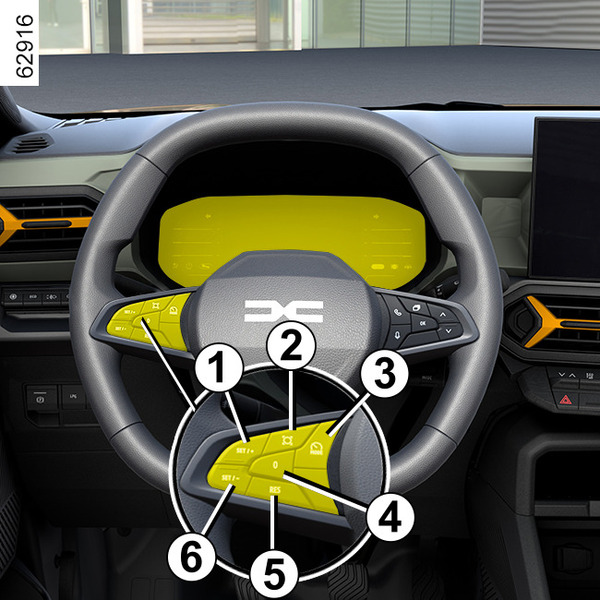
- 1
Switch to activate and increase the cruising speed (SET/+).
- 2
Depending on the vehicle, the road sign detection activation switch Detection of road signs.
- 3
Switch for selecting/deselecting the driving aids, depending on the vehicle:
- cruise control;
- speed limiter;
- OFF.
- 4
Put the function on standby (with storage of the cruising speed (0).
- 5
Recall the stored cruising speed (RES).
- 6
Switch to activate and decrease the cruising speed (SET/˗).
tip
When "OFF" mode is selected before the ignition is switched off, the "Speed limiter" function will be activated by default the next time the engine is started.
tip
You can link the cruise control function to the "Road sign detection" function Detection of road signs.
Switching on
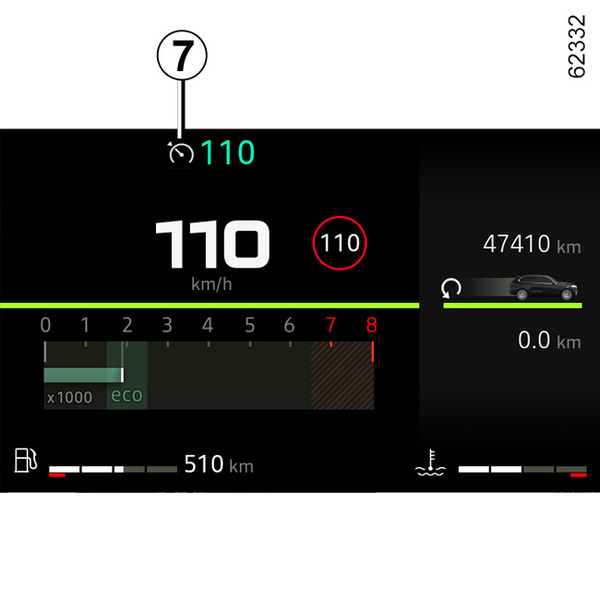
Press switch 3 until the light 7 lights up grey on the instrument panel.
The "Cruise Control selected" message appears on the instrument panel accompanied by dashes to indicate that the cruise control function is activated and waiting to store a cruising speed.
Activating cruise control
While the vehicle is moving a steady speed above approximately 12 mph (20 km/h) or 19 mph (30 km/h), depending on the vehicle, press switch 6 (SET/˗) or switch 1 (SET/+): the function is activated and the current speed is taken into account.
The cruising speed replaces the dashes. Cruise control is confirmed when the memorised speed and warning light appear in green 7.
If you try to activate the function below 12 mph (20 km/h) or 19 mph (30 km/h), depending on the vehicle, the "Invalid Speed" message is displayed and function remains inactive.
Driving
Once a cruising speed is registered and the cruise control function is active, you may lift your foot off the accelerator pedal.
warning
Please note that you must keep your feet close to the pedals in order to react in an emergency.
Adjusting the cruising speed
The cruising speed may be changed by repeatedly pressing the:
- switch 6 (SET/˗) to decrease the speed;
- switch 1 (SET/+) to increase the speed.
Note: press and hold one of the switches to modify speed by successive increments
Exceeding the cruising speed
The cruising speed may be exceeded at any time by depressing the accelerator pedal.
While it is being exceeded, the cruising speed flashes on the instrument panel.
Then, release the accelerator pedal: after a few seconds, the vehicle will automatically return to its set cruising speed.
warning
If the cruise control is no longer available (after several attempts to activate it), contact an Approved Dealer.Putting the function on standby
The function is set to standby if you:
- the switch 4 (O);
- the brake pedal;
- the clutch pedal for a prolonged period or if the vehicle is in neutral for a prolonged period on vehicles equipped with a manual gearbox
- shifting to neutral position on vehicles equipped with an automatic gearbox.
The cruising speed is stored and displayed in grey on the instrument panel.
Returning to the cruising speed
If a speed is stored, it can be recalled, once you are sure that the road conditions are suitable (traffic, road surface, weather conditions, etc.). Press switch 5 (RES) if the vehicle speed is over 12 mph (20 km/h) or, depending on the vehicle, 19 mph (30 km/h).
When the speed is stored, cruise control activation is confirmed in green of the cruising speed and, depending on the vehicle, the 7 warning light is displayed.
Note: if the speed previously stored is much higher than the current speed, the vehicle will accelerate more rapidly to reach this threshold.
With the cruise control on standby, press switch 6 (SET/˗) or switch 1 (SET/+) to reactivate the cruise control function without taking into account the stored speed: it is the speed at which the vehicle is moving that is taken into account.
Switching off the function
The cruise control function is interrupted:
- if you press switch 3 until the "Driving assist. deactivated" message appears on the instrument panel. In this case, there is no stored speed;
tip
In this case, the next time the engine is started, the "Speed limiter" function will be activated and waiting for a speed limit to be stored.
- you press the switch 3 until the light
 appears on the display. In this case the speed limiter is selected and there is no stored speed.
The 7 warning light disappears from the instrument panel to confirm that the function has stopped.