New Dacia Spring
Vehicles fitted with a multimedia screen 1
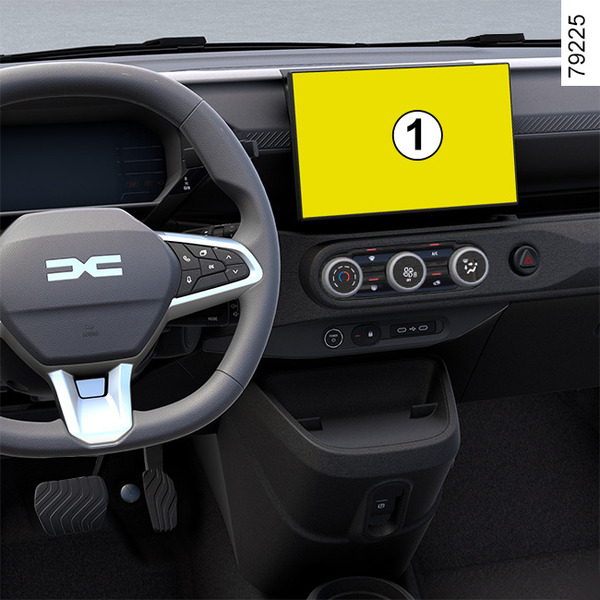
Depending on the vehicle equipment, this function allows you to activate/deactivate and adjust some of the vehicle's functions.
Accessing the settings menu
Wirth the vehicle stationary and the motor on (READY), from the multimedia screen 1 select the "Vehicle" world, press the "Vehicle" menu then the "Outside" tab to access the various settings.
Adjusting the settings
Select a tab then the function to be modified (the display depends on the vehicle equipment and country):
a) "Access":
- « Auto door lock while driving » ;
- « Hands-free lock/unlock » ;
- ...
b) "Welcome":
- « External lighting sequence » ;
- « Internal sequence sound » ;
- « Internal light function » ;
- ...
c) "Wiping":
- « Rear wiper when in reverse gear » ;
- ...
Depending on the function, select:
- "ON" or "OFF" to activate or deactivate;
or
- a time period to adjust the time during which the headlights are illuminated (e.g. for the "Follow me home" function).
Please refer to the multimedia instructions for further information.
warning
For safety reasons, carry out any adjustments while the vehicle is stationary.
Vehicles not fitted with a multimedia screen 2
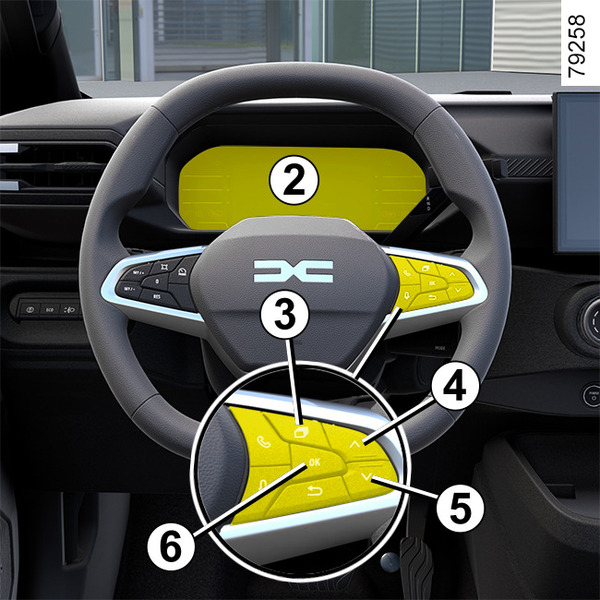
Accessing the settings menu on display 2.
Vehicle stationary:
- press the switch 3
repeatedly
to access the
 menu;
menu; - repeatedly press control 4 or 5 to access the « Setting » menu.
- Press the OK switch 6;
Adjusting the settings
Navigate using control 4 or 5 to select the function to be modified and press control 6 « OK » to confirm (display may vary according to vehicle equipment and country):
a) « VEHICLE SETTING »:
- DASHBOARD:
- Language;
- Unit.
b) « VEHICLE »:
Rear Wiper When Reverse;
Traction control.
c) « PARKING ASSIST »:
Bip volume;
d) « DRIVING ASSIST »:
Lane Departure Sensitivity;
Lane Departure Vibration;
Lane Keeping Sensitivity;
Active braking;
Active Braking Sensitivity;
Dashed line correction.
e) « MY SAFETY PERSO »:
Speed alert;
Lane Keeping;
Vigilance.
f) « ACCESS »:
Lock Doors When Moving;
g) « RESET »:
 Confirmation.
Once a line has been selected, press the switch 6 « OK » to modify the function
h) « EXIT »:
Audio setting;
Phone setting;
Time setting;
Brightness adj.
If you select « PARKING ASSIST » then « VOLUME » or « DASHBOARD » then « LANGUAGE », you will be
able to make a selection (Park Assist sound volume or instrument panel language). In
this case, make your selection and confirm it by pressing the switch 6 «
OK », the selected value
is shown by a
 in front of the line.
To exit the menu, press the switch 4 or 5 to reach « BACK » and confirm by pressing switch 6 « OK ». It may be necessary to carry out this operation more than once.
tip
The vehicle settings personalisation menu cannot be used when driving. At a speed exceeding 12 mph (20 km/h), the instrument panel display switches automatically back to trip computer and warning system mode.