Dacia Spring
Worlds screen
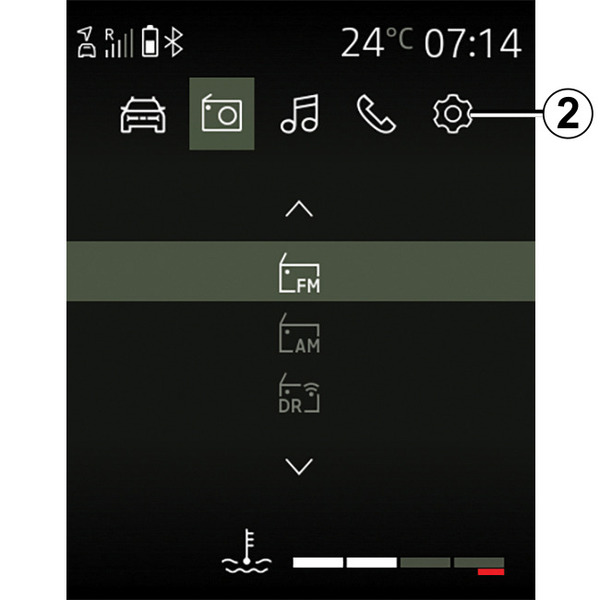
You can access the various worlds 2 at any time by pressing and holding on
 .
.
Press repeatedly on
to reach the "Settings" world, then
 to confirm.
- « Vehicle » ;
- « Radio » ;
- "Media";
- « Phone » ;
- « Settings » ;
- ...
Note: the availability of Worlds depends on the equipment.
You can access the different worlds at any time using the
button on the steering wheel.
tip
Certain functions are only available while the vehicle is stationary.
Display screen
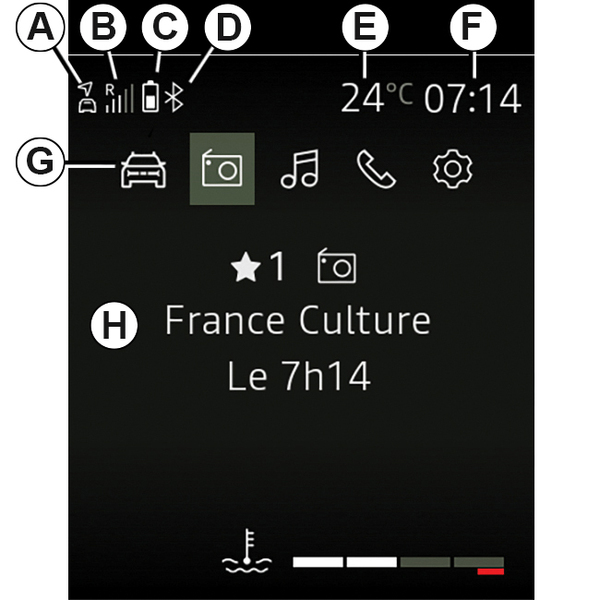
- A.
Status of the connection and sharing of data;
- B.
Information on the telephone network status.
- C.
Information on the telephone battery level.
- D.
Bluetooth®connection information.
- E.
Exterior temperature.
- F.
Current time.
- G.
Worlds display.
- H.
Display area showing the world/menu currently in use.