New Dacia Spring
Controls
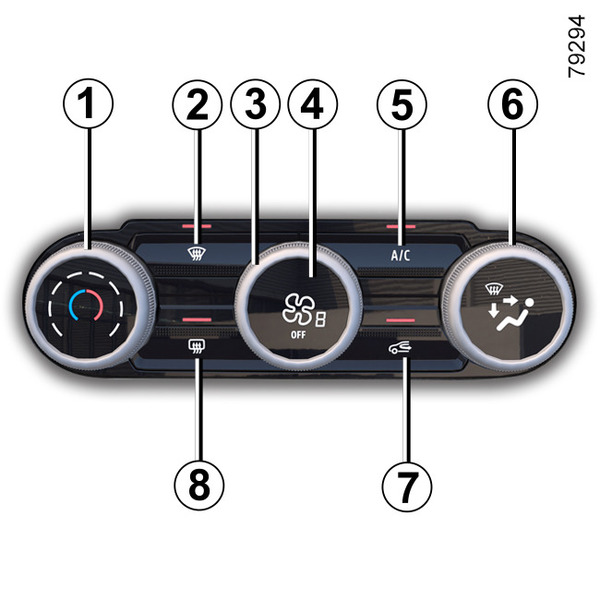
- 1.
Adjusting the air temperature.
- 2.
"Clear View" function.
- 3.
Adjusting the ventilation fan speed.
- 4.
Starting/stopping the system.
- 5.
Air conditioning control.
- 6.
Distribution of air in the passenger compartment.
- 7.
Air recirculation.
- 8.
De-icing/demisting of the rear screen and, depending on the vehicle, the rear view mirrors.
Activating the system
When the vehicle is started, the system runs based on the option chosen previously.
The system is also functional when the vehicle is stationary with the engine on.
Press control 4 to activate the system, then rotate the control 3 to the desired ventilation speed.
Stopping the system
Press the control 4 to stop the system.
Adjusting the air temperature
Turn control 1 to obtain the desired temperature. The further towards the red the slide is, the higher the temperature will be.
When the air conditioning system is used for long periods, it may begin to feel cold. To increase the temperature, turn the control 1 to the right.
"Clear View" function
Press button 2 and the built-in warning light comes on.
This function quickly demists and de-ices the windscreen, the rear screen, the front side windows, and the exterior rear view mirrors (depending on the vehicle). It automatically activates the air conditioning and rear screen de-icing functions.
Press the button 8 (control A) or 7 (control B) to deactivate the heated rear screen: the integrated indicator light goes out.
Note: it automatically deactivates air recirculation.
To exit this function, press button 2.
Adjusting the ventilation fan speed
Turn the control 3 to adjust the amount of air blown. If you want to shut off the flow of air, press the control 4 to switch OFF the system.
The system is deactivated: the ventilation speed is zero (vehicle stationary). You can, however, still feel a slight flow of air when the vehicle is moving.
tip
Setting position
 using the control
6
will deactivate the recirculation function in order to prevent the risk of
condensation on the windscreen.
using the control
6
will deactivate the recirculation function in order to prevent the risk of
condensation on the windscreen.
Switching the air conditioning on or off
Activation is not possible if control 4 is set to OFF position.
Press the button 5 (control A) or 4 (control B) to activate (indicator light on) or deactivate (indicator light off) the air conditioning.
The air conditioning system is used for:
- lowering the temperature (control A) or Increasing the temperature (control B) inside the passenger compartment;
- eliminating condensation more quickly.
Distribution of air in the passenger compartment
There are five air distribution options. Turn control 6 (control A) or 5 (control B) to choose the distribution option.
-
All the air is then directed to the windscreen and front side window demisting vents.
-

The air flow is distributed between front side window demisting vents, the windscreen demisting vents and the footwells.
-

The air flow is directed mainly towards the footwells.
-

- The air flow is directed towards the dashboard air vents and towards the footwells.
-

The air flow is mainly directed to the dashboard air vents.
Switching the air recirculation on
Press the button 7: the button's indicator light comes on. Under these conditions, air is taken from the passenger compartment and is recirculated, with no air being taken from outside the vehicle.
Air recirculation operates as follows:
- isolating the vehicle from the external atmosphere (e.g. when driving in polluted areas, etc.);
- to cool the passenger compartment temperature more quickly when air conditioning is activated.
This function is managed automatically but you can also activate it manually. In this case, the operation is confirmed by the illumination of the indicator light on button 7.
Manual use
Press button 7 and the button's indicator light comes on.
Prolonged use of this position may lead to odours, caused by non-renewal of air, and the formation of condensation on the windows. To avoid this, air recirculation is disabled automatically after a certain time.
Stopping the system
Press the control 4 to switch OFF the system or press button 7.
tip
If the air conditioning is not activated ("A/C" indicator light on button 5 off), the prolonged use of recirculated air may cause condensation to form on the side windows and windscreen as well as other problems due to the presence of non-recirculated air in the passenger compartment. To avoid this, air recirculation is disabled automatically after a certain time.
Rear screen de-icing and demisting
Press the button 8. The operating tell-tale comes on.
This function permits rapid demisting of the rear screen and de-icing of the rear view mirrors (on equipped vehicles).
To exit this function, press the button 8 again. Warning light goes out.
Demisting automatically stops.
Rapid demisting
Turn controls 6, 3 and 1 to positions:
- demisting
;
- fan speed to position 3 or 6;
- maximum temperature.
Press the button 7 to deactivate the air recirculation (indicator light off).