Dacia Duster
Trip computer A or B
Depending on the vehicle, this includes the following functions:
- mileage;
- trip settings;
- information messages;
- operating fault messages (related to the
 warning light);
 - warning messages (related to the
 warning light);
 - vehicle settings customisation menu Vehicle settings personalisation menu.
Vehicle fitted with trip computer A
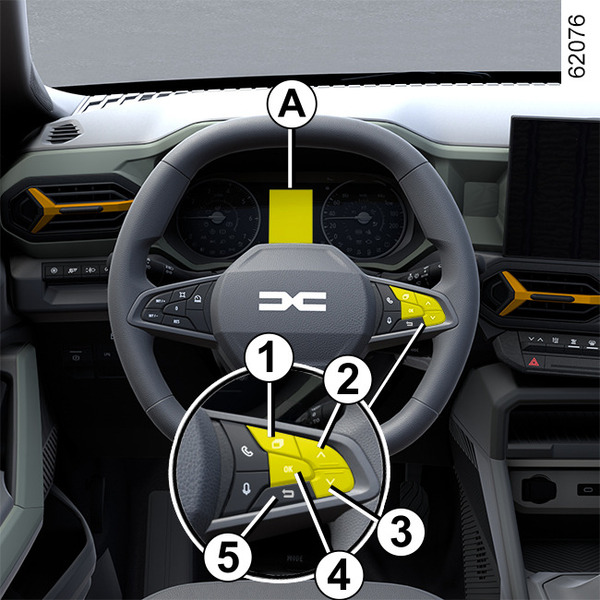
- With the vehicle stationary, press the switch 1 as many times as required to reach the
 tab;
tab; - press switch 4 "OK";
Select the function by repeatedly pressing switch 2 or 3 and press the switch 4 "OK" to confirm.
Press switch 5 to return to the previous menu (the display depends on the vehicle equipment and country):
f) Trip log, operating fault and information message readout;
b) Trip settings:
- average consumption;
- current fuel consumption;
- estimated mileage with remaining fuel;
- mileage;
- average speed;
- average LPG consumption;
- estimated range with remaining LPG fuel;
- LPG distance;
c) total mileage and trip mileage recorder and average speed;
d) reset the tyre pressures;
e) set the time;
f) mileage before service:
- distance before service;
- mileage before oil change.
g) estimated range with remaining reagent.
Vehicle fitted with trip computer B
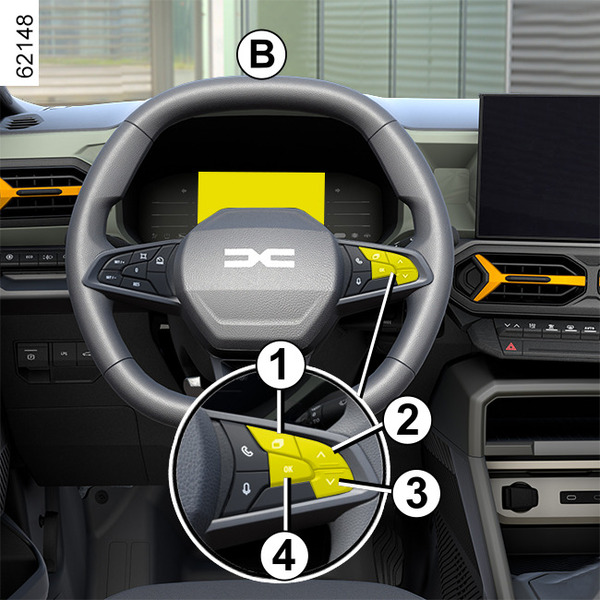
Depending on the vehicle, it allows the following functions to be displayed in zone 6. Select the functions by repeatedly pressing switch 2 or 3:
- mileage;
- trip settings;
- information messages;
- operating fault messages (related to the
warning light);
- warning messages (related to the
warning light);
- ECO monitor;
- depending on the vehicle, energy flow;
- vehicle inclinations and compass;
- guidance information.
Zone 7 is customisable using switch 1 and displays the following functions;
- rev counter or, depending on the vehicle, charge meter;
- driving aids.
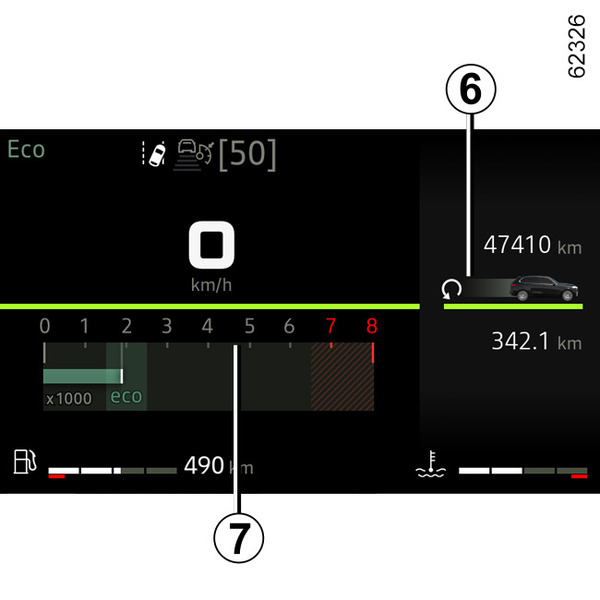
Selections for display in zone 6
(the display depends on the vehicle equipment and country):
f) Trip log, operating fault and information message readout;
b) Trip settings:
- average consumption;
- current fuel consumption;
- estimated mileage with remaining fuel;
- mileage;
- average speed;
- average LPG consumption;
- estimated range with remaining LPG fuel;
- LPG distance;
c) trip mileage recorder and average speed;
d) reset the tyre pressures;
e) range before service:
- distance before service;
- mileage before oil change.
f) estimated range with remaining reagent;
g) ECO monitor;
h) depending on the vehicle, energy flow;
i) vehicle inclinations and compass;
j) guidance information;
k) coolant temperature indicator (Hybrid vehicle).
Resetting the trip mileage recorder and journey parameters (reset button)
With one of the trip settings selected as the display, press and hold switch 2 or 3 until the display resets to zero.
Interpreting some of the values displayed after resetting
The values showing average fuel consumption, range and average speed will become more stable and reliable the further you travel after pressing the reset button.
For the first few miles after pressing the reset key you will notice that the range increases as you travel.
This range takes into account the average fuel consumption since the last time the reset button was pressed.
However, average consumption can decrease when:
- the vehicle stops accelerating;
- the engine reaches its operating temperature (if the engine was cold when the reset key was pressed);
- when driving from an urban area onto the open road.
Automatic resetting of the journey parameters
Resetting occurs automatically when the maximum value of any of the parameters is exceeded.