Dacia Bigster
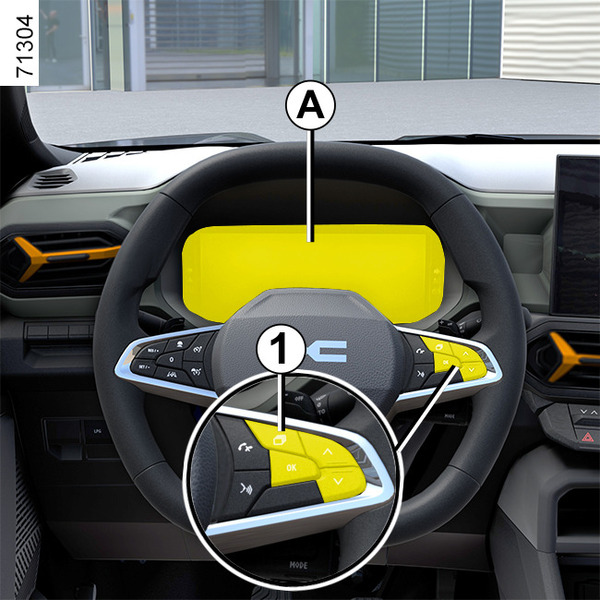
Instrument panel A
The presence and operation of the display and indicators DEPENDS ON THE LEVEL OF EQUIPMENT AND THE COUNTRY.
lights up when the driver’s door is opened. In some cases, the appearance of a warning light is accompanied by a message.
Selection of views
Depending on the vehicle, several views may be available on the instrument panel. To select a view, press control 1 as many times as necessary to scroll through the different views on the instrument panel A until you reach the desired view.
All of the available views display the following essential information on the instrument panel:
- speedometer;
- the information on the activated driving aids;
- information area.
The "Minimal" view displays only the essential information on the instrument panel.
The "Classic" view displays essential information, the rev counter and the power meter (depending on the vehicle) on the instrument panel.
The "Driving Aids" view displays detailed and instantaneous information related to the activated driving aids on the instrument panel. For example, the proximity of a white line or being too close to the vehicle in front.
The "Navigation" view displays the following on the instrument panel:
- essential information;
- the road map replicated from your smartphone and duplicated from the multimedia system to the entire instrument panel.
Note: for further information on your smartphone replication, please the multimedia user manual.
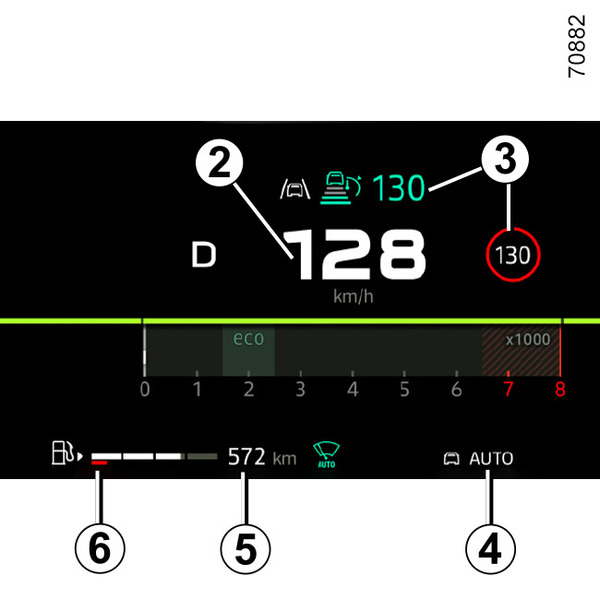
Information display
Speedometer 2
Information on driving aids 3
Driving mode selected 4
Estimated range with remaining fuel 5
The value is displayed after driving 400 metres Journey settings.
Fuel gauge 6
If the level is at the minimum, warning light
 integrated in the indicator comes on orange, accompanied by a beep.
Fill the tank with at least 1.76 gal (8 litres) of fuel.
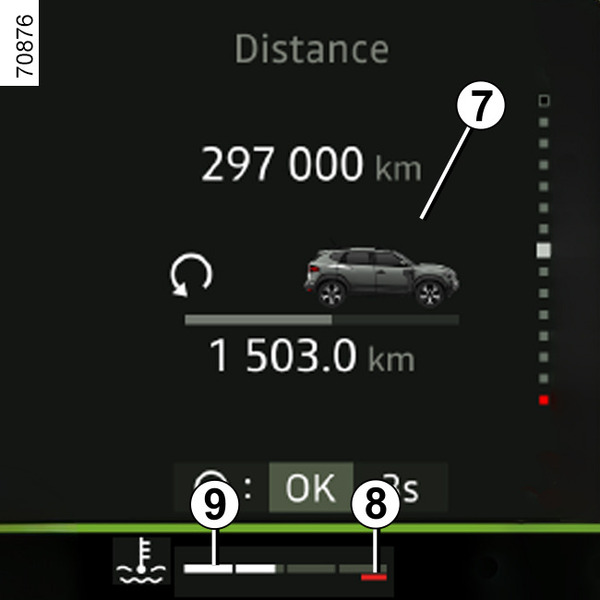
Coolant temperature indicator 9
In normal use, the indicator 9 should be located before zone 8.
Under "intensive" operating conditions, the needle may approach this zone.
This is not serious unless the warning light
 comes on accompanied by a message on the instrument panel and a beep.
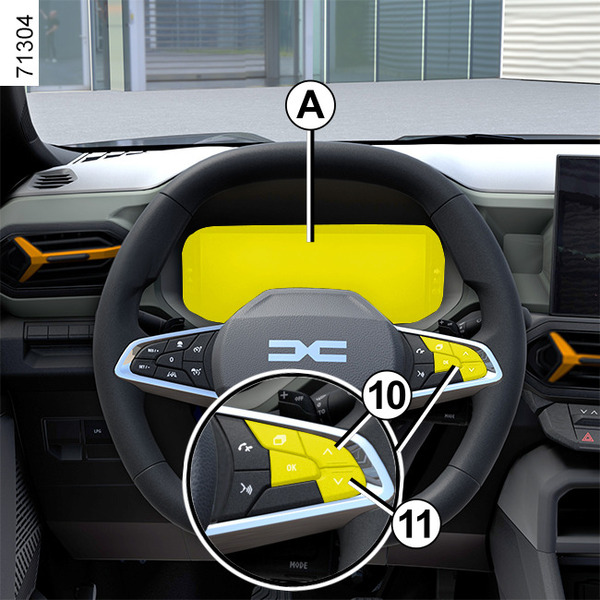
Information area 7
Depending on the vehicle, use control 10 or 11 to browse and select the various widgets on the instrument panel:
- trip computer information (mileage recorder, warning messages, etc.);
- multimedia information (compass, audio source currently playing, etc.);
- ...
Instrument panel B
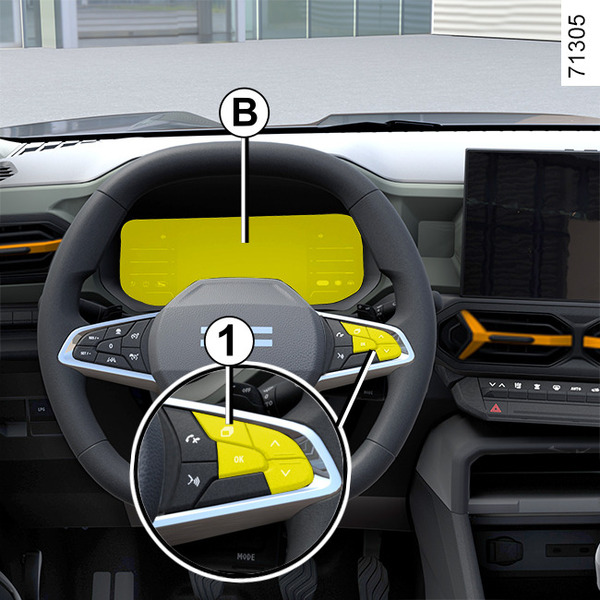
lights up when the driver’s door is opened. In some cases, the appearance of a warning light is accompanied by a message.
Selection of views
Depending on the vehicle, several views may be available on the instrument panel. To select a view, press control 1 as many times as necessary to scroll through the different views on the instrument panel B until you reach the desired view.
All of the available views display the following essential information on the instrument panel:
- speedometer;
- information on the activated driving aids;
- information area.
The "Minimal" view displays only the essential information on the instrument panel.
The "Classic" view displays essential information, the rev counter and the power meter (depending on the vehicle) on the instrument panel.
The "Driving Aids" view displays detailed and instantaneous information related to the activated driving aids on the instrument panel. For example, the proximity of a white line or being too close to the vehicle in front.
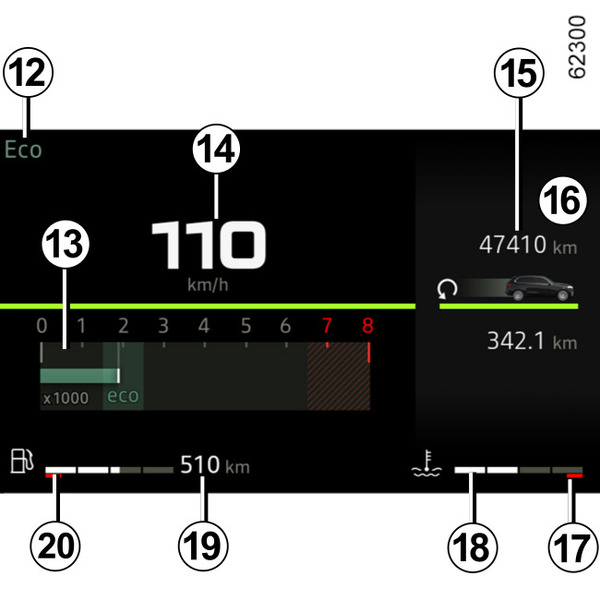
Information display
Excessive speed audible alarm
Depending on the vehicle and country, the
 warning light is displayed and a beep sounds. This beep sounds as soon as the vehicle is travelling at over 75 mph (120 km/h). This warning light remains lit for as long as the vehicle is travelling at over 75 mph (120 km/h).
Driving mode selected 12
Rev counter 13
(scale x 1,000)
This is displayed differently according to how the instrument panel is customised. Depending on the style selected, it may not be displayed.
Speedometer 14
Depending on the style selected, the display varies.
Total mileage recorder 15Journey settings
Coolant temperature indicator 18
In normal use, the indicator 18 should be located before zone 17.
Under "intensive" operating conditions, the needle may approach this zone.
This is not serious unless the warning light
comes on accompanied by a message on the instrument panel and a beep.
Estimated range with remaining fuel 19
The value is displayed after driving 400 metres Journey settings.
Fuel gauge 20
If the level is at the minimum, warning light
integrated in the indicator comes on orange, accompanied by a beep.
Fill the tank with at least 1.76 gal (8 litres) of fuel.
Information area 16General information
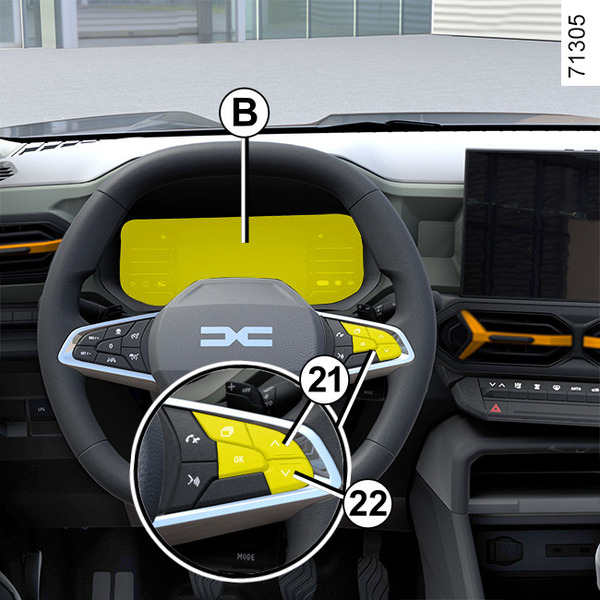
Depending on the vehicle, use control 21 or 22 to browse and select the various widgets on the instrument panel:
- trip computer information (mileage recorder, warning messages, etc.);
- multimedia information (compass, audio source currently playing, etc.);
- ...
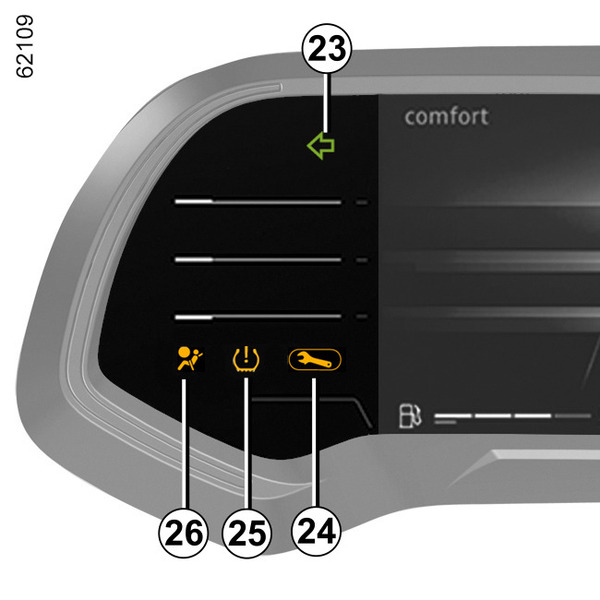
Direction change indicators 23
Warning light 24Warning lights
Tyre low pressure warning light 25Tyre pressure loss warning
Warning light airbag26Driver correction devices and aids
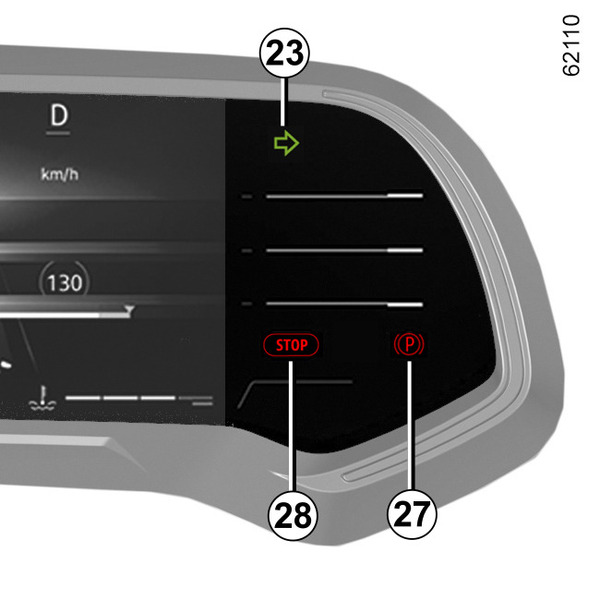
Parking brake or Electronic parking brake warning light 27Parking brake
Urgent stop warning light 28Warning lights
Hybrid version
Instrument panel A
lights up when the driver’s door is opened. In some cases, the appearance of a warning light is accompanied by a message.
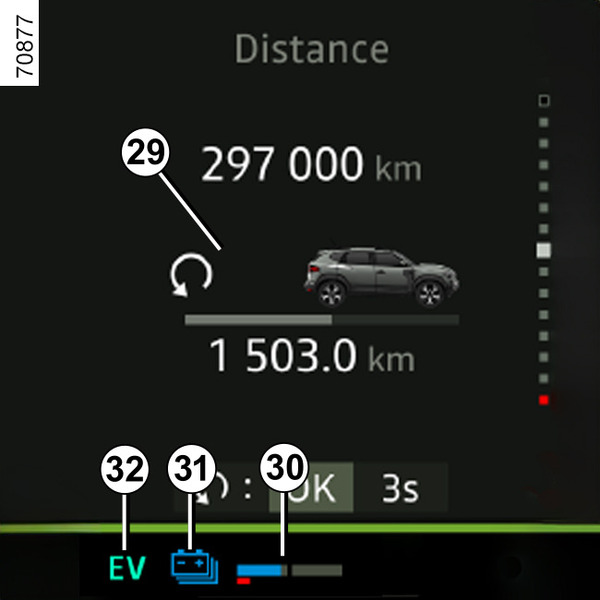
"230 V" traction battery level remaining 30
Traction battery level low
In the event of extreme use at low speed, the traction battery charge may reach a low level.
The warning light 31 is displayed in yellow to warn you.
The electric motor performance will be limited to ensure that the Hybrid system operates correctly, until the battery charge level becomes sufficient.
Opt for a smoother driving style or, if possible, stop the vehicle without switching off the ignition until the warning light 31 appears in blue once again.
Immobilisation threshold imminent
In the event of extreme and prolonged use of the vehicle (e.g. towing or driving in steep off-road conditions) at speeds below 6 mph (10 km/h), the charge level may reach the threshold for imminent immobilisation.
A beep sounds and the warning light
 appears in red.
If the charge level continues to drop, the electric range value will no longer be displayed.
If possible, stop the vehicle when traffic conditions allow it.
Leave the combustion engine on until the warning lights disappear.
This must be done to recharge the traction battery.
Electric operating mode warning light 32
It is displayed when only the traction battery is powering movement of the vehicle.
Information area 29
Depending on the vehicle, use control 10 or 11 to browse and select the various widgets on the instrument panel:
- trip computer information (mileage recorder, warning messages, etc.);
- multimedia information (compass, audio source currently playing, etc.);
- energy flow indicator;
- coolant temperature indicator;
- ...
Instrument panel B
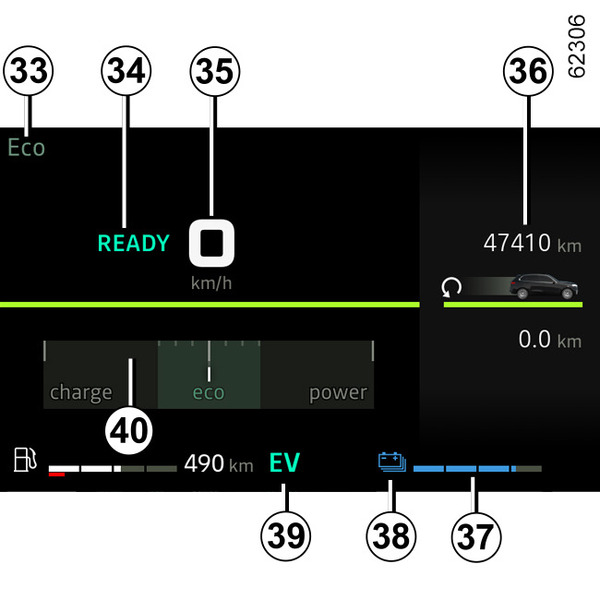
Driving mode selected 33
Message indicating that the vehicle is ready to drive 34
The READY message appears when the ignition is switched on and disappears when the vehicle speed exceeds approximately 3 mph (5 km/h) km/h.
Speedometer 35
Depending on the style selected, the display varies.
"230 V" traction battery level remaining 37
Traction battery level low
In the event of extreme use at low speed, the traction battery charge may reach a low level.
The warning light 38 is displayed in yellow to warn you.
The electric motor performance will be limited to ensure that the Hybrid system operates correctly, until the battery charge level becomes sufficient.
Opt for a smoother driving style or, if possible, stop the vehicle without switching off the ignition until the warning light 38 appears in blue once again.
Immobilisation threshold imminent
In the event of extreme and prolonged use of the vehicle (e.g. towing or driving in steep off-road conditions) at speeds below 6 mph (10 km/h) km/h, the charge level may reach the threshold for imminent immobilisation.
A beep sounds and the warning light
appears in red.
If the charge level continues to drop, the electric range value will no longer be displayed.
If possible, stop the vehicle when traffic conditions allow it.
Leave the combustion engine on until the warning lights disappear.
This must be done to recharge the traction battery.
Electric operating mode warning light39
It is displayed when only the traction battery is powering movement of the vehicle.
Charge meter 40Driving advice, eco-driving
Information area 36General information
Depending on the vehicle, use control 21 or 22 to browse and select the various widgets on the instrument panel:
- trip computer information (mileage recorder, warning messages, etc.);
- multimedia information (compass, audio source currently playing, etc.);
- energy flow indicator;
- coolant temperature indicator;
- ...
Engine oil level low warning
When the engine is started, the instrument panel display alerts you when the minimum oil level is reachedEngine oil.
The first time the warning appears, it can be cleared by pressing the "OK" switch.
Subsequent warnings will disappear automatically after around 30 seconds.
Instrument panel in miles
(option to switch to km/h)
With the vehicle stationary and the engine switched on, from the multimedia screen select the "Vehicle" world, press the "Settings" menu, "System", "Units" then "Speed".
Select km/h or mph.
Please refer to the multimedia instructions to select the unit.
Note: in both cases, once the battery is switched off, the on-board computer automatically returns to the original unit of measurement.
The speedometer and some of the distance information displayed on the instrument panel are converted.
To return to the previous mode, repeat the same operation.
Note: once the battery is switched off, the on-board computer automatically returns to the original unit of measurement.
Please refer to the multimedia instructions for further information.
tip
To use certain driving aids, it is necessary to change the unit of measurement on the instrument panel in order to obtain the correct information when driving in a country where the speed units differ from those set as default on your vehicle.
warning
For safety reasons, carry out any adjustments while the vehicle is stationary.