Dacia Bigster
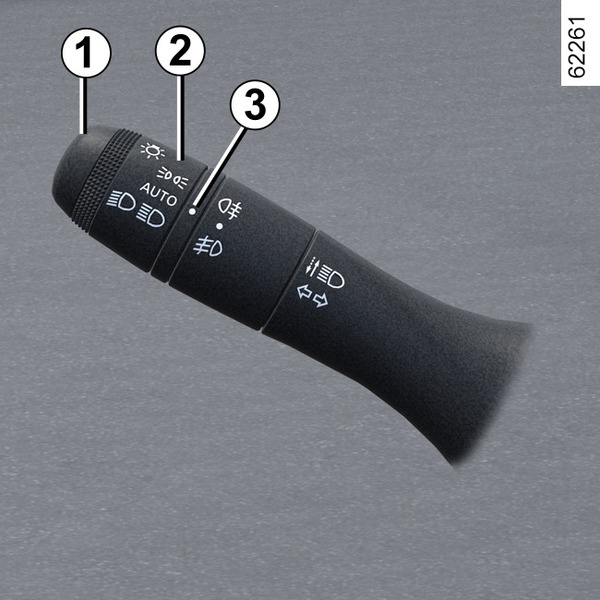
Side lights
-

Turn the ring 2 until the symbol is opposite the mark 3.
This indicator light on the instrument panel comes on.
Note: depending on the vehicle, the side lights can only be activated manually when the parking brake is applied or, depending on the vehicle, when the gear lever is in the P position.
Otherwise, the "Unavailable position lights" message is displayed on the instrument panel to inform you that it is not possible to activate the side lights.
Daytime running lights function
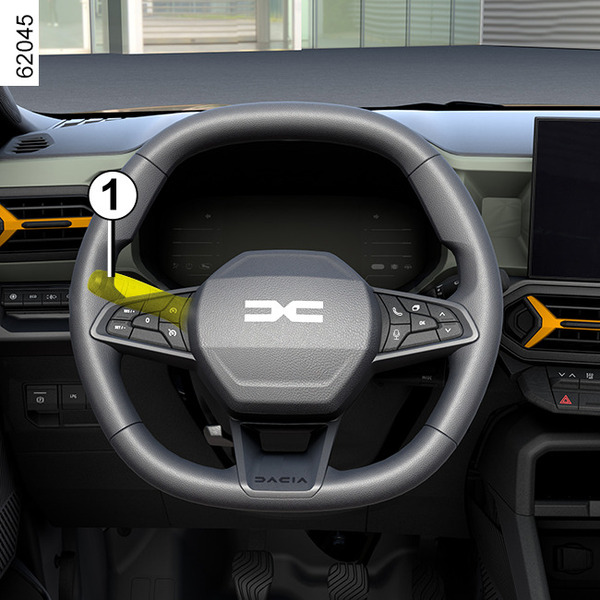
If fitted on the vehicle, the daytime running lights and rear side lights come on automatically without any action on the stalk 1 when the engine is started, and they go off once the engine is switched off.
Special feature:
The daytime running light will go out automatically when the indicator light is in operation.
warning
Before driving at night, check that the electrical equipment is operating correctly and adjust the headlight beams (if your vehicle is not carrying its normal load). As a general precaution, check that the lights are not obscured (by dirt, mud, snow or objects being transported).
Dipped beam headlights
-

Turn the 2 until the symbol is opposite mark 3.
This indicator light on the instrument panel comes on.
tip
Always make sure the windscreen is not obscured (dirt, mud, snow, condensation, etc.).
Main beam headlights
-

With the engine running and the dipped beam headlights on, push the stalk 1. This indicator light on the instrument panel comes on.
To return to the dipped beam headlights position, pull the stalk 1 towards you again.
Automatic main beam headlights
-

Depending on the vehicle, this system switches the main beam headlights on and off automatically.
It uses a camera located behind the interior rear view mirror to detect vehicles that are being followed and those coming in the opposite direction.
Note: at night, in urban areas with street lighting, the automatic main beam headlights automatically switch off.
The main beam headlights come on automatically if:
- the exterior light level is low;
- no other vehicle or lighting is detected;
- the vehicle speed is above approximately 25 mph (40 km/h).
If any of the above conditions are not fulfilled, the system switches to dipped beam headlights.
Note: make sure that the windscreen is not obscured (dirt, mud, snow, condensation, etc.).
To activate the automatic main beam headlights
Turn ring 2 until the AUTO symbol is aligned with the mark 3.
The indicator light
on the instrument panel lights up if the dipped beam headlights are on.
To deactivate the automatic main beam headlights
Turn ring 2, until the
symbol is opposite mark 3. The warning light
will disappear from the instrument panel and the main beam headlights will be activated.
tip
The system may encounter difficulties under certain conditions, including:
- extreme weather conditions (rain, snow, fog, etc.);
- obstruction in front of the windscreen or camera;
- when a following or oncoming vehicle has weak or hidden lighting;
- incorrect settings for the front headlights;
- reflecting systems;
- ...
Operating faults
When the "Check Automatic Lighting" message appears on the instrument panel, the system is deactivated.
Consult an approved Dealer.
Switching off the dipped beam headlights
There are two possibilities:
- manually, move the 2 ring to position
or, depending on the vehicle, to position 0;
- the lights will go out automatically when the engine is switched off, the driver's door is opened or the vehicle is locked. In this case, when you start the engine the lights will be switched back on according to the position of the ring 2, taking into account the exterior light level, without moving the stalk 1.
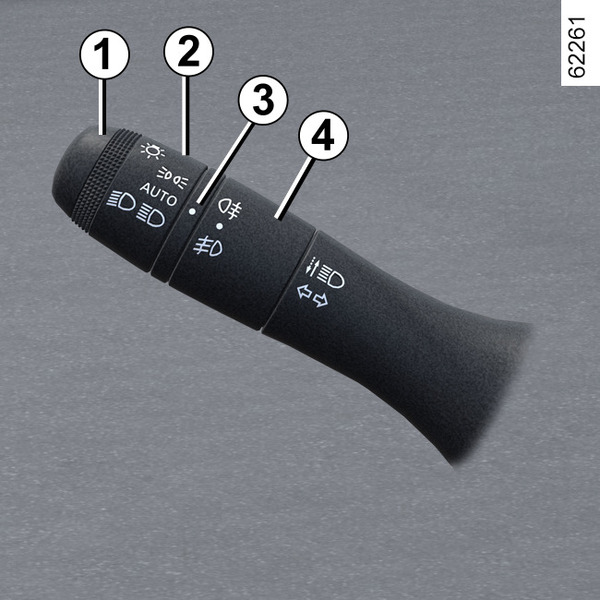
Front fog lights
(depending on the vehicle)
-

With the engine running, turn centre ring 4 on the stalk 1 until the symbol faces mark 3 then release it.
Depending on the vehicle, the stalk returns to the initial position or stays in position.
Operation of the fog lights depends on the exterior lighting selected, and an indicator light will light up on the instrument panel.
Rear fog light
-

With the engine running, turn centre ring 4 on the stalk until the symbol faces mark 3, then release it.
Depending on the vehicle, the stalk returns to the initial position or stays in position.
Operation of the fog lights depends on the exterior lighting selected, and an indicator light will light up on the instrument panel.
To avoid inconveniencing other road users, remember to switch off this light when it is no longer needed.
tip
When driving in fog or snow, or when transporting objects which are higher than the roof, the headlights do not come on automatically.
The fog lights are controlled by the driver: indicator lights on the instrument panel inform you whether they are on (indicator light on) or off (indicator light off).
Turning off the fog lights
There are two possibilities:
- manually, depending on the vehicle, turn centre ring 4 again until mark 3 is opposite the symbol for the fog light that you wish to switch off. The corresponding indicator light will go out on the instrument panel;
- the lights will go out automatically when the engine is switched off or the vehicle is locked, and the fog lights when the driver's door is opened.
The front and rear fog lights switch off when the exterior lights are switched off.
Welcome and goodbye function
(depending on the vehicle)
Once the function is activated, the daytime running lights and the rear side lights light up automatically on detecting the card or when the vehicle is unlocked and a beep sounds.
They switch off automatically:
- approximately one minute after lighting up;
- when starting the engine, based on the position of the lighting stalk;
or
- upon locking the vehicle.
Activating/deactivating the function
To activate or deactivate the external welcome function, please see the multimedia instructions.
Choose "ON" or "OFF".
Lights-on reminder audible alarm
A warning beep sounds when the driver's door is opened to warn you that the lights are still on.
warning
Before driving at night, check that the electrical equipment is operating correctly and adjust the headlight beams (if your vehicle is not carrying its normal load). As a general precaution, check that the lights are not obscured (by dirt, mud, snow or objects being transported).