New Dacia Spring
Selection of views
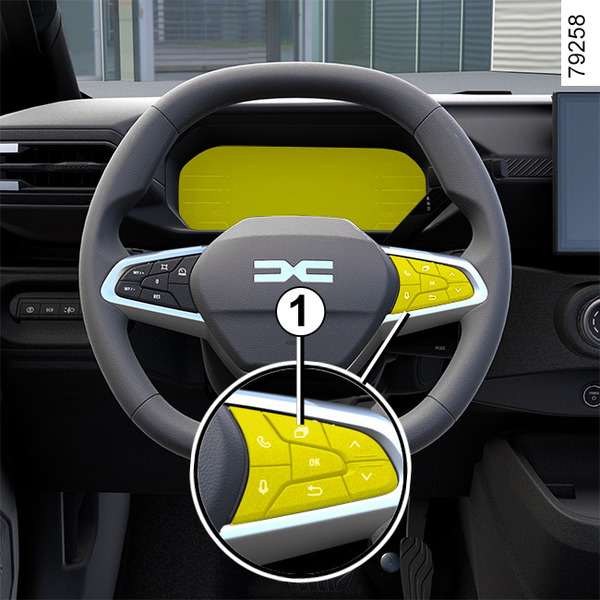
Depending on the vehicle, use control 1 to browse and select the various views on the instrument panel.
Several views are proposed:
- charging view: displays the range, battery percentage and remaining charging time on the instrument panel only when the vehicle is charging;
- classic view: displays the speed, active driving aids, information area and, depending on the vehicle, the power meter on the instrument panel;
- navigation view: displays the speed, active driving aids and the information area on the instrument panel;
- minimum view: displays only essential information, the speed, active driving aids and the information area on the instrument panel.
Instrument panel
lights up when the driver’s door is opened. In some cases, the appearance of a warning light is accompanied by a message.
Depending on the vehicle, you can customise your instrument panel with the content and colours of your choice.
Please refer to the multimedia instructions for more information.
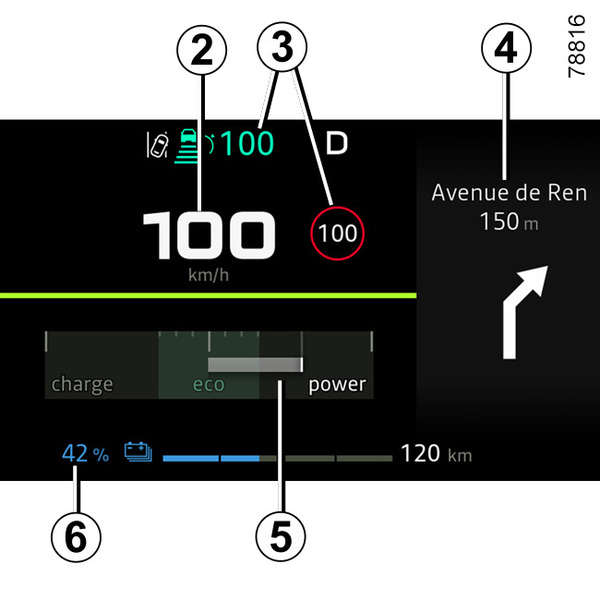
Speedometer 2
Excessive speed audible alarm
Depending on the vehicle and country, the
 warning light is
displayed and a beep sounds. This beep sounds as soon as the vehicle is travelling
at over 75 mph (120 km/h).
warning light is
displayed and a beep sounds. This beep sounds as soon as the vehicle is travelling
at over 75 mph (120 km/h).
This warning light remains lit for as long as the vehicle is travelling at over 75 mph (120 km/h).
Information on driving aids 3
Navigation in progress information 4
Depending on the vehicle, you can display information from the multimedia screen (compass, telephone, navigation, etc.) or information from the trip computer.
Please refer to the multimedia instructions for more information.
Power meter 5
Battery information 6 (traction battery charging rate, estimated range)
Total mileage recorder 7
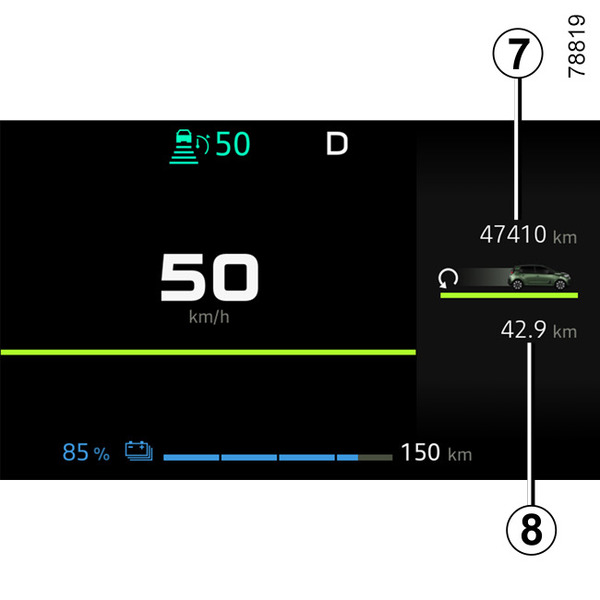
Information area 8
Depending on the vehicle, use the control 1 to browse and select the various widgets on the instrument panel A:
- trip computer information (mileage recorder, consumption, etc.);
- telephone, multimedia (audio source currently playing, etc.) information;
- vehicle information (warning messages, etc.);
- ...
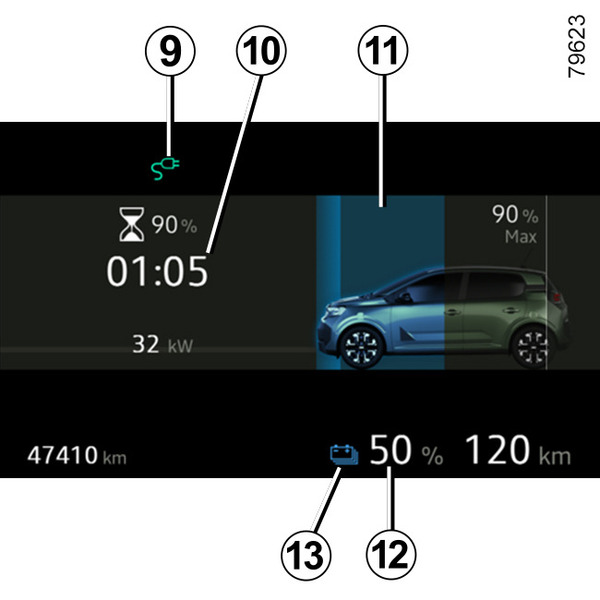
Charging cable "Plugged In" warning light 9
This comes on when the charging cable is plugged into the vehicle.
Remaining charge time 10
Charge level 11
The gauge indicates the level of energy remaining.
Traction battery charge rate 12
Reserve threshold
When the traction battery charge reaches approximately 15%,
the traction battery level
11
and indicator light
13
 appear in yellow.
To optimise your range Vehicle range: advice.
Immobilisation threshold imminent
When the charge level reaches about 5%, a beep is emitted. Indicator light
13
flashes in yellow and the traction battery level
11
is displayed in red.
Note: When the charge level reaches approximately 0%, the remaining range value is no longer displayed on the dashboard or depending on the vehicle, after a delay of approximately 30 seconds.
Engine performance gradually decreases until the vehicle comes to a halt Breakdown recovery
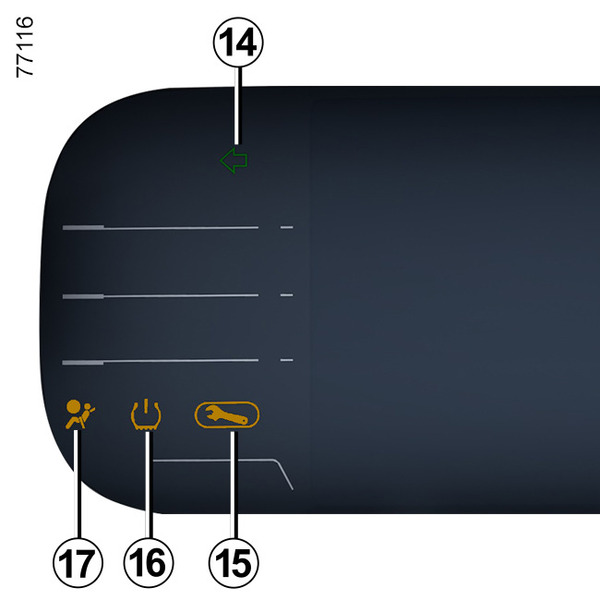
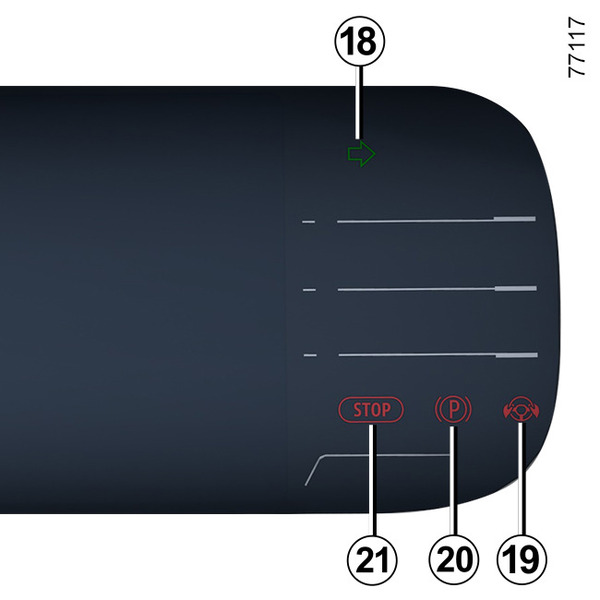
Direction indicators 14 and 18
Warning light 15
Tyre under-inflation warning light 16
Airbag warning light 17
"Hands off steering wheel" detection warning light 19
Electronic parking brake warning light 20
Urgent stop warning light 21
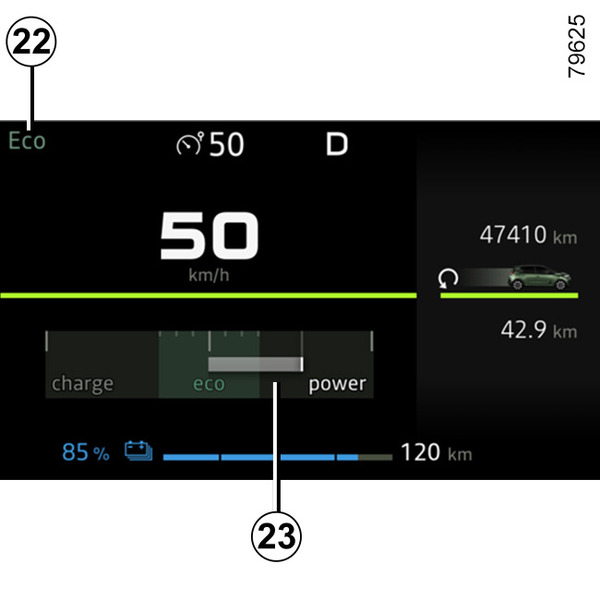
ECO mode 22
Charge meter 23
Estimated range 26
The estimated range in real time is calculated according to various factors such as the conditions of use, equipment, driving style, weather conditions, etc.
The calculation is based on the last few kilometres driven. It is automatically corrected during your journey if the factors change (type of road, driving style, etc.).
Furthermore, to understand your estimated range, you can refer to indicators 24 and 25. Depending on the traction battery charging level:
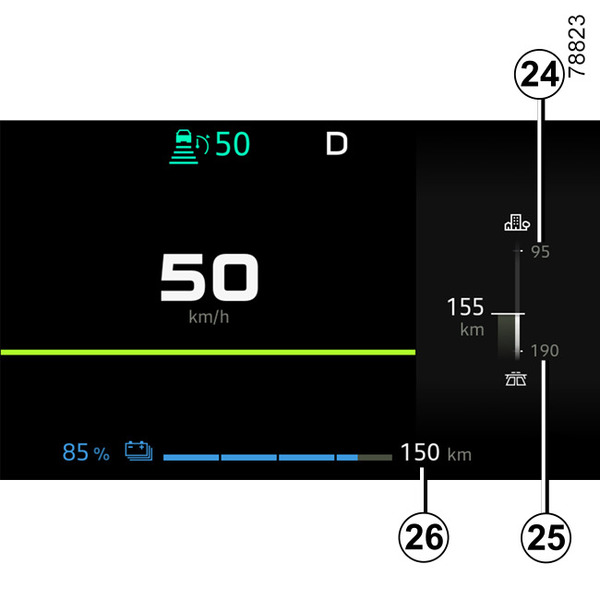
- indicator 25 : "high" range estimation calculated according to optimal driving conditions (e.g. driving on a roads or dual carriageways in warm weather with little use of air conditioning);
- indicator 24 : "low" range estimation calculated according to unfavourable driving conditions (e.g. driving on a motorway in cold weather or in a traffic jam with intensive use of the heating system).
To optimise your range Vehicle range: advice.
Instrument panel in miles
(option to switch to km/h)
Vehicles not fitted with a multimedia screen
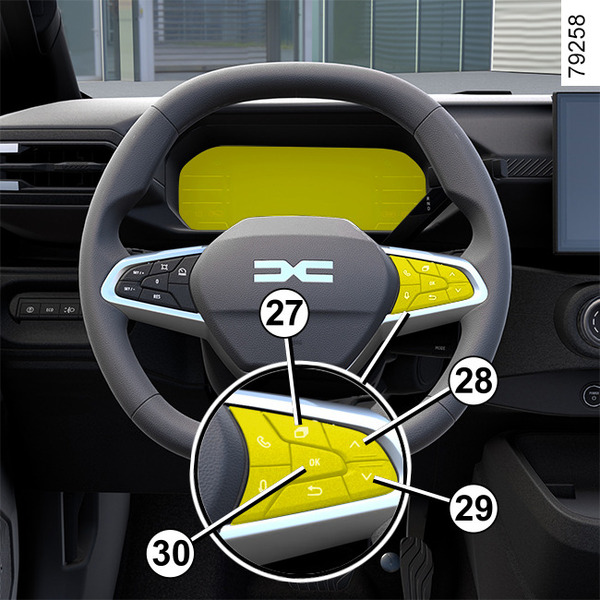
- With the ignition off, press the 27 switch as many times as required to reach the « Settings » world;
- press the 28 or 29 control repeatedly to reach « Vehicle settings » and press the 30 « OK » switch;
- press the 28 or 29 control repeatedly to reach « INSTRUMENT PANEL » and press the 30 « OK » switch;
- press the 28 or 29 control repeatedly to reach the « Unit: km/h » (or « Unit: mph » if required), then press the 30 « OK » switch.
Vehicles fitted with a multimedia screen.
Please refer to the multimedia instructions to select the unit.
Note: in both cases, once the battery is switched off, the trip computer automatically returns to the original unit of measurement.
To return to the previous mode, repeat the same operation.
Please refer to the multimedia instructions for more information.
tip
To use certain driving aid functions, it is necessary to change the unit of measurement on the instrument panel in order to obtain the appropriate information when driving in a country where the speed units differ from those set as default on your vehicle.
warning
For safety reasons, carry out any adjustments while the vehicle is stationary.