Information messages <?xml version="1.0" standalone="yes"?>These can help in the vehicle starting phase, or give information about a selection or a driving status.Examples of information messages are given in the following pages.Examples of messages Chapter
Journey settings <?xml version="1.0" standalone="yes"?>The display of information shown below DEPENDS ON THE VEHICLE EQUIPMENT AND COUNTRY. Chapter
General information <?xml version="1.0" standalone="yes"?>Trip computer A or BDepending on the vehicle, this includes the following functions: Chapter
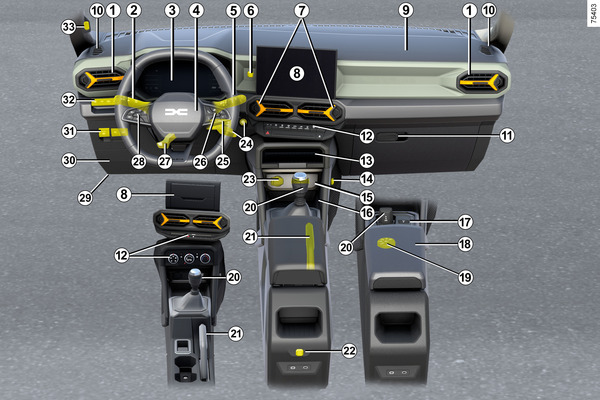
Driver’s position, right-hand drive <?xml version="1.0" standalone="yes"?> The equipment described DEPENDS ON THE VEHICLE VERSION AND COUNTRY.1. Demister outlet.2. Side air vents. Chapter
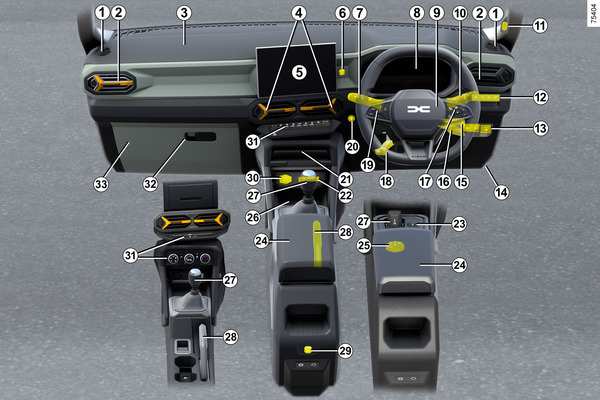
Driver's position: left-hand drive <?xml version="1.0" standalone="yes"?> The equipment described DEPENDS ON THE VEHICLE VERSION AND COUNTRY.1. Side air vents.2. Stalk for: Chapter
Child safety: deactivating, activating the front passenger airbag <?xml version="1.0" standalone="yes"?>warningThe passenger airbag may only be deactivated or activated while the vehicle is stationary with the ignition off. Chapter
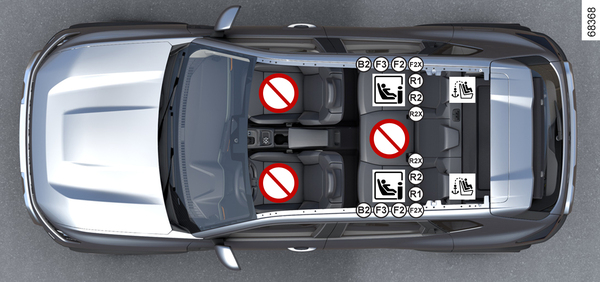
Attachment using the ISOFIX system <?xml version="1.0" standalone="yes"?>Installation visual for the five-door, five-seat version Chapter