Dacia Striker
General information
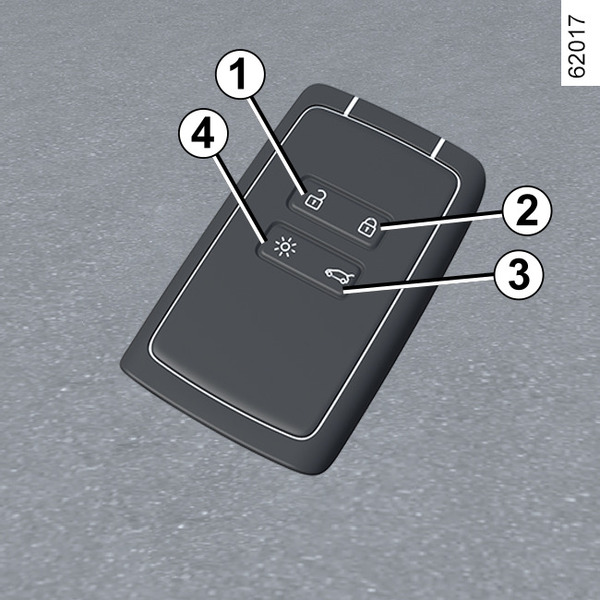
- 1.
Unlocking the doors and luggage compartment.
- 2.
Locks all the opening elements.
- 3.
Unlocking/locking the luggage compartment.
- 4.
Switching on the lighting remotely.
The card is used for:
- locking/unlocking the opening elements (doors, luggage compartment) Locking, unlocking the opening elements and doors;
- switching on the vehicle lighting remotely;
- automatic remote opening and closing of the windows Electric windows;
- remote automatic opening and closing of the automatic tailgate (depending on the vehicle) Automatic tailgate;
Range
Make sure that the correct battery type is being used, and that the battery is in good condition and inserted correctly. Its lifetime is approximately two years: replace it when the "Keycard Battery Low" message appears on the instrument panel "Hands-free" card: battery.
card operating range
This varies according to the environment: when handling the card, take care not to accidentally press a button as this could unintentionally lock or unlock the vehicle.
Note: if an opening element (door or luggage compartment) is open or incorrectly closed, locking is unsuccessful and a beep is emitted.
Interference
Interference by factors in the immediate vicinity (external installations or the use of equipment operating on the same frequency as the card) may disrupt its operation.
tip
If the battery is flat, you can still lock/unlock and start your vehicle Locking, unlocking the opening elements and doorsIgnition-starter switch on a vehicle with card.
"Remote lighting" function
Press button 4 to switch on the interior lighting, the side lights and the dipped beam headlights for approximately 20 seconds. This can be used, for example, to identify your vehicle from a distance when parked in a car park.
Note: press button 4 again to switch off the lighting.
tip
Recommendations
Avoid leaving the card in hot, cold or humid areas.
Do not store the card in a place where it could be bent or accidentally damaged: for example, sitting down while the card is in a back pocket of a garment.
tip
Replacement: need for an additional card
If you lose your card or require another, you can obtain one from an approved Dealer.
If a card is replaced, it will be necessary to take the vehicle and all its cards to an approved Dealer to re-set the system.
You may use up to four cards per vehicle.
warning
Driver's responsibility when parking or stopping the vehicle
Never leave your vehicle with a child, a dependent adult, or an animal inside, even for a short time.
They may pose a risk to themselves or to others by starting the engine, activating equipment such as the electric windows or locking the doors.
Also, in hot and/or sunny weather, please remember that the temperature inside the passenger compartment increases very quickly.
RISK OF DEATH OR SERIOUS INJURY.
Fitting a strap 7
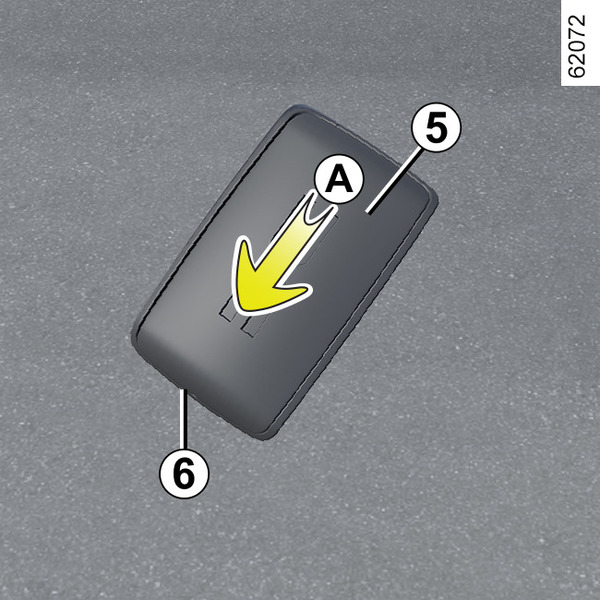
Slide the rear casing 5 downwards while pressing on area A.
tip
Never insert screwdriver-type tools into the 6 opening.
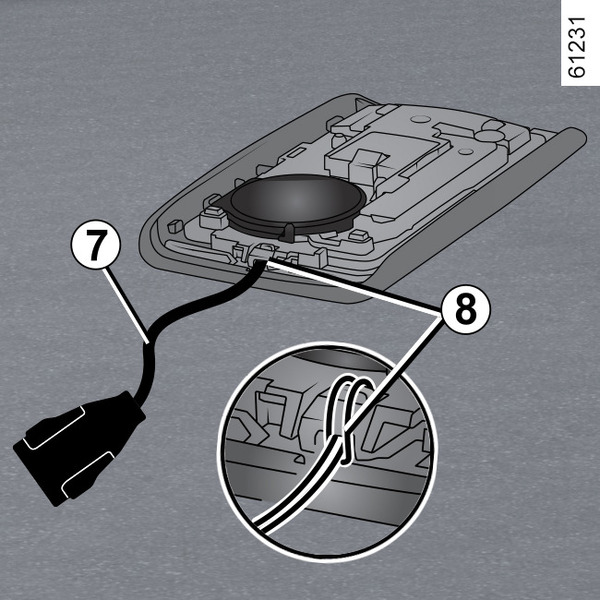
Insert the hand strap into the component 8 and pass the end of the hand strap through the loop.
Position the strap at the opening 6 and close the casing.
Note: check that the diameter of the hand strap cord 7 fits the opening 6.
Use
There are two ways to lock/unlock the vehicle:
- in "hands-free" mode, when approaching and moving away from the vehicle;
- using the card in remote control mode.
warning
Never leave your vehicle with the card inside.
tip
Do not store the card anywhere it may come into contact with other electronic equipment (computer, telephone etc.) as this could hinder its operation.
warning
Driver's responsibility
Never leave your vehicle with a child, a dependent adult, or an animal inside, even for a short time.
They may pose a risk to themselves or to others by starting the engine, activating equipment such as the electric windows or locking the doors.
Also, in hot and/or sunny weather, please remember that the temperature inside the passenger compartment increases very quickly.
RISK OF DEATH OR SERIOUS INJURY.
Deactivating/activating the "hands-free" mode
Depending on the vehicle, you can deactivate/activate unlocking when approaching and locking when moving away from the vehicle.
You can also deactivate/activate the beep that is emitted upon locking when moving away from the vehicle Vehicle settings customisation menu.
Using the card in "hands-free" mode
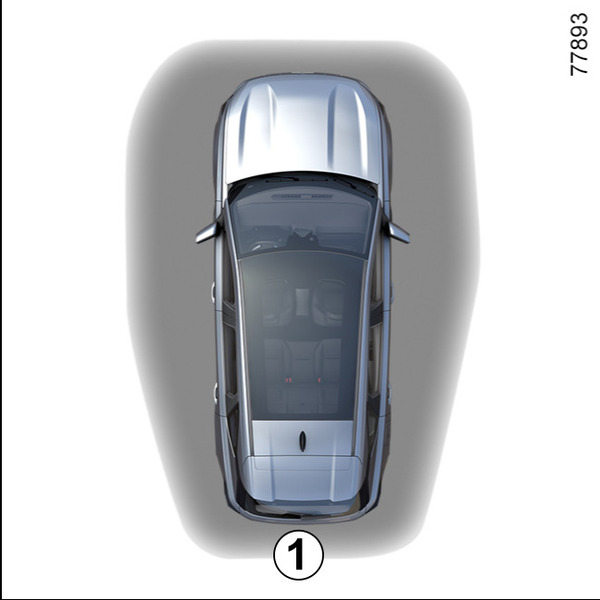
In "hands-free" mode, it is possible to lock/unlock the vehicle without using any of the buttons on the card, as long as the card is within the access zone 1.
Note: if the vehicle has not been used for more than eight days, the "hands-free" system enters standby mode. To reactivate it, press the unlocking button on the card.
"Hands-free" unlocking when approaching the vehicle
With the card in the access zone 1, the vehicle will be unlocked.
Unlocking is indicated by one flash of the hazard warning lights and the side repeaters.
"Hands-free" locking when moving away from the vehicle
With the card on you and the doors and luggage compartment closed, move away from the vehicle: the vehicle locks automatically as soon as you leave access zone 1.
Note: the distance at which the vehicle locks depends on the environment you are in.
The hazard warning lights and side repeaters flash twice to indicate that the doors have locked.
The locking is confirmed by a beep.
Special features of the unlocking system
After eight days of non-use, approach unlocking is disabled.
Use the card as a remote control to unlock the vehicle and reactivate the mode.
Special features of the locking system
If a door is open or not properly closed, when you go away, the vehicle is not locked.
Special features relating to "hands-free" locking
After locking in "hands-free" mode, you have to wait approximately three seconds to be able to unlock the vehicle again. During these three seconds, the door handles can be tried to make sure that the vehicle is locked properly.
If the card has been within the detection zone 1 for approximately 15 minutes, remote locking is deactivated. To lock the vehicle, press the button 4 on the card.
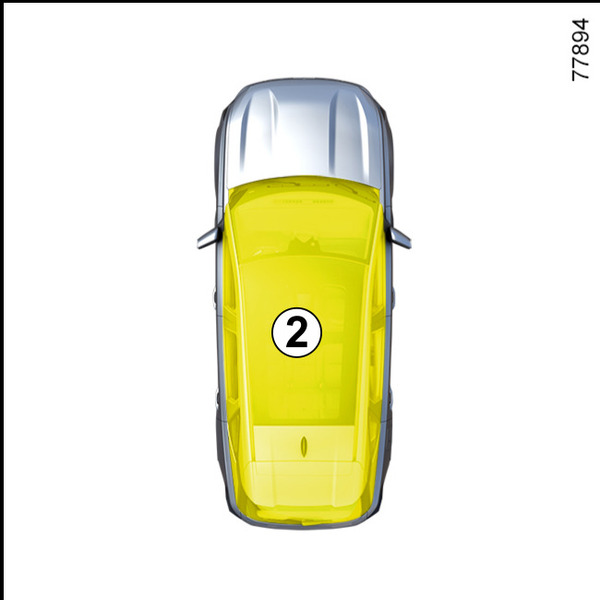
The vehicle cannot be locked if the card is within the zone 2. If the vehicle is unlocked by pressing the button on the card, but an opening element is not then opened, "hands-free" locking when moving away is disabled.
warning
Driver's responsibility when parking or stopping the vehicle
Never leave your vehicle with a child, a dependent adult, or an animal inside, even for a short time.
They may pose a risk to themselves or to others by starting the engine, activating equipment such as the electric windows or locking the doors.
Also, in hot and/or sunny weather, please remember that the temperature inside the passenger compartment increases very quickly.
RISK OF DEATH OR SERIOUS INJURY.
Using the card as a remote control
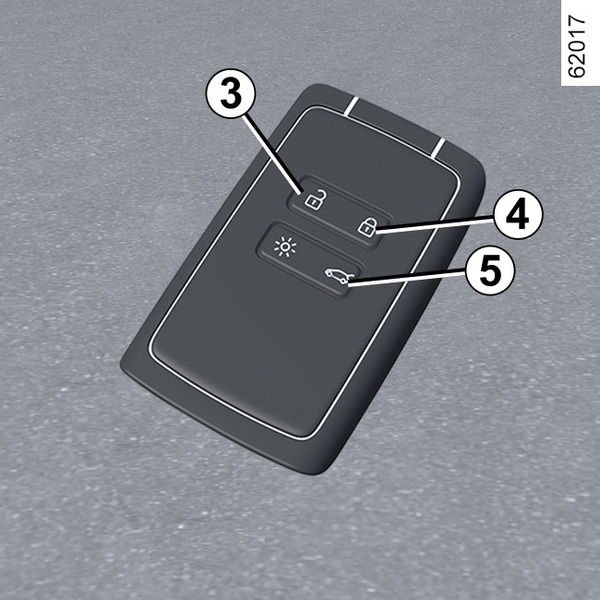
Unlocking with the card
Press the button 3. Unlocking is indicated by one flash of the hazard warning lights and side repeaters.
In the case of a vehicle equipped with an automatic tailgate, press and hold the button 5 to unlock the vehicle and open the tailgate.
Pressing the button 5 again closes the automatic tailgate but does not lock the vehicle. To lock the vehicle, press the button 4.
If an attempt is then made at trying to open a door by pressing the handle at the same time as the doors are unlocked remotely, the door concerned will remain locked. To rectify this, release the handle and unlock the vehicle again by pressing the button 3 on the card.
Locking using the card
With the doors and luggage compartment closed, press button 4: the vehicle is locked. The hazard warning lights and side repeaters flash twice to indicate that the doors have locked.
Note: the maximum distance from which the vehicle can be locked depends on the surroundings.
Special features
The vehicle cannot be locked if one of the opening elements (door or luggage compartment) is open or not properly shut, and a beep sounds.
tip
The card buttons are deactivated when the engine is running.
With the engine running, if a door is opened and closed and the card is no longer in zone 2, the "Keycard Not Detected" message indicates that the card is not inside the vehicle. This will, for example, prevent you from driving away after dropping off a passenger who has kept the card on them.
The warning disappears when the card is detected again.
Opening/closing windows
Press and hold button 3 on the card to open the 4 front and rear windows.
Press and hold button 4 on the card to close the 4 front and rear windows.
Unlocking/locking the luggage compartment only
In the case of a vehicle equipped with a manual (non-motorised) tailgate, press button 5 to unlock/lock the luggage compartment only.
Note: after unlocking the luggage compartment only using button 5, to unlock the other opening elements it is necessary:
- to press button 3;
or
- to move away from the vehicle in order to activate the automatic locking when moving away from the vehicle. In this case, unlocking when approaching the vehicle will be functional again.
warning
Driver's responsibility when parking or stopping the vehicle
Never leave your vehicle with a child, a dependent adult, or an animal inside, even for a short time.
They may pose a risk to themselves or to others by starting the engine, activating equipment such as the electric windows or locking the doors.
Also, in hot and/or sunny weather, please remember that the temperature inside the passenger compartment increases very quickly.
RISK OF DEATH OR SERIOUS INJURY.
"Hands-free" card: battery
Operating faults
If the battery is too weak to ensure correct operation, you will still be able to start and lock/unlock the vehicle Locking, unlocking the opening elements and doors.
warning
If they need to be replaced, be sure to use the same or equivalent type of battery (please consult an approved Dealer).
warning
When replacing:
- make sure that the batteries are correctly inserted.
Risk of explosion.
- if the flap does not close correctly, do not use and keep out of reach of children.
Replacing the battery
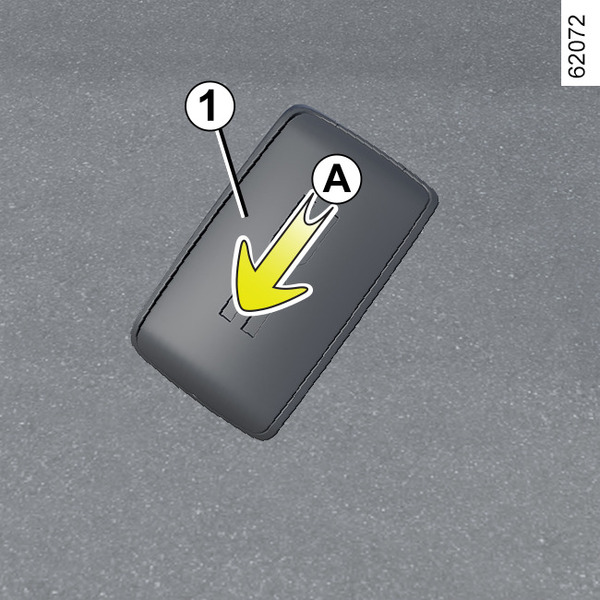
When the "Keycard Battery Low" message appears on the instrument panel, replace the card battery:
- slide the rear casing 1 downwards while pressing on area A;
- in area B, remove the cover 2 from the battery 3 by lifting upwards;
- remove the battery by pressing on one side and lifting the other;
- replace it according to the direction and template shown inside the cover.
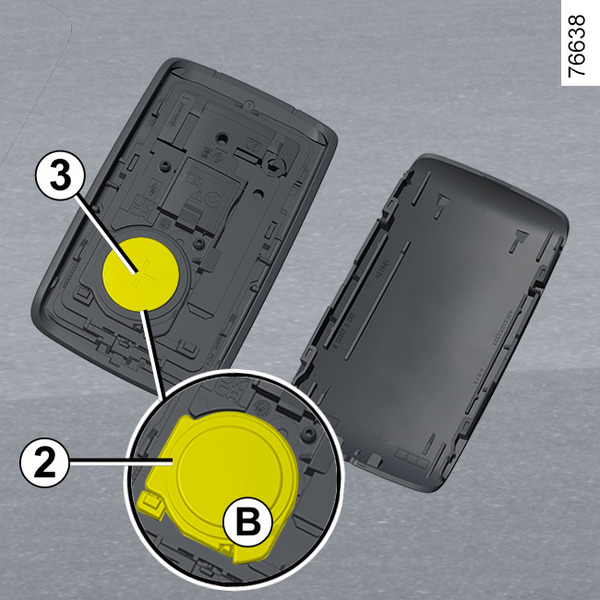
When reassembling, proceed in the reverse order, then stand near the vehicle and press one of the buttons on the card four times: the message will disappear the next time the vehicle is started.
Check that the cover is clipped shut.
Note: when replacing the battery, do not touch the electronic circuit or contacts in the card.
warning
Precautions relating to batteries:
- keep batteries (new or used) out of reach of children;
- do not swallow batteries;
Risk of chemical burns which may lead to death.
- if ingested or inserted into any part of the body, consult a doctor as soon as possible.
tip
The batteries are available from approved Dealers, and their service life approximately two years. Ensure that there are no ink marks on the battery: risk of poor electrical contact.
tip
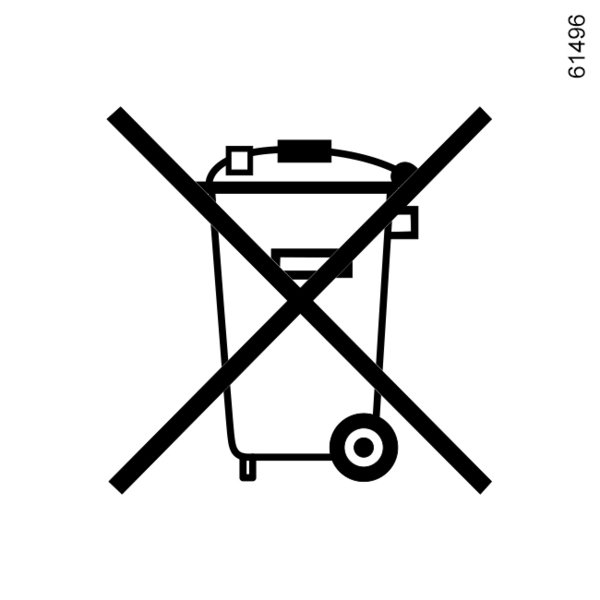
Do not throw away your used batteries as rubbish. Take them to an approved Dealer or consult your local authority for information on disposing of them at an accredited recycling centre.