Dacia Bigster
The controls
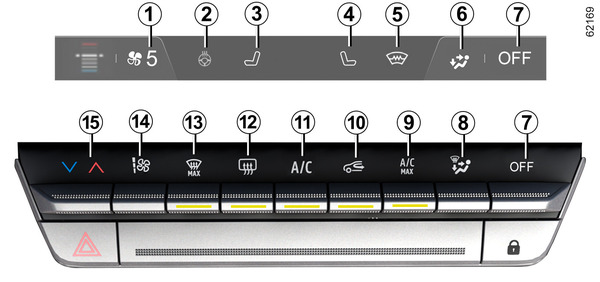
- 1.
Ventilation speed indicator.
- 2.
Heated steering wheel activation control.
- 3.
Driver's heated seat activation control.
- 4.
Passenger's heated seat activation control.
- 5.
Heated windscreen activation control.
- 6.
Passenger compartment air distribution indicator.
- 7.
Stopping the system.
- 8.
Passenger compartment air distribution adjustment.
- 9.
Activation control for the "A/C MAX" function.
- 10.
Air recirculation.
- 11.
Air-conditioning activation control.
- 12.
De-icing/demisting of the rear screen and, depending on the vehicle, the rear view mirrors.
- 13.
"Clear View" function.
- 14.
Adjusting the ventilation fan speed.
- 15.
Adjusting the air temperature.
Activating the system
When the vehicle is started, the system returns to the last programme used.
The system is also functional when parked.
Raise the control 14 to the desired ventilation speed.
Stopping the system
Press the button 7:
- the air conditioning or heating stops automatically;
- the air ventilation speed in the passenger compartment is zero;
- – there is, however, a slight flow of air when the vehicle is moving.
This position should not normally be used.
Switching the air conditioning on or off
The control 11 authorises activation (warning light on) or deactivation (warning light off) of the air conditioning.
The system cannot be switched on if the ventilation power is zero.
The air conditioning system is used for:
- lowering the temperature inside the passenger compartment;
- eliminating condensation more quickly.
Recommendation: to optimise vehicle range, deactivate the air conditioning when the outside temperature is comfortable.
Adjusting the distribution of air in the passenger compartment
Press 8 one or more times to select the air distribution. The air distribution selected 6 is displayed on the multimedia screen. The positions are in the following order:
-

All the air is then directed to the windscreen and front side window demisting vents.
-

The air flow is distributed between front side window demisting vents, the windscreen demisting vents and the footwells.
-

The air flow is mainly directed to the dashboard air vents.
-

The air flow is directed towards the dashboard vents and towards the footwells.
-

The air flow is directed mainly towards the footwells.
Adjusting the air temperature
Press the button 15 then use the tab on the multimedia screen to adjust the air temperature. The further towards the red the slide is, the higher the temperature will be.
When the air conditioning system is used for long periods, it may begin to feel cold. To increase the temperature, press 15 then raise the tab upwards on the multimedia screen.
Adjusting the ventilation fan speed
In automatic mode, the system uses the most suitable amount of air to reach and maintain the desired comfort level.
You will still be able to adjust the ventilation speed by pressing the control 14 to increase or reduce the ventilation speed.
"Clear View" function
Press the button 13 and the built-in warning light comes on.
This function quickly de-mists the windscreen, rear screen, front side windows and door mirrors (depending on the vehicle). It automatically activates the air conditioning and rear screen de-icing functions.
To exit this function, press the button 13 again.
tip
Some buttons have an operating light indicating their operative state.
Rear screen de-icing and demisting
Press button 12 and the built-in warning light comes on. This function enables rapid demisting or de-icing of the rear screen and de-icing of the rear view mirrors (on equipped vehicles).
To exit this function, press the button 12 again. Demisting automatically stops.
" A / C MAX " function
Press the button 9 to activate the function. Deactivate ECO mode to make the most of it.
The "A/C MAX" function enables the user to feel the maximum power of their air conditioning system without any constraint or compromise related to the acoustics and the feeling of the air being too cold on the hands and face.
This function involves automatic modifications:
- temperature programmed to fully cold;
- distribution of air to the occupants;
- air flow at its maximum power;
- activation of the air conditioning;
- air recirculation.
Air recirculation (isolation of the passenger compartment)
tip
Demisting/de-icing will still take priority over the air recirculation.
Manual use
Press button 10 and the built-in warning light comes on.
Prolonged use of this position may lead to odours, caused by non-renewal of air, and the formation of condensation on the windows.
To exit this function, press the button 10 again.
tip
Prolonged use of air recirculation can lead to condensation forming on the side windows and windscreen, and discomfort due to the use of non-renewed air in the passenger compartment. We therefore advise you to return to normal mode (external air) as soon as the air recirculation function is no longer required, by pressing button 10 again.