Dacia Spring
Vehicle stationary and parking brake applied, the Vehicle to Load (V2L) function allow you to connect electronic devices directly to the vehicle.
The system provides AC power (up to 16 A/3,7 kW) using the stored electricity energy in the traction battery of your vehicle Electric vehicle.
The V2L connector let you plug and operate various electric devices to the charging socket on the front of your vehicle.
Important Recommendation
warning
Please read these instructions carefully. Failure to follow these instructions may lead to a risk of fire, serious injury or electric shock which may present a risk to life.
Precautions when using the V2L function
Do not try to supply electricity to the house as this can expose to damages and electrical shock.
Do not do wash the vehicle or work in the engine compartment when using the V2L function.
Do not use the V2L function:
- In the event of the presence of water in the V2L connector or in the vehicle charging socket;
- If V2L connector or vehicle socket are damaged (broken, corrosion, browning, etc.), please see an approved dealer to replace them;
- outdoors if weather conditions are not favorable (rain, risk of lightning, etc.).
Do not place any metal objects on the V2L connector.
Do not modify or perform any action on the V2L connector during using V2L function.
Never plug an adapter on the V2L connector.
Precautions for handling and using the V2L connector.
Only use the V2L connector supplied with the vehicle. The V2L connector have been designed specifically for this vehicle. For safety reasons, the use of a V2L connector not recommended by the manufacturer is strictly forbidden. For information on V2L connector suited to your vehicle, please consult an approved dealer.
Do not place any objects on the V2L connector and do not hang devices by their power cable from the AC output socket on the V2L connector. Risk of damage.
Take care of the V2L connector: do not remove it, do not immerse it in water, pull on it when it is plugged in, or let anything knock against it. Check regularly that the V2L connector is in good condition.
Precautions when using electric/ electronic products.
Before connecting and using a product (appliance, extension lead, power strip, etc.), check the precautions for use by referring to its instructions.
Do not connect:
- devices that require a continuous power supply, such as medical equipment. The power supply may be interrupted depending on vehicle operation;
- devices that draw more than 16 A;
- devices that are not compliant with national regulations and standards.
- damaged devices (casing, cables, etc.);
- devices for which the initial recommendations for use are not adapted to the environment in which they are used (risk linked to the penetration of dust and water);
- more than one multi-socket. When using it, do not connect products that consume more than 8 A;
- an extension lead longer than 20m. When using it, be sure to unroll it completely.
V2L connector A
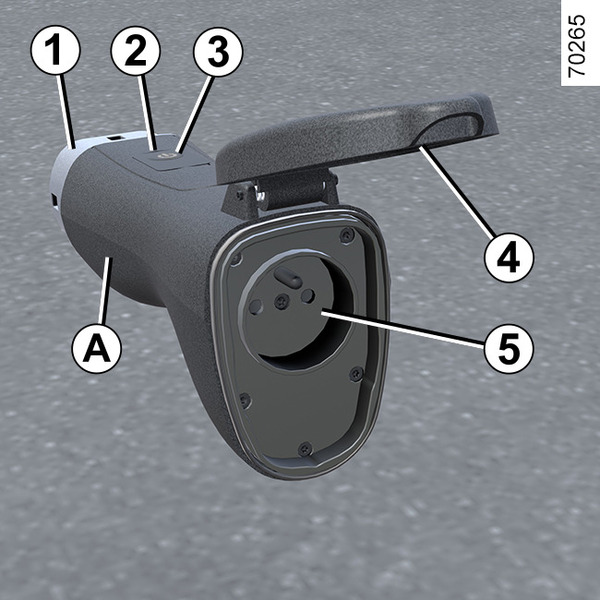
- 1.
Charging socket
- 2.
Operating indicator light
- 3.
Start/Stop switch
- 4.
Protective cover
- 5.
AC outlet socket
The V2L connector is stored with tools kit underneath the boot carpet.
tip
To maintain the V2L connector, make sure it is unplugged. Clean the connector with a cloth slightly dampened with water.
When cleaning, make sure that the cloth does not come into contact with the ends of the V2L connector (outlets, charging pins) to avoid any risk of corrosion.
Operation
warning
Make sure that the parking brake is applied always whenever the V2L function is used.
tip
It is imperative to follow the plugging/unplugging steps of the V2L connector in order.
tip
Before connecting or disconnecting a device, make sure that indicator light 2 on connector V2L connector is off.
To connect the V2L connector
Vehicle stationary, opening element unlocked, ignition off:
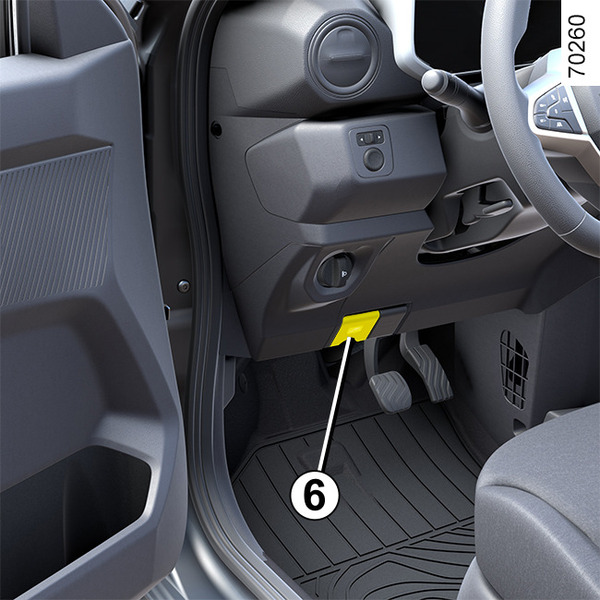
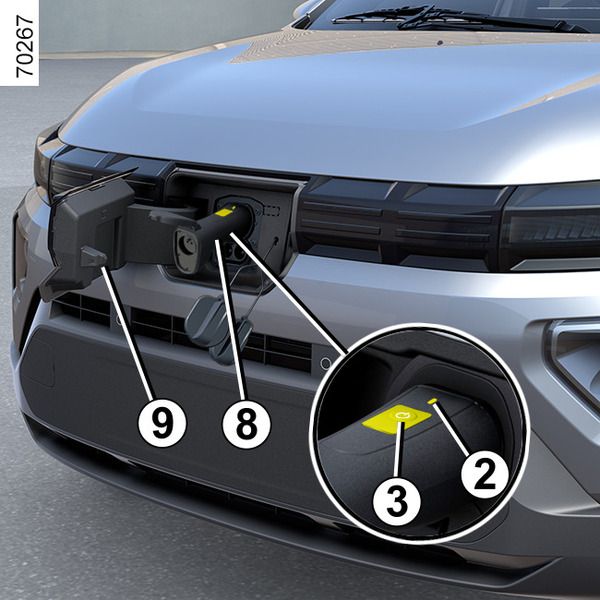
pull the button 6 to unlock the charging flap 9;
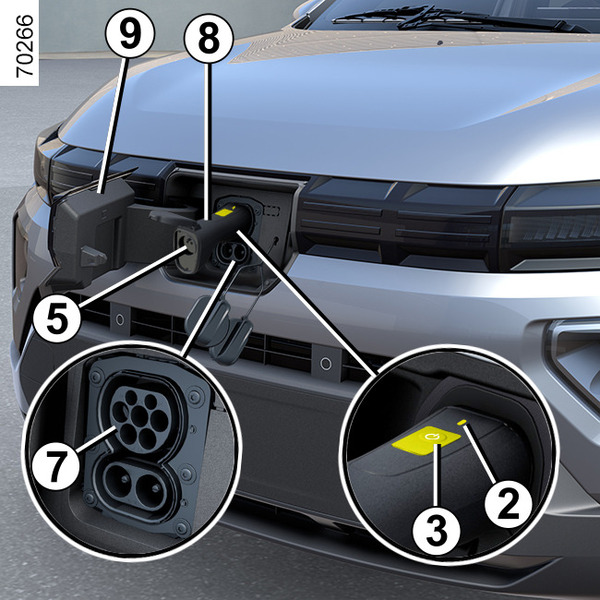
- remove cap from the charging inlet of the vehicle 7;
- grab the connector handle 8 and plug the end 1 of the connector into the vehicle charging inlet 7;
check that the V2L connector is properly plugged in by pulling gently on the handle 8. Before the discharging starts, the plug lock will be active. The V2L connector is automatically locked with the vehicle. This will make it impossible to unplug the connector from the power supply of your vehicle;
- plug the electric appliance or electric device to the AC outlet 5;
- press the switch 3 of the V2L connector for more than three seconds until the indicator light 2 turned on green. The V2L function is activated and the electrical appliance is supplied with power.
NOTE: do not pull on the handle 8 after the locking of the V2L connector to the vehicle.
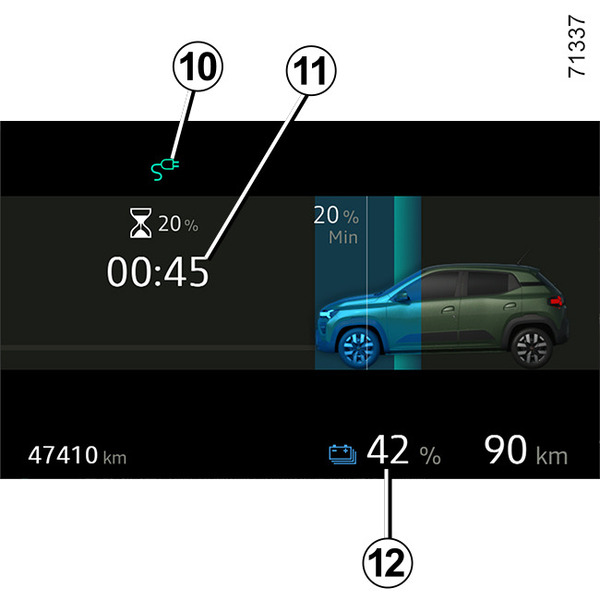
When using, the following information is displayed on the instrument panel:
- the warning light 10 to show that the vehicle is connected to the V2L connector;
- an estimate of the time remaining 11 before the low battery charge level is reached;
- the battery energy level 12.
Note: the energy supply stops automatically when:
- the V2L function is not used for approximately one hour (no electrical appliances connected to the AC socket 5 of the V2L connector or no power consumption);
an electrical appliance exceeding the maximum power supply capacity is connected;
when the doors have been locked beforehand, the driver's door is unlocked;
when the minimum traction battery charge threshold set on the multimedia screen is reached.
When the power is switched off, a message is displayed on the instrument panel to inform you.
To disconnect the V2L connector
If opening element of the vehicle are locked:
- press the unlock button in the remote-control key Key, remote control.
or
- press the unlock button on the central console Interior locking/unlocking door control.
vehicle unlocked, press the switch 3 of the V2L connector for more than three seconds to stop the discharge. The light 2 goes out and the V2L function is deactivated.
the V2L connector is automatically unlocked with the vehicle. This will allow to unplug the connector from your vehicle;
Unplug your device and grab the connector handle 8 of the V2L connector to disconnect it from the vehicle within approximately 15 seconds. Otherwise, the charging socket 7 will be locked again automatically.
replace the cap of the charging inlet of the vehicle and close the charging flap 9.
place the V2L connector in its storage compartment.
tip
Do not drive the car with the charging flap 9 open condition. Once the V2L connector is unplugged from the vehicle, make sure that the cap is put and the charging flap 9 is properly closed.
Settings
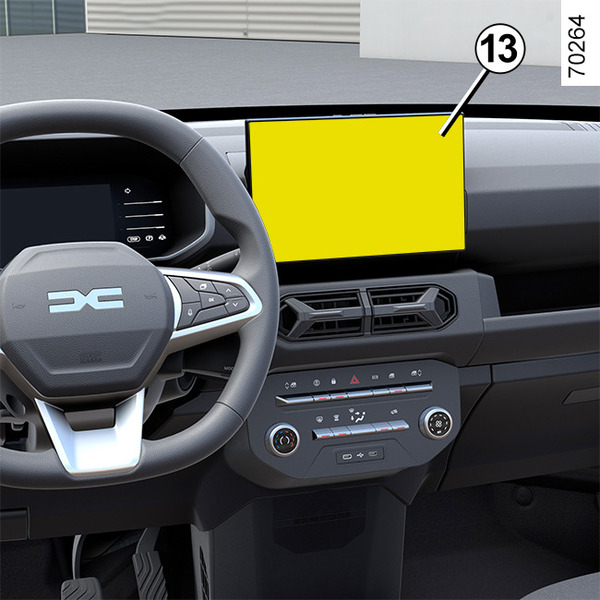
You can set the threshold’s value for the minimum traction battery charge level from the multimedia screen 13.
For more information, refer to the multimedia manual.
Operating faults
In case of operating faults, the indicator light 2 on the V2L connector goes out and the V2L power supply (discharge) automatically turns off. A message is displayed on the instrument panel to inform you.
In case of V2L function internal failure, message « V2L discharge impossible V2L to check » is displayed on the instrument panel: unplug the device and disconnect the V2L connector. please contact an approved dealer.
In case of V2L function failure coming from the device connected to V2L connector AC outlet, message « V2L discharge impossible - appliance connected fault » is displayed on the instrument panel:
unplug the device and the V2L connector;
- check that the device and the V2L connector are not damaged and that the power plug is not broken or corroded;
- make sure that the electrical device does not exceed the maximum power capacity that the vehicle can supply.
If a fault occurs again, please contact an approved dealer.