Dacia Spring
Operating principle
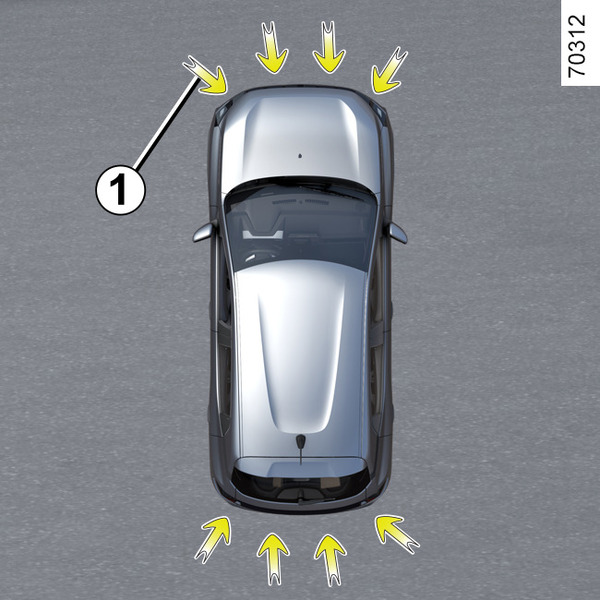
Ultrasonic sensors, indicated by arrows 1, are fitted in the bumpers to detect obstacles near the vehicle.
The function alerts the driver via audible signals and a display representing the area where the obstacle was detected.
Depending on the equipment, the system detects obstacles behind, in front and to the sides of the vehicle.
The parking distance control system is only activated when the vehicle is driven at a speed below approximately 6 mph (10 km/h).
The function does not take into account towing or carrying systems that are not recognised by the system.
warning
This function is an additional driving aid.
Under no circumstances should it replace the driver's care or responsibility whilst reversing.
The driver should always be ready for sudden incidents while driving: always ensure that there are no small, narrow moving obstacles (such as a child, animal, pushchair, bicycle, stone, post, etc.) in the blind spot when manoeuvring.
warning
An impact to the underside of the vehicle while manoeuvring (e.g. striking a post, raised kerb or other street furniture) may result in damage to the vehicle (e.g. deformation of an axle).
To avoid any risk of accident, have your vehicle checked by an approved dealer.
Location of the ultrasonic sensors 1
Ensure that the area around the ultrasonic sensors indicated by the arrows 1 is not obscured (by dirt, mud, snow, a badly fitted/attached number plate), impacted, modified (including paintwork) or obstructed by any accessory fitted to the rear and/or, depending on the vehicle, to the front of your vehicle.
Operation
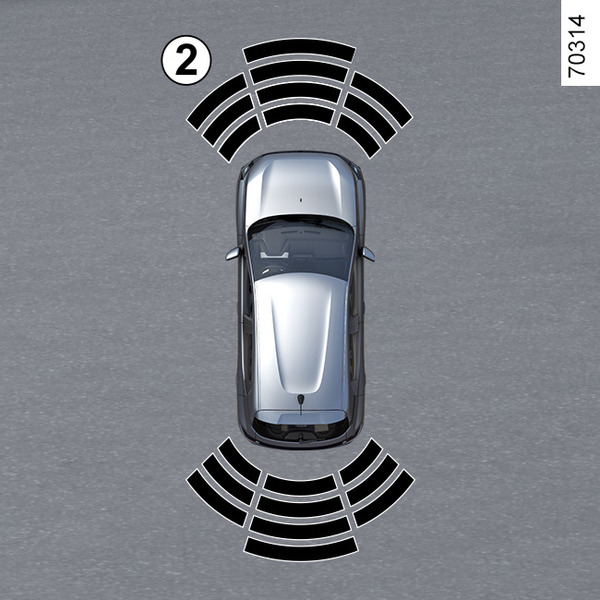
Depending on the vehicle, the display 2 shows the vehicle surroundings, accompanied by beeps.
Obstacle detection
Most obstacles located near the rear and, depending on the equipment, the front of the vehicle are detected.
The frequency of the beep will increase as the obstacle approaches and will become a continuous beep at around 30 cm from an obstacle detected in front of the vehicle or behind it, depending on the vehicle.
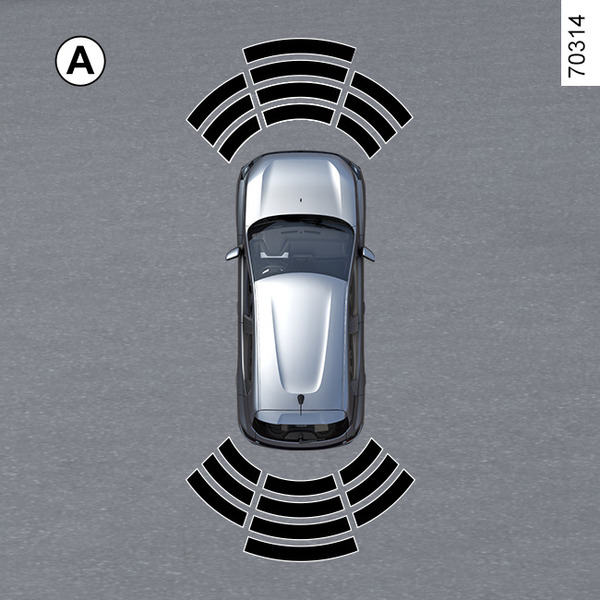
Depending on the vehicle, the area where the obstacle has been detected is shown (display A). Depending on the vehicle, the area is displayed in green, orange (or yellow depending on the vehicle) or red, depending on the proximity of the detected obstacle.
tip
In the event of a change in trajectory during a manoeuvre, the risk of collision with an obstacle may be signalled late.
Activation/deactivation
Activation/deactivation from the multimedia screen 3
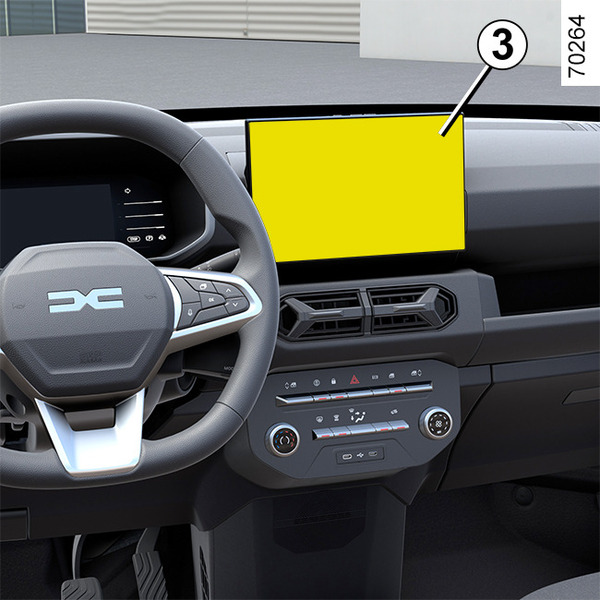
From the « Vehicle » world on your multimedia screen 3, press the « Parking aids » menu.
Activate or deactivate areas covered by the ultrasonic detectors.
Please refer to the multimedia instructions for further information.
Note: the rear detection zone cannot be deactivated.
Parking distance control automatic deactivation
The system is deactivated:
- when the vehicle speed is above approximately 6 mph (10 km/h);
- depending on the vehicle, when the vehicle is stationary for more than approximately five seconds and an obstacle is detected (such as when in a traffic jam, etc.);
- when you are in N or P position;
- when an operating fault is detected.
Note: depending on the vehicle, if the vehicle is fitted with a towbar recognised by the system, only the rear Park Assist function is deactivated.
Settings
warning
For safety reasons, carry out any adjustments while the vehicle is stationary.
tip
Each time the vehicle is started, the function resumes the activation status saved the last time the engine was stopped.
Settings from the multimedia screen 3
With the vehicle stationary, from the « Vehicle » world on the your multimedia screen 3, press the « Parking aids » menu.
Please refer to the multimedia instructions for further information.
Settings from the trip computer 4
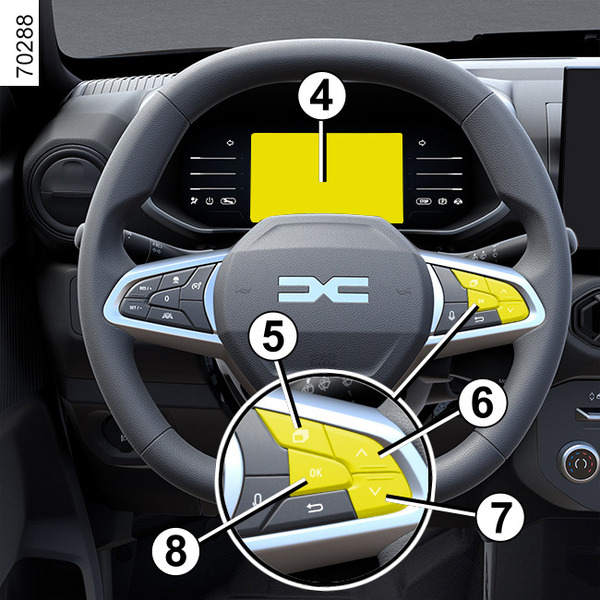
Vehicle stationary:
press switch 5 repeatably to access the menu
 ;
;repeatedly press control 6 or 7 to access the «
 Vehicle Setting » menu. Press the OK switch 8;
- press control 6 or 7 repeatedly until you reach the « PARKING ASSIST » menu. Press the OK switch 8;
- press the 6 or 7 control repeatedly to reach the « Bip volume » menu. Press the OK switch 8;
- scroll repeatedly pressing control 6 or 7 to adjust the setting;
- press the OK switch 8.
Deactivating the system sound
(depending on the vehicle)
Activate or deactivate the parking distance control sound.
Note: if you mute the sound, when approaching an obstacle you will be alerted only by the display.
Parking distance control audio volume
Adjust the Park Assist volume using the volume bar.
tip
Each time the vehicle is started, the function resumes the activation status saved the last time the engine was stopped.
Special cases
You can manually deactivate sound alerts or, depending on the vehicle, the detection zone concerned in the event that:
- towing, carrying or trailer equipment that is unrecognised by the system is present in front of the ultrasonic sensors;
- the ultrasonic sensors are damaged.
Note:if the sound is deactivated, the displays will continue to warn you erratically.
Operating faults
When the system detects a malfunction: either a sound signal warns you for about three seconds when the reverse gear is engaged, accompanied by the « Check Parking sensors » message on the instrument panel, or the system does not produce a sound or display when the reverse gear is engaged.
Check that the ultrasonic sensors are clean.
If it the fault persists, consult an approved dealer.
tip
When the vehicle is travelling at a speed below approximately 6 mph (10 km/h), some noises (motorcycle, lorry, pneumatic drill, etc.) may trigger the Park Assist system audible warnings.
Guidelines
tip
System servicing/repairs
- In the event of an impact, the alignment of the ultrasonic sensors may be altered and its operation may consequently be affected. Deactivate the function and consult an authorised dealer.
- Any work in the area where the ultrasonic sensors are located (repairs, replacements etc.) must be carried out by a qualified professional.
Only an authorised dealer is qualified to service the system.
System disturbance
Some conditions can disrupt or damage the system operation, for example:
- poor weather conditions (rain, snow, hail, black ice, etc.);
- some types of noise (motorcycle, lorry, pneumatic drill, etc.);
- fitting an non-compatible towing ball or hook.
Risk of false alarms or absence of warnings
If the system behaves abnormally consult an authorised dealer.
Limitation of the system operation
- The ultrasonic detection zones should be kept clean and free of any modifications in order to ensure the proper operation of the system.
- Small objects moving close to the vehicle (motorcycles, bicycles, pedestrians, etc.) may not be recognised by the system.
- The system may not detect obstacles that are too close to the vehicle.
- The system may not provide a warning when the other vehicles or obstacles are travelling at a significantly different speed.
- When there is a change in trajectory during a manoeuvre, the system may be slow in reporting obstacles