Dacia Duster
Assisted operation
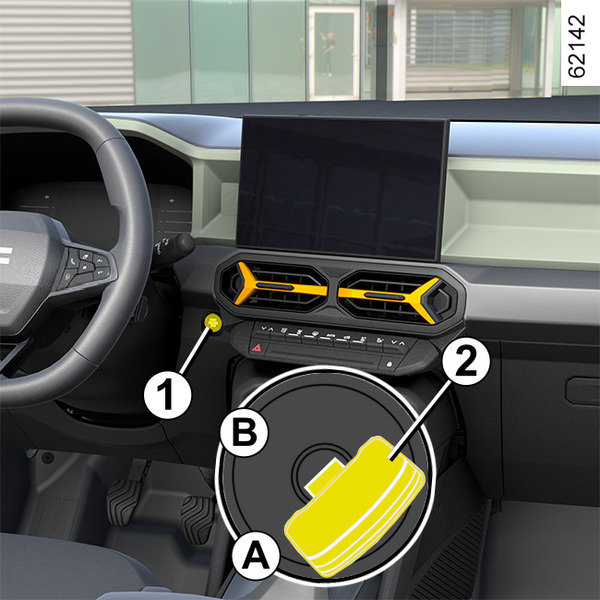
Applying the electronic parking brake
With the vehicle stationary, the electronic parking brake can be used to immobilise the vehicle:
- by pressing the engine start/stop button 1or by turning the ignition key2(key in "Stop and steering lock applied" positionA);
or
- when the driver's seat belt is unfastened;
or
- when the driver's door is opened;
or
- for vehicles equipped with an automatic gearbox, when position P is engaged.
In all other cases, for example when the engine stalls or goes on standby due to the Stop and StartStop and Start function function, the electronic parking brake is not applied automatically. Manual mode must be used.
For certain country-specific model versions, the assisted brake application function is not activated. See the information on "Manual operation".
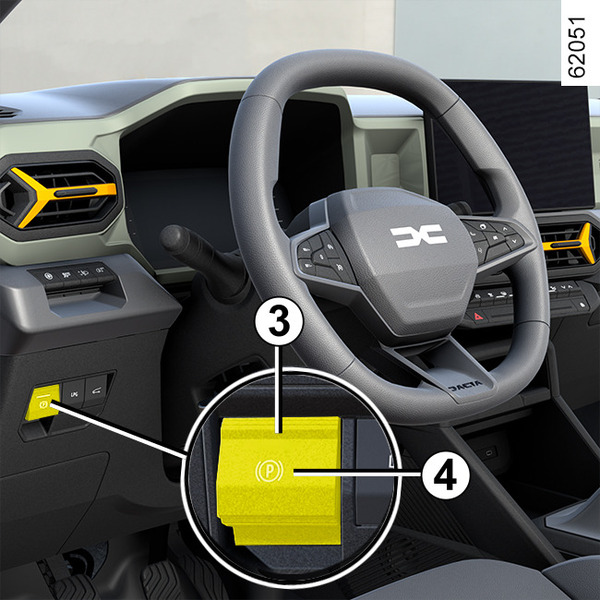
To confirm that the electronic parking brake is applied, the "Parking Brake ON" message and the "
 " warning light appear on the instrument panel and the indicator light 3 lights up on the switch 4.
After the engine is switched off, the indicator light 3 goes out a few minutes after the electronic parking brake has been applied and the
warning light goes out when the vehicle is locked.
warning
Before leaving the vehicle, check that the electronic parking brake is fully applied. Warning light 3 on switch 4 and warning light
on the instrument panel illuminate to show that the parking brake is applied but switch off when the doors are locked.
Note: in some situations (electronic parking brake failure, manual release of the parking brake, etc.), to indicate that the electronic parking brake is released a beep sounds and the "WARNING: Apply Parking Brake" message appears on the instrument panel:
- with the engine on: when the driver’s door is opened;
- with the engine off (e.g. when the engine stalls): when a front door is opened.
In this case, pull and release the switch 4 to apply the electronic parking brake.
Assisted release of the parking brake
The parking brake is released as soon as the vehicle is started by accelerating or, on vehicles equipped with an automatic gearbox, with the ignition on, when shifting from P position to R, N or D position.
Manual operation
You can apply the electronic parking brake manually.
Manually applying the electronic parking brake
Pull the switch 4. Warning light 3 and warning light
on the instrument panel light up.
Manually releasing the electronic parking brake
To release the parking brake, press the 1 switch without pressing the pedals or turn the key 2 to the "On" position B to switch on the vehicle ignition. Press the brake pedal then press switch 4: the indicator light 3 on the switch goes out and the
warning light disappears from the instrument panel.
warning
Before leaving the vehicle, check that the electronic parking brake is fully applied. Warning light 3 on switch 4 and warning light
on the instrument panel illuminate to show that the parking brake is applied but switch off when the doors are locked.
Brief stop
To apply the electronic parking brake manually (when stopping at a red light, stopping when the engine is running, etc.): pull and release the switch 4. The brake is released as soon as the vehicle is started up again.
Special cases
To park on a slope or while towing a trailer, for example, pull switch 4 for a few seconds to enable maximum braking.
To park, with the electronic parking brake released (if there is a risk of freezing, for example):
- engage any gear or the P position: the drive wheels will be mechanically locked by the driveshaft;
- switch off the engine by pressing the engine start/stop button 1 or by turning the ignition key 2;
- unfasten the driver's seat belt;
- open the driver's door;
- manually release the electronic parking brake (please see the paragraph on "Manually releasing the electronic parking brake");
- depending on the vehicle, the electronic parking brake is applied automatically. You will have to release it manually;
- close the driver's door and lock the vehicle.
Versions with an automatic gearbox
For safety reasons, automatic release is deactivated when the driver’s door is open or not shut properly and the engine is running (in order to prevent the vehicle from moving without the driver). The "Release Parking Brake" message appears on the instrument panel when the driver presses the accelerator pedal.
warning
Never leave your vehicle without moving the selector lever to position P and switching off the engine. This is because when the vehicle is stationary with the engine running and a gear engaged, the vehicle may begin to move if you accelerate.
There is a risk of accidents.
warning
If the "WARNING: Electric System" or "Check battery" or "WARNING: Braking System" message appears, you must immobilise the vehicle by engaging the first gear (manual gearbox), P position (automatic gearbox) or by pulling the switch 4 for approximately 10 seconds.
If the conditions and the slope require it, chock the wheels of the vehicle.
Risk of loss of immobilisation of the vehicle.
Call an approved dealer.
Operating faults
- If there is a fault, the
 warning light illuminates on the instrument panel accompanied by the "Check Parking Brake" message and, in some cases, the
warning light.
warning light illuminates on the instrument panel accompanied by the "Check Parking Brake" message and, in some cases, the
warning light.
Contact your approved Dealer straight away.
- If there is an electronic parking brake fault, the
 warning light comes on, along with the "Parking brake failure" message, a beep and, in some cases, the
warning light.
warning light comes on, along with the "Parking brake failure" message, a beep and, in some cases, the
warning light.
This means that you must stop as soon as traffic conditions allow.
warning
If no lights or sounds are apparent, this indicates a fault in the instrument panel. This indicates that it is essential to stop immediately (as soon as traffic conditions allow). Ensure that the vehicle is correctly immobilised and contact an approved Dealer.