Media Display & Media Nav Live (Gen 3)
" My driving " menu
tip
Certain features are only available while the vehicle is stationary.
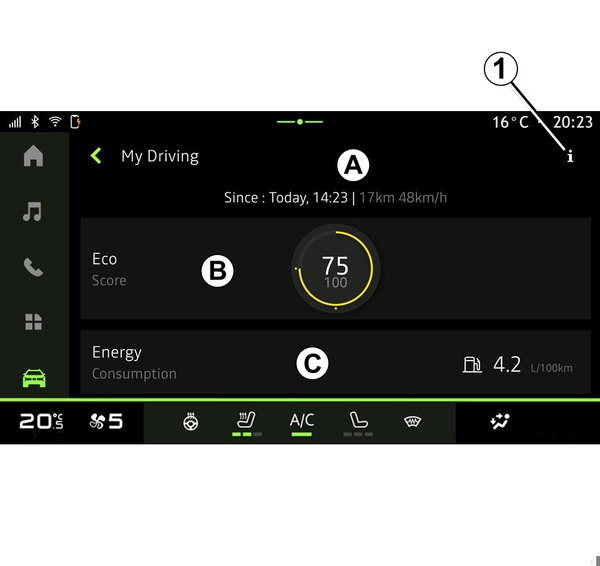
From the "Vehicle" world
 , press "My driving" to access the following information and functions:
- start date, distance travelled and average speed of the current journey A;
- "Eco score" B;
- "Energy consumption" C.
You can also access it using the "My driving" icon in the "Vehicle" widget, from the "Home screen" world
 .
.
From the "Information" icon
 1, you can access information on "My driving".
Note:
- the information that can be accessed via the "My driving" menu may vary according to your vehicle equipment level.
- the data displayed is automatically reset when the engine has been shut down for at least two hours or when changing "Profile".
"Eco score"
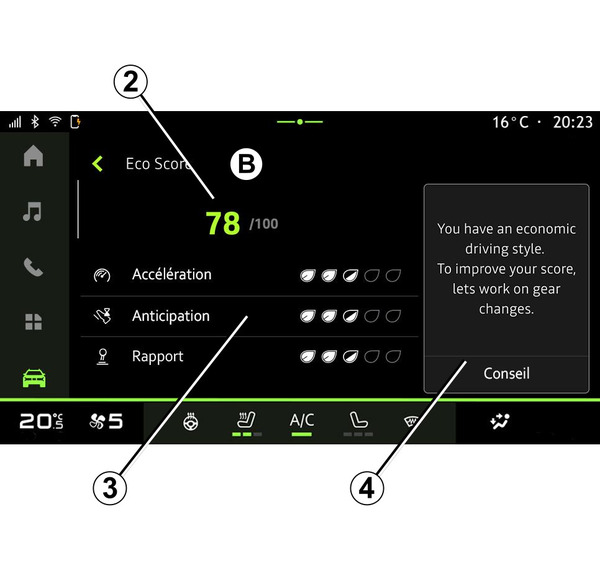
From the "Eco score" view mode B, you can view the your driving behaviour with regard to energy saving since your departure on your current journey.
Note: the data displayed is calculated from the last vehicle data reset, either automatically after the vehicle has not been used for two hours or when the "Profile" is changed.
Using the "Information" icon
, you can access information related to the "Eco score".
This data allows you to know your overall score (from 0 to 100) on the current journey:
- score between 76 and 100: "Congratulations, you are an Eco driver";
- score between 51 and 75: "You have a normal driving style";
- score between 0 and 50: "You have a dynamic driving style".
The overall score is calculated from the sub-scores.
Sub-scores are assessments of your driving behaviour on the current route based on the following criteria:
- "Acceleration" assesses your behaviour in relation to acceleration and speed;
- "Anticipation", assesses your ability to anticipate and avoid hard braking;
- "Gear change" assesses your behaviour regarding gear changes in relation to the gear change indicator displayed on the instrument panel;
Note: this assessment is only available with manual gearboxes.
- ...
Using your sub-scores, this information offers you a driving style rating to help you drive more efficiently.
To access additional advice, press "Advice".
« Energy consumption »
(depending on equipment)
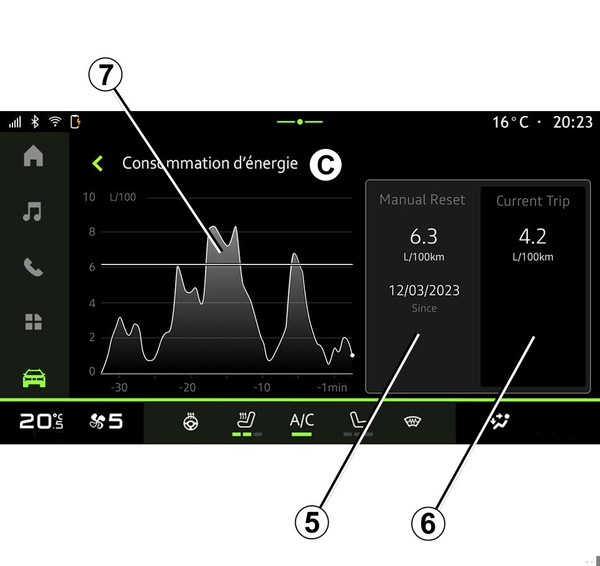
From the "Energy consumption" view mode C, you can view the following energy consumption data in relation to your driving:
- current journey data 5;
- data since the last reset 6;
- history of average consumption 7.
From the "Information" icon
, you can access information related to the "Energy consumption".
Depending on the version, the following data may be available:
- "Average consumption";
- "Distance EV" journey distance in electric mode (hybrid vehicle);
- ...
Note: the data displayed is calculated from the last "Eco score" data reset, automatically after the vehicle has not been used for two hours or when changing "Profile".
Depending on the version, the following data may be available:
- "Average consumption";
- driving distance in pure electric mode (hybrid vehicle);
- date of the last reset;
- ...
Note: the displayed data is reset along with the instrument panel data.
A graph shows the evolution of your average consumption per minute, over the last thirty minutes of the journey.
The row and associated value correspond to the average consumption since the last manual reset.
Note: the chart data is reset along with the data since the last manual reset.