Media Display & Media Nav Live (Gen 3)
Introduction
warning
These functions provide additional driving aids.
Therefore, under no circumstances can they replace the driver's vigilance and responsibility (the driver must always be ready to brake).
warning
For safety reasons, carry out any adjustments while the vehicle is stationary.
The vehicle is equipped with parking aids that offer additional assistance during parking manoeuvres.
Depending on the equipment, from the "Vehicle" world
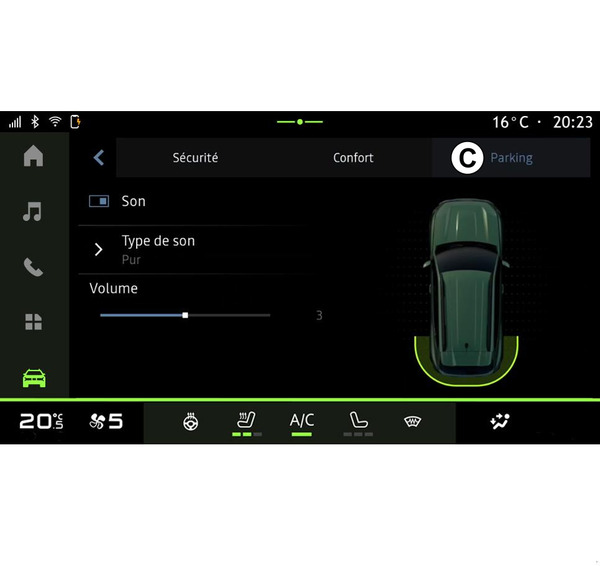
 press the "Driving assistance" menu then the "Parking" tab to access the Park Assist menu.
Please refer to the vehicle user manual for further information.
" Parking assistance " menu
From the "Vehicle" World
, select the "Driving assistance" menu, then tab "Parking" C. Use this menu to access the Park Assist settings. For further information, please refer to the "Parking assistance" section in your vehicle user manual.
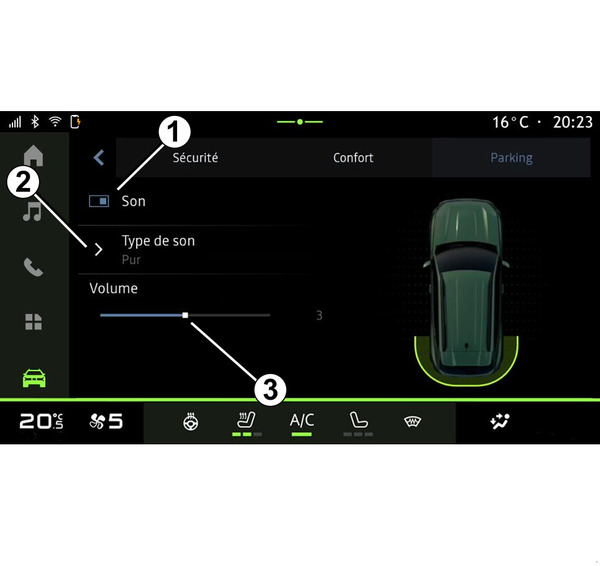
- 1.
« Sound ».
- 2.
« Sound type ».
- 3.
« Volume ».
« Sound » 1
Press "Sound" 1 to activate or deactivate the Park Assist sound warnings.
The following settings can be modified:
- "Sound type" 2: select the type of audible warning among those offered;
- "Volume": adjust the obstacle detection warning volume using the "Volume" bar 3.