Media Display & Media Nav Live (Gen 3)
warning
For safety reasons, carry out these operations when the vehicle is stationary.
tip
For more information on tyre pressure, please refer to the "Tyre pressure monitoring system" section in the vehicle user manual.
From the "Vehicle" world
 , press "Vehicle" then the "Tyre pressure" tab to check the tyre pressure status and reset the "Tyre pressure" monitoring system.
The display on your vehicle's instrument panel informs you of any tyre inflation faults.
Tyre pressure status with TPW system
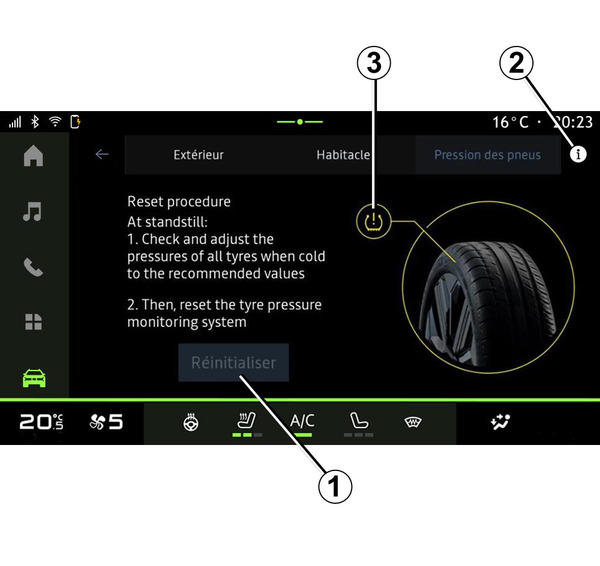
From the multimedia system, you can check the tyre pressure status.
The symbol 3 uses colours to indicate the tyre pressure status:
- green – the tyre pressure is correct or unchanged since the last re-initialisation;
- Orange – the pressure of one of the tyres is insufficient.
For more information on your vehicle's "Tyre pressure" monitoring system, press the
 icon 2.
Re-initialise the "Tyre pressure" control system at 1.
Reinitialising
This function enables re-initialisation by pressing the "Reset" button 1.
The resetting procedure must be carried out while the vehicle is stationary and the ignition is switched on.
Start the re-initialisation procedure by pressing "Yes" or return to the tyre pressure status by pressing "No".
When the reset is finished, a confirmation message is displayed on the screen.