Media Display & Media Nav Live (Gen 3)
Notification centre
warning
For safety reasons, carry out these operations when the vehicle is stationary.
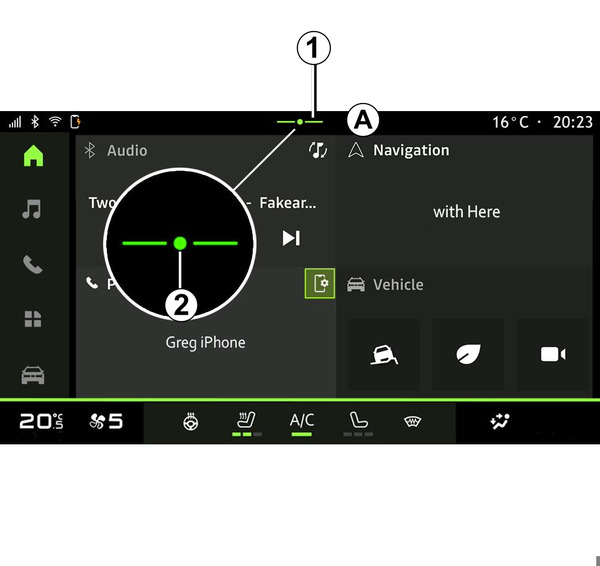
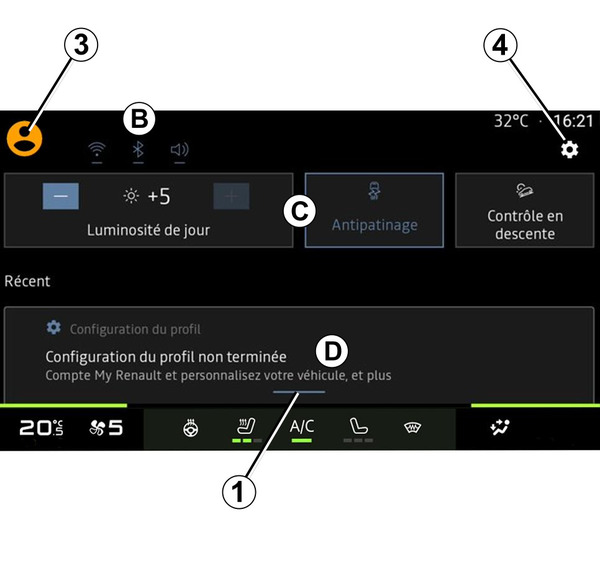
The Notifications centre provides notifications during driving as well as certain functions, suggestions and settings such as:
- access to the user "Profile" 3;
- the status of services B:
- activate/deactivate the WIFI;
- activate/deactivate the Bluetooth®;
- mute/unmute the sound.
- the "Settings"
 4;
4; - shortcuts to the vehicle equipment and screen brightness controls C;
Note: the availability of shortcuts and command types depends on the equipment and cannot be modified.
- the list of notifications received D;
- recently used apps;
- ...
By pressing button 1 or by quickly swiping the multimedia screen vertically from zone A towards the centre of the screen, you can access the Notifications centre in order to view the notifications and available functions.
When an unread notification is available, a dot 2 will appear in the middle of button 1.
By pressing 2, you will automatically open the Notifications centre and be able to read any unread notifications, then the symbol will disappear.
Once the Notifications centre is open, select a notification from the list D to access it.
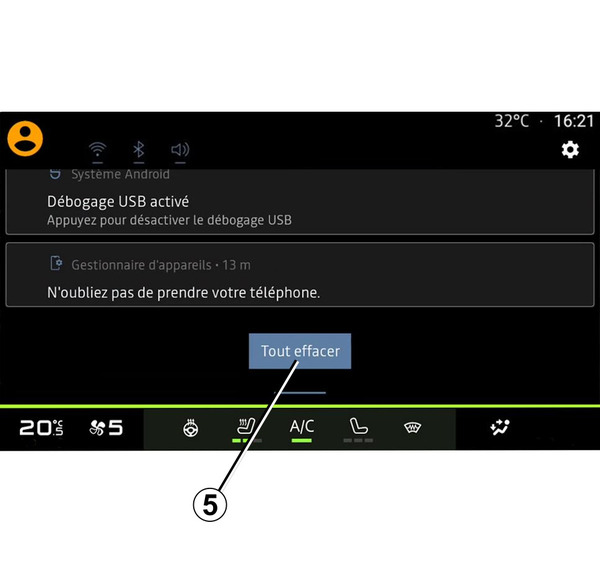
You can delete the notification by performing a quick horizontal swipe on the screen.
To delete all notifications, press button 5.
Note: some notifications will need a required action to be completed in order to be deleted from the notification centre.
To exit the notification centre, press 1 or swipe up quickly from the bottom of the screen towards the centre of the screen.
Notification settings
From the "Settings" icon 4 or the "Vehicle" world
 , access the "Settings" menu, then the "Apps and notifications" menu.
Use this menu to configure the multimedia system notifications.
For more information on the "Apps and notifications" menu, please refer to the "System settings" section System settings.