Dacia Sandero
Location of the radar 1
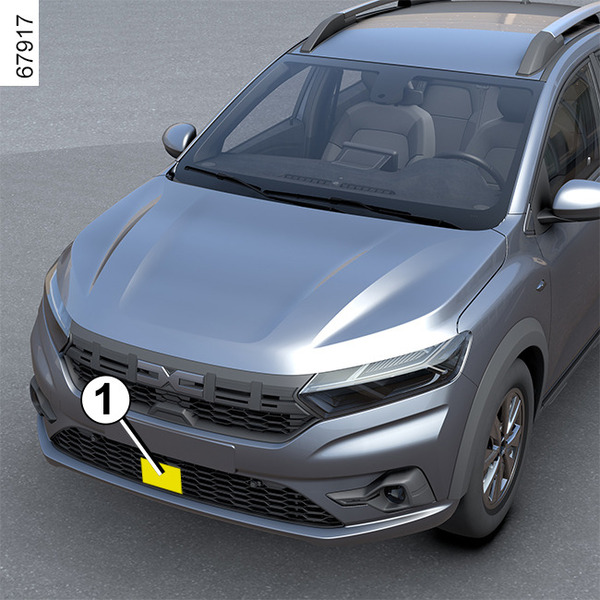
Using the radar data 1, the system calculates the distance:
- from the vehicle ahead in the same lane;
or
- from oncoming vehicles at a crossroads.
The system informs the driver if there is a risk of head-on collision to enable appropriate emergency manoeuvres (pressing the brake pedal and/or turning the steering wheel).
Depending on the reactivity of the driver, the system can assist with braking in order to limit damage or prevent a collision.
Ensure that the radar area is not obstructed (by dirt, mud, snow, a badly fitted front number plate etc.), impacted, modified (including painting) or hidden by any accessory fitted on the front of the vehicle (on the grille or logo etc.).
tip
This system can apply maximum braking to the vehicle until it is completely stationary if necessary.
For safety reasons, always wear your seat belt when travelling in your vehicle and make sure that it is loaded so that no items can be thrown forward and hit the occupants.
warning
This function is an additional driving aid. This function is not under any circumstances intended to replace the due care and attention of the driver, who should at all times be in control of the vehicle.
Operation
Detection of vehicles
When driving at a speed between approximately 4 mph (7 km/h) and 105 mph (170 km/h), if there is a risk of collision with the vehicle in front, the system:
- warns you of a collision risk:
the red
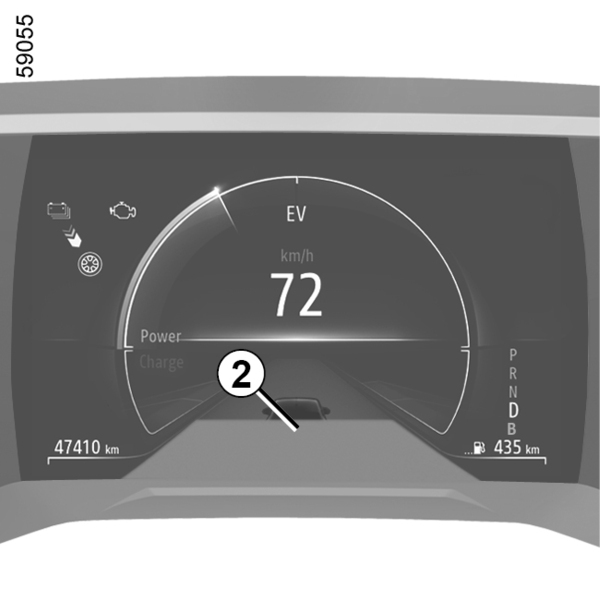
 warning light appears on the instrument panel accompanied by a beep and, depending on the vehicle, the 2 "Brake" message.
If the driver depresses the brake pedal and the system still detects a risk of collision, the brake force is increased.
- may trigger braking:
if the driver fails to react following the alert and collision becomes imminent.
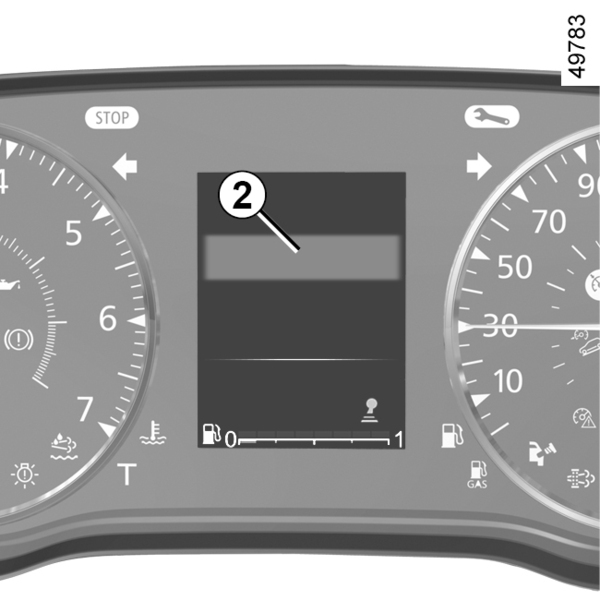
If the vehicle stopped as a result of active emergency braking, the driver must keep the vehicle stationary by applying the brake pedal.
Note: if the driver uses the vehicle controls (steering wheel, pedals, etc.) the system may delay certain operations or not activate.
tip
In the event of an emergency manoeuvre, you can stop the braking at any moment by:
- tapping the accelerator pedal;
or
- turning the steering wheel as a collision avoidance manoeuvre.
Special features of warnings
Depending on the speed, the warning and braking may be activated simultaneously.
Special features of stationary vehicles
Stationary vehicles are detected when your vehicle is being driven at a speed between approximately 4 mph (7 km/h) and 50 mph (80 km/h). The system is not active and does not emit a warning for stationary vehicles when you exceed approximately 50 mph (80 km/h).
Special features of oncoming vehicles at a crossroads
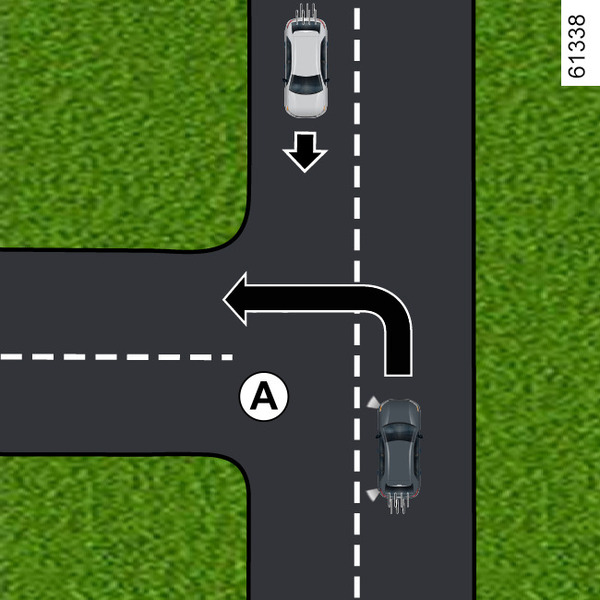
At a crossroads, when you wish to change direction (e.g. A), oncoming vehicles travelling at around 19 mph (30 km/h) to 34 mph (55 km/h) are detected by the system when:
- your vehicle is travelling at a speed of around 4 mph (7 km/h) to 16 mph (25 km/h);
- you have activated the direction indicator.
The system is otherwise inactive and does not trigger an alert.
Activating or deactivating the system
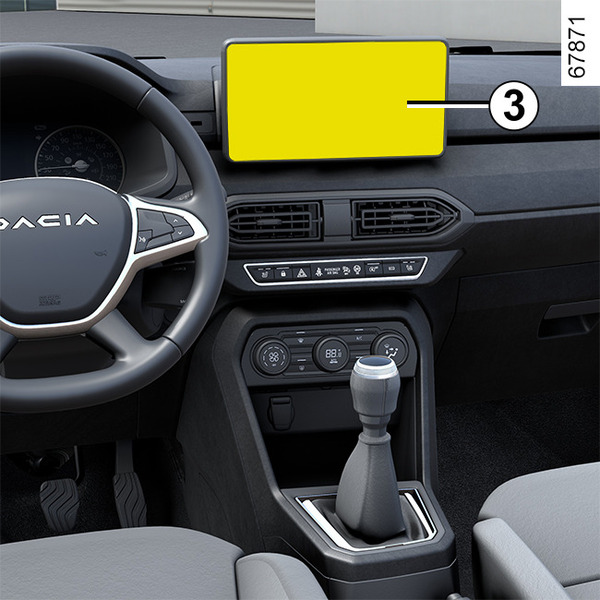
Vehicles fitted with a multimedia screen 3
Refer to the multimedia instructions.
Vehicles not fitted with a multimedia screen
(system A or B, depending on the vehicle)
System A
- With the vehicle stopped, press switch 4 as many times as required to reach the "VEHICLE" tab;
- repeatedly press control 5 or 6 to reach the "SETTINGS" menu. Press the 7 "OK" switch;
- repeatedly press control 5 or 6 to reach the "DRIVING ASSIST" menu. Press the 7 "OK" switch;
- repeatedly press control 5 or 6 to reach the "Active braking" menu and press the 7 "OK" switch.
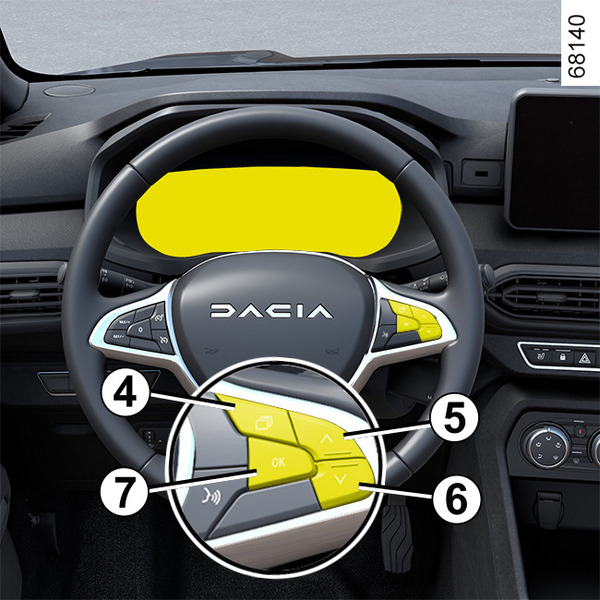
Press the 7 "OK" switch again to activate or deactivate the function:
 function activated;
 function deactivated.
The
warning light appears in yellow on the instrument panel when the system is deactivated.
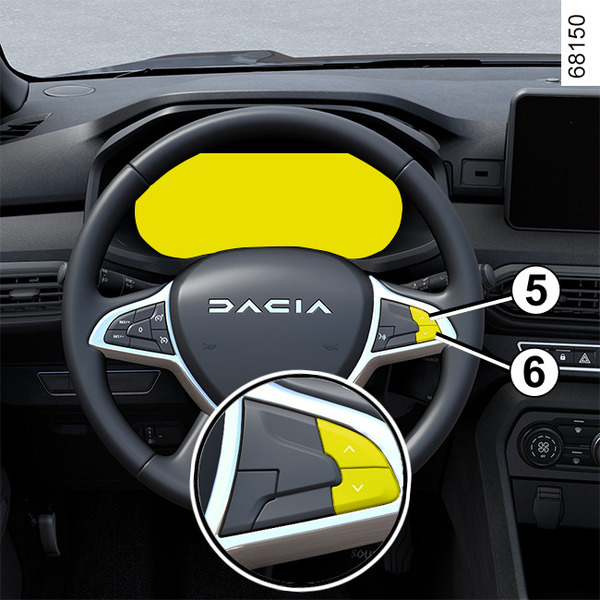
System B
- With the vehicle stationary, repeatedly press the 5 or 6 controls to go to the
tab;
- the function can be switched on and off by pressing and holding one of the controls 5 or 6.
The
warning light appears in yellow on the instrument panel when the system is deactivated.
tip
Every time the vehicle is started the function is automatically activated.
Temporarily not available
If the system detects a temporary unavailability, the
warning light appears in yellow on the instrument panel accompanied, depending on vehicle, by the "Front radar no visibility" message.
The possible causes are:
- the system is temporarily interrupted (e.g. the front grille is clogged by dirt, mud, snow etc.). In this case, park the vehicle and switch off the engine. Clean the front bumper grille. When the engine next starts, the indicators and, depending on vehicle, the message will switch off.
If this is not the case, this may arise from another cause; contact an approved dealer.
Operating faults
 and
appear in yellow on the instrument panel and, depending on the vehicle, the
warning light appears in yellow accompanied by the "Front radar to check" or "Check Camera/Radar" message: this indicates that the system has detected an operating fault. Consult an approved Dealer.
and
appear in yellow on the instrument panel and, depending on the vehicle, the
warning light appears in yellow accompanied by the "Front radar to check" or "Check Camera/Radar" message: this indicates that the system has detected an operating fault. Consult an approved Dealer.
tip
Every time the vehicle is started the function is automatically activated.
Limitations of system operation
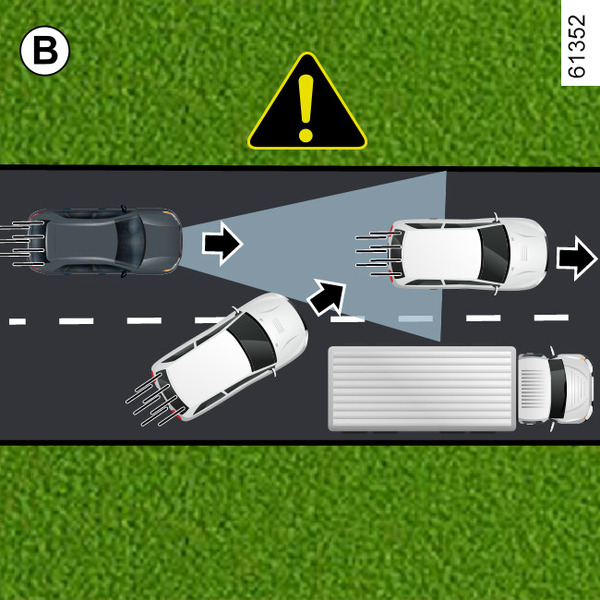
Vehicle detection
A vehicle moving into the same lane (e.g. B) will only be registered by the system once it enters the radar detection areas.
The system may trigger delayed braking.
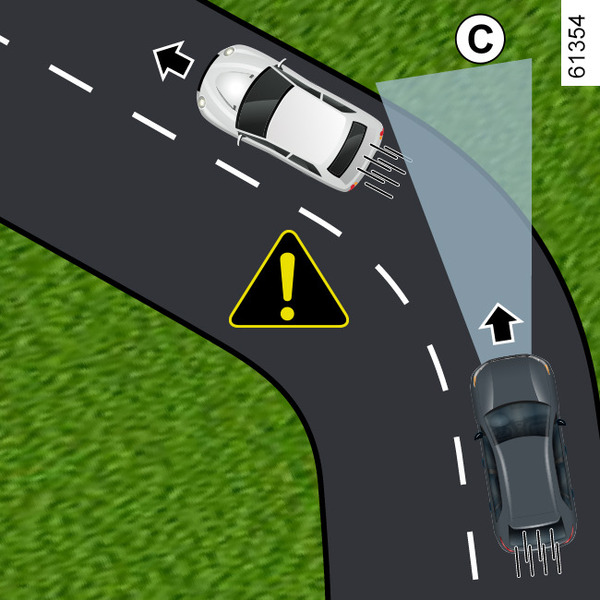
Detection during cornering
When entering a corner or bend, the radar may temporarily be unable to detect the vehicle in front (e.g. C).
When exiting a bend, the system's detection of the vehicle in front may be disrupted or delayed.
The system may trigger delayed braking.
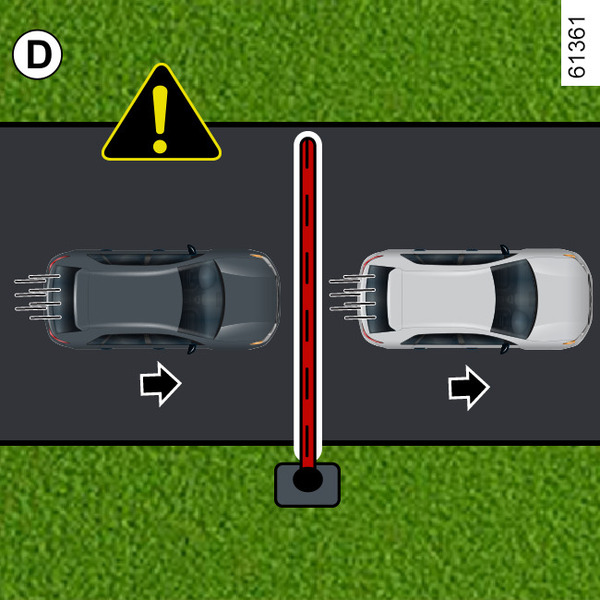
Non-detection of fixed obstacles and objects of a small size
The system cannot detect:
- pedestrians, bikes, scooters, etc.;
- animals;
- fixed obstacles (toll barriers, walls, etc.) (e.g. D).
These are not taken into account by the system. They do not trigger any alert or reaction by the system.
Vehicles hidden due to variations in ground relief
The system will not register vehicles driving uphill or downhill when hidden by terrain or when located outside radar detection areas.
Vehicles outside radar detection areas
The system will react late or not at all if detected vehicles are outside the radar detection areas, particularly in the following situations:
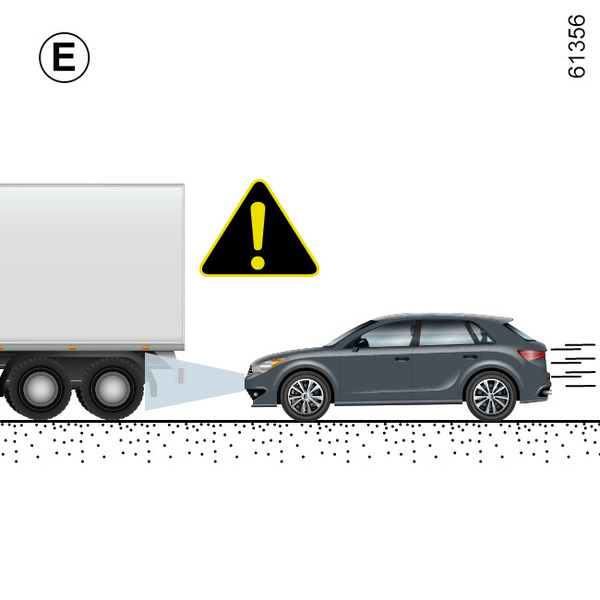
- vehicles transporting long objects which exceed the line;
- the actual length of tall vehicles (e.g. E) is outside the radar detection area (construction machine, agricultural equipment towing vehicle, etc.);
- vehicles insufficiently centred in the lane;
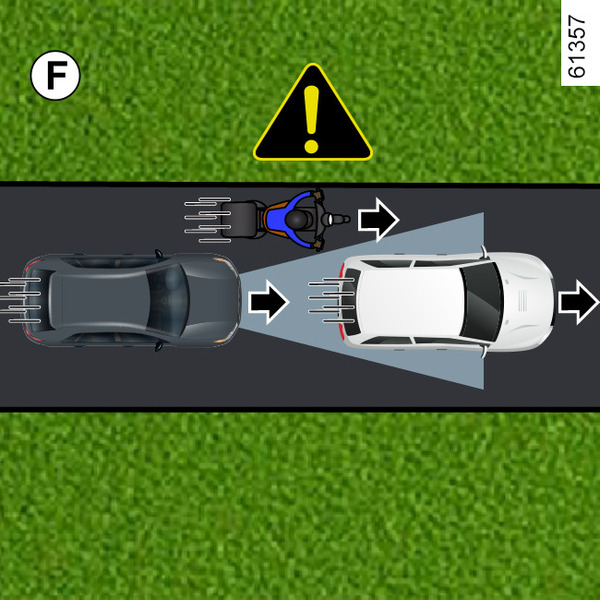
- narrow vehicles which are very close (e.g. F).
Warnings
warning
Active emergency braking
This function is an additional driving aid. This function is not under any circumstances intended to replace the due care and attention of the driver, who should at all times be in control of the vehicle. The triggering of this function may be delayed or prevented when the system detects clear signs of control of the vehicle by the driver (action on the steering wheel, pedals etc.).
The system cannot be activated:
- when the gear lever is in reverse gear position;
- when the parking brake is activated;
- when the Electronic Stability Program (ESC) has started.
System servicing/repairs
- In the event of an impact, there may be changes to the radar, which may affect its performance. Deactivate the function and consult an authorised dealer.
- Any work in the area where the radar is located (repairs, replacements, etc.) must be carried out by a qualified professional.
Only an authorised dealer is qualified to service the system.
warning
System disturbance
Some conditions can disturb or damage the system's operation, such as:
- a complex environment (metal bridge, tunnel, etc.);
- poor weather conditions (snow, hail, black ice, etc.);
- obstruction of the radar area (by dirt, ice, snow, condensation etc.);
- ...
In these conditions, the system may not react, may warn the driver or may brake inadvertently.
Limitation of the system operation
- Each time the vehicle is started, the system carries out a calibration according to the vehicle surroundings and may be inactive for up to three minutes;
- An oncoming vehicle will not trigger any warning or system action if the conditions detailed in the "Special features of oncoming vehicles at a crossroads" paragraph are not met (see previous pages);
- The radar area should be kept clean and free of any modification to ensure the correct operation of the system;
- The system may not respond to small vehicles such as motorbikes as effectively as to other vehicles;
- The system may not operate properly when the road surface is slippery (rain, snow, black ice, etc.);
- ...
In these conditions, the system may not react, may warn the driver or may brake inadvertently.
warning
Deactivating the function
You must deactivate the function if:
- the front of the vehicle was damaged (impact, scratch on the radar, etc.);
- the vehicle is being towed (breakdowns);
- you are not driving on a paved road.
In the event of the system behaving abnormally, deactivate it and contact an authorised dealer.
Halting the function
You can halt the active braking function at any time by tapping the accelerator pedal or by turning the steering wheel in a collision avoidance manoeuvre.
System B
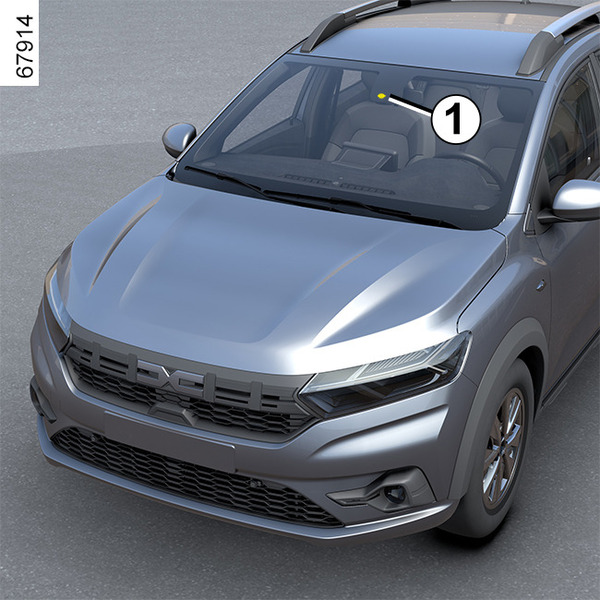
The system uses information from the camera 1, to determine the distance from your vehicle:
- from the vehicle ahead in the same lane;
or
- from any oncoming vehicles in the context of a manoeuvre to change direction;
or
- from vehicles passing perpendicularly;
or
- stationary vehicles;
or
- surrounding pedestrians and cyclists.
The system informs the driver if there is a risk of head-on collision to enable appropriate emergency manoeuvres (pressing the brake pedal and/or turning the steering wheel).
Depending on the reactivity of the driver, the system can assist with braking in order to limit damage or prevent a collision.
The system is otherwise inactive and does not trigger an alert.
warning
This function is an additional driving aid.
This function is not under any circumstances intended to replace the due care and attention of the driver, who should at all times be in control of the vehicle.
tip
This system can apply maximum braking to the vehicle until it is completely stationary if necessary.
For safety reasons, always wear your seat belt when travelling in your vehicle and make sure that it is loaded so that no items can be thrown forward and hit the occupants.
Location of the camera 1
Make sure the windscreen is not obscured (by dirt, mud, snow, condensation etc.).
Operation
When driving, when there is a risk of collision, the system:
- alerts you of a collision risk: the "Detected obstacle" message appears on the instrument panel accompanied by a beep.
Note: if the driver presses the brake pedal and the system still detects a risk of collision, the braking force may be increased if it is not sufficient to prevent the collision.
- braking may be triggered: if the driver does not react to the alert and the collision becomes imminent, the red
warning light and the "Brake" message are displayed on the instrument panel accompanied by a beep.
Note:
- if the driver uses the vehicle controls (steering wheel, pedals, etc.) the system may delay its reaction or not activate;
- if active emergency braking has caused the vehicle to stop, the vehicle is kept stationary for a short time. Beyond this time limit, the driver must keep the vehicle stationary by holding their foot on the brake pedal;
- after the system activates braking, the "Advanced Safety triggered" message will be displayed.
tip
In the event of an emergency manoeuvre, you can stop the braking at any moment by:
- tapping the accelerator pedal;
or
- turning the steering wheel as a collision avoidance manoeuvre.
tip
Special features of warnings
Depending on the speed, the warning and braking may be activated simultaneously.
Detection of vehicles
Detection of vehicles travelling in the same lane
The risk of a collision with the vehicle in front of you in the same lane is detected by the system when:
your vehicle is travelling at a speed between approximately 3 mph (5 km/h) and 112 mph (180 km/h).
Detection of oncoming vehicles in the context of a manoeuvre to change direction
When you wish to change direction (e.g. A), oncoming vehicles are detected by the system when:
- your vehicle is travelling at a speed between approximately 4 mph (7 km/h) and 19 mph (30 km/h).
- you have activated the direction indicator light.
Detection of vehicles crossing the lane perpendicularly
Vehicles crossing the lane perpendicularly are detected by the system when:
- your vehicle is travelling at a speed between approximately 3 mph (5 km/h) and 53 mph (85 km/h).
Detection of vehicles stopped in the lane
Stationary vehicles are detected by the system when:
- your vehicle is travelling at a speed between approximately 3 mph (5 km/h) and 53 mph (85 km/h).
Detection of pedestrians and cyclists
Detection of pedestrians and cyclists in the same lane
The system detects pedestrians and cyclists when:
- your vehicle is travelling at a speed between approximately 3 mph (5 km/h) and 53 mph (85 km/h).
Detection of pedestrians and cyclists when changing direction
The system detects pedestrians and cyclists when:
- your vehicle is travelling at a speed between approximately 4 mph (7 km/h) and 19 mph (30 km/h).
Activation/deactivation
tip
Depending on the vehicle, according to the length of time following the last time the engine was stopped, the function is reactivated:
- when the vehicle is unlocked;
or
- when a door is opened;
or
- when the engine is restarted.
Activating, deactivating the system from the multimedia screen 2
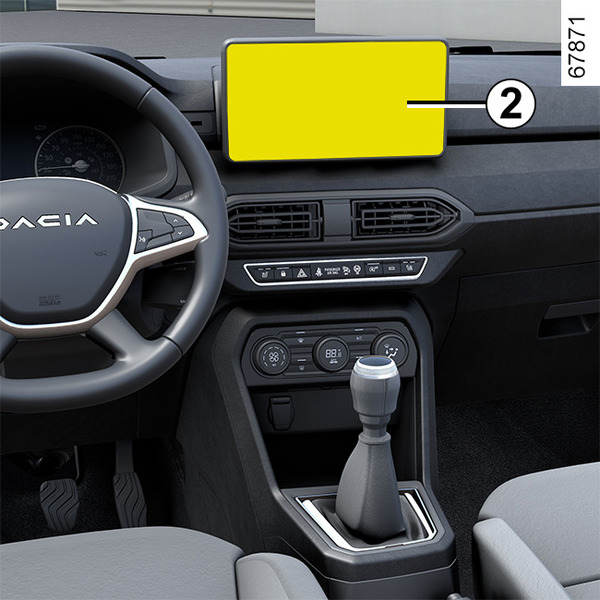
To activate or deactivate the function, please refer‑ to the multimedia instructions.
Select "ON" or "OFF".
Activating, deactivating the system from the trip computer 3
(depending on the vehicle)
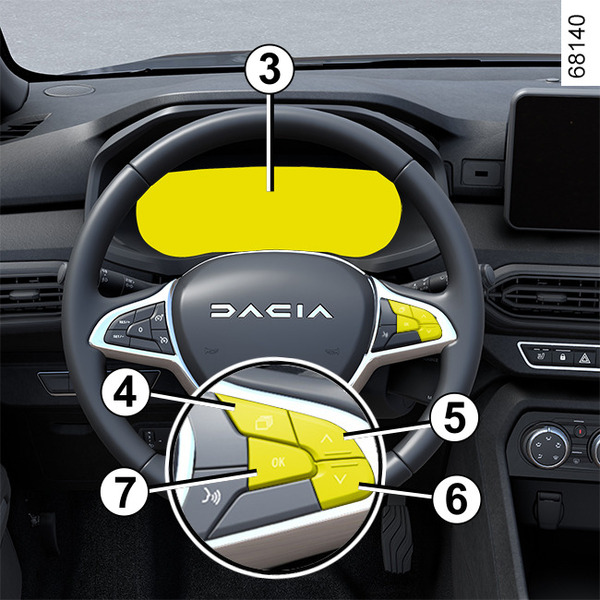
- With the vehicle stationary, press the switch 4 as many times as required to reach the
 tab;
tab;
or
- press switch 4 and repeatedly press control 5 or 6 to reach the
 tab;
tab; - press the 7 "OK" switch
- repeatedly press control 5 or 6 to reach the
 menu, then press the 7 "OK" switch;
 - repeatedly press control 5 or 6 to reach the "DRIVING ASSIST" menu, then press the 7 "OK" switch;
- repeatedly press control 5 or 6 to reach the "Active braking" menu, then press the 7 "OK" switch;
- Press the 7 "OK" switch again to activate or deactivate the function:
-
function activated;
-
function deactivated.
-
Upon deactivation of the system, the
 warning light illuminates or, depending on the vehicle, the
warning light illuminates on the instrument panel. When the system is activated, the warning light disappears.
warning light illuminates or, depending on the vehicle, the
warning light illuminates on the instrument panel. When the system is activated, the warning light disappears.
Settings
warning
For safety reasons, carry out any adjustments while the vehicle is stationary.
Settings from the multimedia screen 2
(depending on the vehicle)
With the vehicle stationary, to access the function settings from the multimedia screen 2; refer to the multimedia instructions:
- "Alert": adjust the alert sensitivity level. To do this select:
- « Late » ;
- « Standard » ;
- « Early ».
Please refer to the multimedia instructions for further information.
Settings from the trip computer 3
- With the vehicle stationary, press the switch 4 as many times as required to reach the
tab;
or
- press switch 4 and repeatedly press control 5 or 6 to reach the
tab;
- press the 7 "OK" switch
- repeatedly press control 5 or 6 to reach the
menu, then press the 7 "OK" switch;
- repeatedly press control 5 or 6 to reach the "DRIVING ASSIST" menu, then press the 7 "OK" switch;
- repeatedly press control 5 or 6 to reach the "Active braking sensitivity" menu, then press the 7 "OK" switch;
- repeatedly press control 5 or 6 to select the setting, then press on switch 7 "OK".
Temporarily not available
If the system detects a temporary fault the
warning light illuminates, or depending on the vehicle the warning light illuminates on the instrument panel.
The possible causes are:
- the system is temporarily blinded (glare from the sun, dipped beam headlights, bad weather conditions etc.). The system will be operational again when visibility conditions are better;
- the system is temporarily disrupted (for example: the windscreen is obscured by dirt, snow, condensation, etc.). In this case, park the vehicle and switch off the engine. Clean the windscreen. The next time the engine is started, after around five or ten minutes of driving, the warning light and the message disappear. If this is not the case, this may arise from another cause; contact an approved dealer.
Operating faults
When the function detects an operating fault, the
warning light or, depending on the vehicle, the warning light appears on the instrument panel.
Consult an approved Dealer.
Warnings
warning
This function is an additional driving aid. This function is not under any circumstances intended to replace the due care and attention of the driver, who should at all times be in control of the vehicle.
The triggering of this function may be delayed or prevented when the system detects clear signs of control of the vehicle by the driver (action on the steering wheel, pedals etc.).
The system cannot be activated when:
the Electronic Stability Control (ESC) has been triggered.
System servicing/repairs
- In the event of an impact, the camera alignment may be changed, and its operation may consequently be affected. Deactivate the function and consult an authorised dealer.
- Any work in the area where the camera is located (repairs, replacements, windscreen modifications etc.) must be carried out by a qualified professional.
Only an authorised dealer is qualified to service the system.
System disturbance
Some conditions can disturb or damage the operation of the system, such as:
- poor weather conditions (snow, rain, hail, black ice etc.) ;
- poor visibility (night, fog etc.) ;
- poor contrast between the object (vehicle, pedestrian etc.) and the surrounding area (e.g. pedestrian dressed in white located in a snowy area etc.) ;
- being dazzled (glaring sun, lights of vehicles travelling in the opposite direction etc.) ;
- windscreen obscured (by dirt, ice, snow, condensation etc.) ;
- ...
In these conditions, the system may not react, may warn the driver or may brake inadvertently.
Limitation of the system operation
- Each time the vehicle is started, the system carries out a calibration according to the vehicle surroundings and may be inactive for a length of time between approximately two to five minutes of driving;
- the camera should be kept clean and free of any modifications in order to ensure the proper operation of the system;
- the system may not respond to small vehicles as effectively as to other vehicles;
- the system may not operate properly when the road surface is slippery (rain, snow, black ice, etc.). ;
- to ensure correct operation, the system needs to distinguish the entire obstacle. So the system cannot detect:
- pedestrians/cyclists in the darkness or in poor lighting conditions;
- partially visible pedestrians/cyclists;
- pedestrians less than approximately 80 cm tall;
- pedestrians carrying large objects;
- ...
In these conditions, the system may not react, may warn the driver or may brake inadvertently.
Deactivating the function
You must disable the function if:
- the area of the camera has been damaged (e.g. on the inside or outside of the windscreen);
- the vehicle is being towed (breakdowns);
- the windscreen is cracked or distorted (do not carry out windscreen repairs in this area; have it changed by an approved dealer);
- you are not driving on a paved road.
In the event of the system behaving abnormally, deactivate it and contact an authorised dealer.
Halting the function
You can halt the active braking function at any time by tapping the accelerator pedal or by turning the steering wheel in a collision avoidance manoeuvre.