Dacia Bigster
tip
Remember that driving a vehicle off-road is very different to driving it on the road. To make the most of your vehicle in an off-road situation, we recommend that you are trained to drive a 4x4 vehicle.
The safety of both you and your passengers is your responsibility, and depends on your skill and the care you take when driving off-road.
Driving mode selector
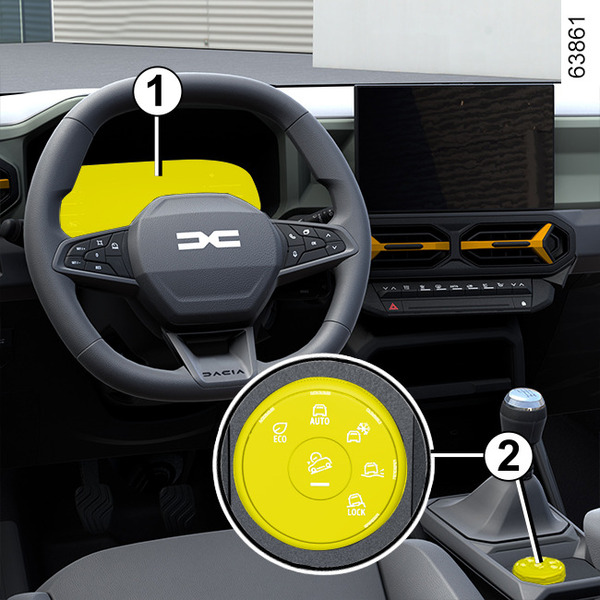
Depending on the type of roads or tracks you are taking and the external conditions, you can select from five driving modes:
- "ECO" mode;
- "AUTO" mode (default mode every time the vehicle is started);
- "SNOW" mode;
- "MUD-SAND" mode;
- "OFF‑ROAD" mode.
All the modes are preset. Each of these modes is characterized by specific settings for:
- steering force;
- electronic stability control (ESC and traction control);
- accelerator pedal sensitivity and engine responsiveness;
- the engine torque distributed between the front and rear axles.
Turn the selector 2 to select the mode that best suits the driving and road conditions.
The selected mode is displayed on the instrument panel 1.
tip
Special cases
Depending on the selected mode and the grip conditions encountered, the ESC intervention may reduce engine power to limit slipping of the drive wheels.
In some off-road situations, it is possible to deactivate the ESC function in order to manage wheel slip and vehicle traction.
" ECO " mode
Using "ECO" mode optimises fuel consumption.
It acts on some of the vehicle's energy-consuming systems (air conditioning, etc.) and on vehicle performance (acceleration, cruise control, deceleration, etc.)
Use this mode on paved roads.
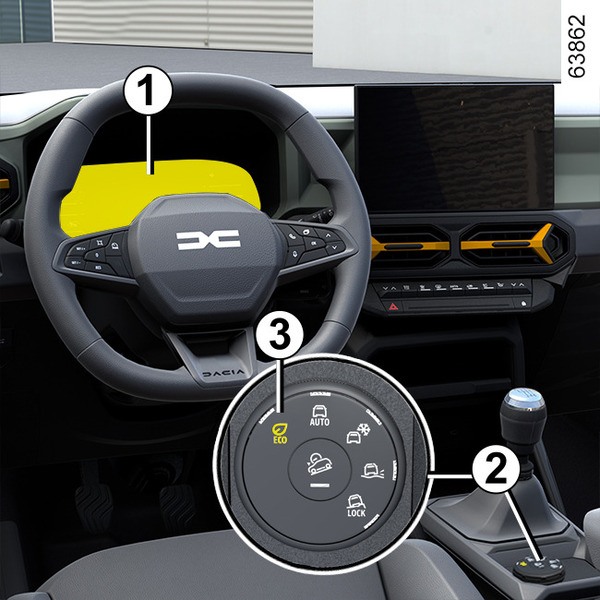
To activate this mode, turn the selector 2 to "ECO" position 3: the light on the selector comes on and the "
 " warning light is displayed on the instrument panel 1 to confirm that it is activated.
"ECO" mode automatically distributes the engine torque between the front and rear axles according to the roadholding conditions and the vehicle speed.
Note: when driving (e.g. when overtaking), it is possible to temporarily regain the engine's optimum acceleration capabilities. To do this, press the accelerator pedal firmly and fully. "ECO" mode is reactivated when you ease off the accelerator pedal.
To change modes, turn the selector 2 to a different position. The "
" indicator light disappears from the instrument panel 1 to confirm deactivation and the newly activated is displayed.
" AUTO " mode
"AUTO" mode is the default mode to be used on the road.
It is a versatile mode that covers the majority of uses intended for the usual road conditions.
Use this mode on paved roads or when towing (trailer, caravan, etc.).
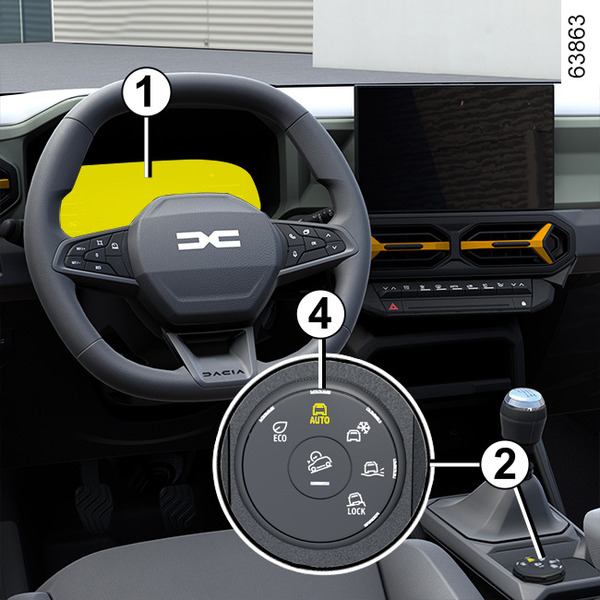
To activate this mode, turn the selector 2 to "AUTO" position 4: the light on the selector comes on and the "AUTO" indicator light is displayed on the instrument panel 1 to confirm that it is activated.
"AUTO" mode automatically distributes the engine torque between the front and rear axles according to the roadholding conditions and the vehicle speed.
This mode optimises road holding.
To change modes, turn the selector 2 to a different position. The "AUTO" display disappears from the instrument panel 1 to confirm deactivation and the newly activated mode is displayed.
" SNOW " mode
"SNOW" mode allows you to optimize your vehicle's electronic stability program on slippery roads (snow, ice, etc.).
The electronic stability control ESC and traction control interventions are enabled and the steering force is increased.
Use this mode on paved and slippery roads.
Note: the use of "SNOW" mode is not suitable in certain driving situations (on soft ground, deep snow, mud, sand, etc.).
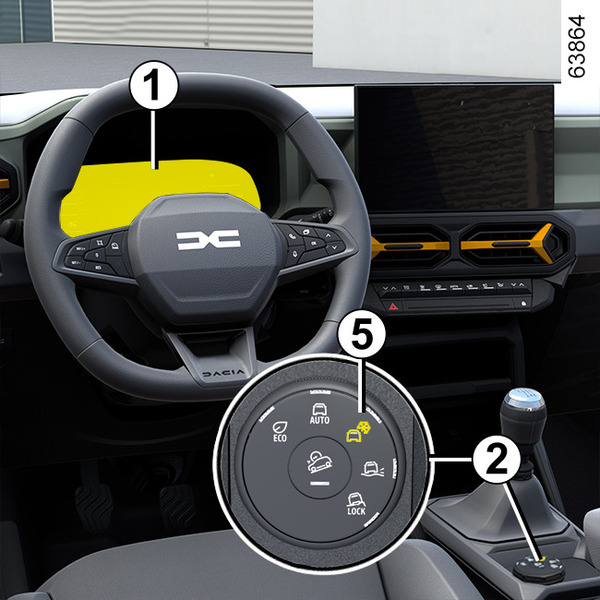
To activate this mode, turn the selector 2 to the "SNOW" position 5: the light in the selector comes on.
The SNOW indicator light 1 lights up on the instrument panel to confirm activation.
"SNOW" mode automatically distributes the engine torque between the front and rear axles according to the road conditions and the vehicle speed.
To change modes, turn the selector 2 to a different position. The "SNOW" display disappears from the instrument panel 1 to confirm deactivation and the newly activated mode is displayed.
" MUD-SAND " mode
"MUD-SAND " mode allows you to make progress on soft ground in conditions of reduced grip (sand, mud, deep snow, etc.).
The "traction control" function is automatically deactivated to keep the engine speed under your control and help you move your vehicle forwards by probing the ground to find grippier areas.
Use this mode only off paved roads and on soft ground.
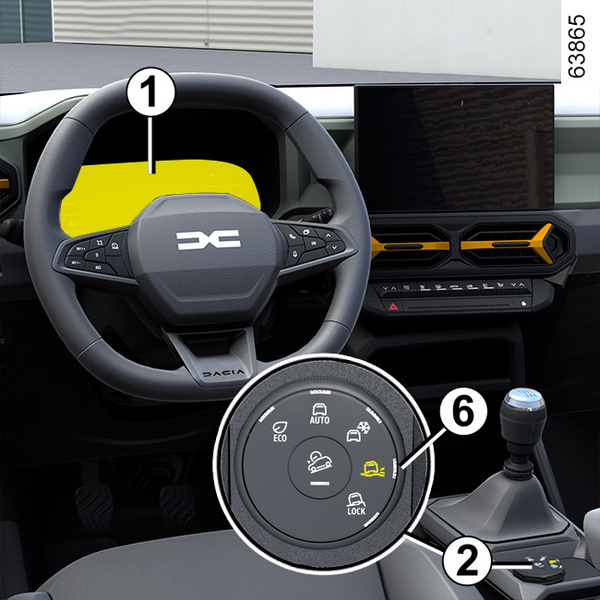
To activate this mode, turn the selector 2 to the "MUD-SAND" position 6: the light integrated in the selector comes on and "MUD-SAND" is displayed on the instrument panel 1 to confirm activation.
"MUD-SAND" mode distributes engine torque between the front and rear wheels in all grip conditions and under certain speed conditions.
To change modes, turn the selector 2 to a different position. The "MUD-SAND" display disappears from the instrument panel 1 to confirm deactivation and the newly activated mode is displayed.
" OFF-ROAD " (LOCK) mode
Using "OFF-ROAD" mode maximizes the performance capacity of your vehicle in off-road situations (rough or rutted roads, quagmire, soft sand, steep uphill and downhill slopes, etc.).
Use this mode only when off drivable roads and on difficult terrain.
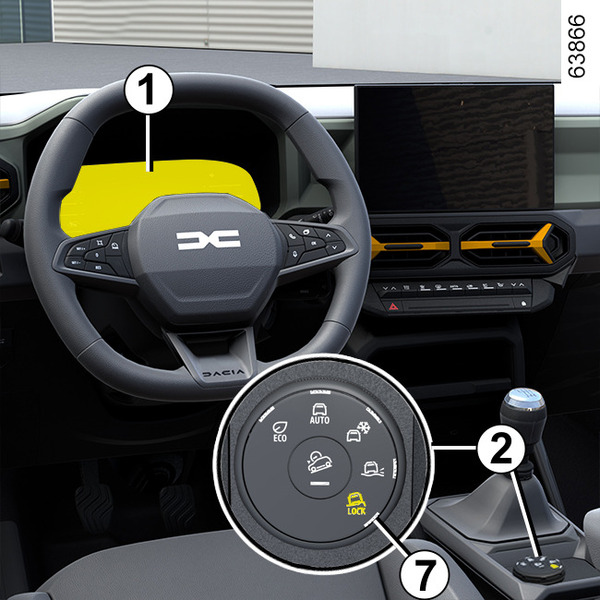
To activate this mode, turn the selector 2 to the "OFF-ROAD" position 7: the light integrated in the selector comes on, "OFF-ROAD" is displayed and the indicator light
 1 appear to confirm activation.
"OFF-ROAD" mode distributes engine torque between the front and rear wheels in all grip conditions and under certain speed conditions.
To change modes, turn the selector 2 to a different position. The "OFF-ROAD" display and the
indicator light disappear from the instrument panel 1 to confirm deactivation and are replaced by display of the newly activated mode.
Special features of the 4-wheel drive transmission
If the system detects a difference in size between the front and rear wheels (e.g. under-inflation, significant wear on an axle, etc.), the "4-wheel drive" system automatically switches to "2-wheel drive" operation: the
 warning light is displayed on the instrument panel 1 accompanied by the "4 wheel drive unavailable" message and, depending on the vehicle, "4 wheel drive unavailable unsuitable tyres".
Note: the problem may be resolved by replacing the tyres. Always use four identical tyres (same brand, profile, etc.) and with similar wear.
In the event of excessive stress resulting in abnormal overheating of the system:
- the
warning light is displayed on the instrument panel 1 accompanied by the "4WD Overheating (or 4x4)" message;
- if the wheels still spin, the system automatically switches to "2-wheel drive" operation to protect the mechanical components.
In this case, stop as soon as possible to allow the system to cool down. This cooling can last for several minutes.
When the 4WD (or 4x4) system is operational again, the
warning light will switch off and the
warning light will be displayed again on the instrument panel.
Anti-lock braking in OFF-ROAD mode
(vehicles equipped with ABS)
When "OFF-ROAD" mode is activated, the ABS automatically switches to an off-road setting. In this case, the wheels may lock intermittently to achieve better grip and reduce braking distances on soft ground.
When "OFF-ROAD" mode is active:
- the vehicle's manoeuvrability is limited during braking. This operating mode is therefore not recommended in very low-grip conditions (e.g., ice);
- there may be some noise. This is normal, and does not indicate an operating fault.
Electronic stability control ( ESC ) and traction control when driving off-road
(vehicles equipped with ESC)
When driving on soft ground (sand, mud, deep snow), we recommend that you deactivate the ESC function by pressing and holding the "ESC" button. In this case, only individual wheel braking remains active.
This function applies the brake to any wheel that is slipping, allowing the engine torque to be transferred to the wheels where there is the most grip. This is particularly useful when crossing a bridge.
All the ESC functions will be automatically reactivated when the vehicle speed exceeds approximately 31 mph (50 km/h), (62 mph (100 km/h) in "OFF-ROAD " mode) or after restarting the engine or pressing the "ESC" button again Driver correction devices and aids.
Note: the traction control system is reactivated only after the engine is restarted or by pressing the "ESC" button.
Operating faults
When the system detects a malfunction, the system automatically switches to "2-wheel drive" operation, the
,
 warning lights and the "Check 4 wheel drive" message appear on the instrument panel.
Drive as soon as possible at a moderate speed to an approved dealer.
Warnings
warning
4-wheel drive system
- Regardless of the mode selected, do not start the engine if all four wheels are not on the ground.
- Do not turn the mode selector when cornering, reversing or if the wheels are spinning excessively.
- The "MUD-SAND" and "OFF-ROAD" modes are exclusively reserved for driving off-road. The use of this mode in any other conditions may adversely affect the vehicle's manoeuvrability and damage certain mechanical components.
- Always ensure tyres with identical specifications are fitted to all four wheels (brand, size, structure, wear etc.). Fitting tyres of different sizes to the front and rear wheels and/or left and right wheels may have serious consequences for the tyres and mechanical drive components (gearbox, transfer box, 4WD (or 4x4) coupler, rear differential, etc.).