Dacia Sandero
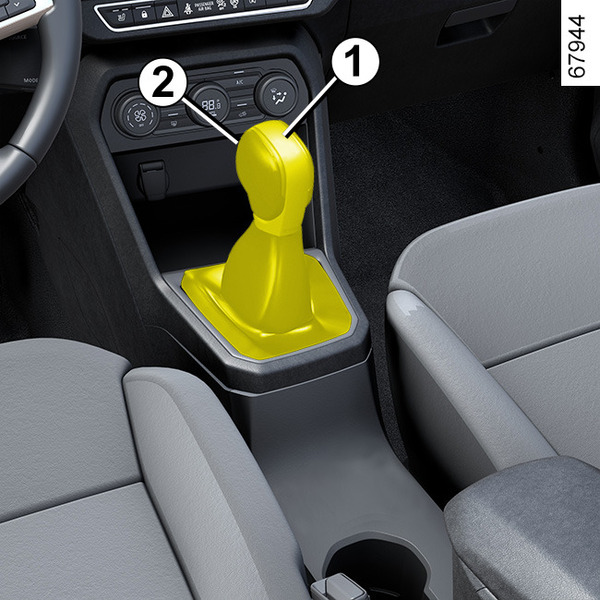
Selector lever 1
P: park
R: reverse gear
N: neutral
D: forward gear
L: "Low" mode
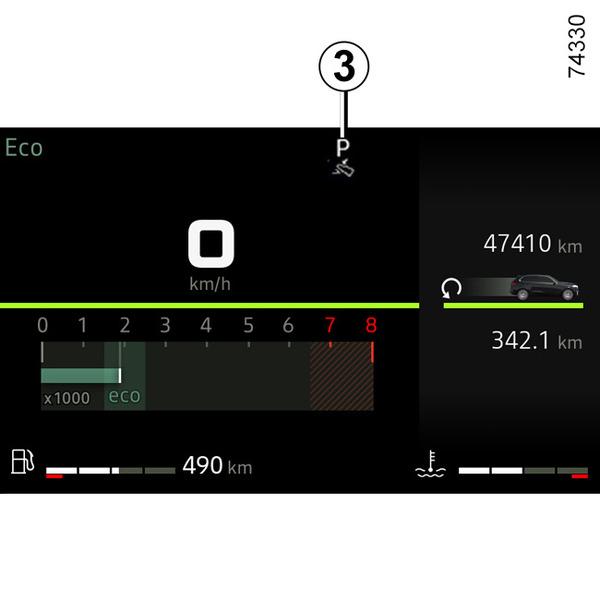
The 3 display on the instrument panel indicates the selector lever position engaged 1.
Note: press the 2 button to:
- exit position P;
- shift from D, L or N position to R or P position;
- shift from D position to L position.
Operation
With the selection lever 1 in Pposition, press the brake pedal then start the engine.
To move out of P position, you must press the brake pedal before pressing the unlocking button 2.
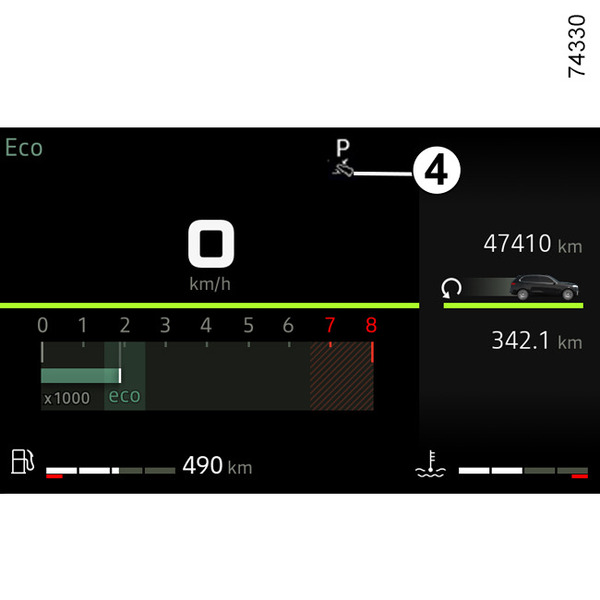
With your foot on the brake pedal (warning light 4 disappears from the display), disengage P.
Only engageDorRwhen the vehicle is stopped, with your foot on the brake and the accelerator pedal released.
To engage the forward gear (D position)
Set the lever 1 to D position.
In the majority of driving conditions, you will no longer have to use your gear lever: the gears change automatically, at the right time, to a suitable engine speed because the automated system takes the vehicle's load, road profile and the selected driving style into account.
To engage reverse gear (R position)
With the vehicle stationary and the engine running, shift the selector lever 1 two notches forwards to engage R position.
If the brake pedal is not pressed, a beep will sound, the R position display will flash for around five seconds on the grid shown on the instrument panel and the "Press brake pedal" message will be displayed for around 15 seconds.
Note: with the engine running and the vehicle moving at between approximately 0 and 5 mph (8 km/h), in N or D position you do not need to press the brake pedal to engage R position. This is useful during parking manoeuvres requiring a number of alternate forward and reverse movements.
Economical driving
When driving, always leave the lever in position D, keeping the accelerator pedal lightly depressed to ensure automatic gear changes at a lower engine speed.
Accelerating and overtaking
Depress the accelerator pedal briskly and fully (so that it goes beyond the kickdown point).
This will enable you to change down to the optimum gear within the engine range.
Special cases
In certain driving conditions (resulting in, for example, engine protection, activation of the electronic stability control (ESC), etc.), the automatic system may change the gear automatically.
Likewise, to prevent incorrect manoeuvres, a gear change may be refused by the automatic system: in this case the gear display flashes for a few seconds as a warning.
tip
When facing uphill, to remain stopped, do not keep your foot on the accelerator.
Risk of overheating the automatic gearbox.
warning
Check that the P warning light is displayed on the instrument panel before leaving the vehicle.
Risk of loss of immobilisation of the vehicle.
Special circumstances
If the road type or weather conditions (steep uphill slopes, steep descents, deep snow, sand or mud) make it difficult to stay in automatic mode, depending on the vehicle, it is advisable to switch to "Low" mode to enable the vehicle to drive at low speed below 30 mph (50 km/h) on surfaces with low grip (snow, mud etc.), climbing a slope or engine braking during a hill descent. To do this, set the lever to position L.
Note: in "Low" mode, the variations in engine speed are continuous and the accelerations are more linear.
In very cold weather, to avoid stalling the engine, wait a few seconds before shifting from P or N position and shifting to D, R or L position, depending on the vehicle,
P or N position end engaging the lever
at D/B or R.
Parking the vehicle
With the vehicle stationary, move the lever to P position while keeping your foot on the brake pedal: the gearbox is in neutral and the drive wheels are mechanically locked by the driveshaft.
Ensure that the electronic parking brake is engaged.
warning
An impact to the underside of the vehicle while manoeuvring (e.g. striking a post, raised kerb or other street furniture) may result in damage to the vehicle (e.g. deformation of an axle).
To avoid any risk of accident, have your vehicle checked by an approved Dealer.
Maintenance period
Refer to the maintenance document for your vehicle or consult an approved Dealer to check whether the automatic gearbox requires scheduled maintenance.
If it does not need to be serviced, there is no need to top up the oil.
Operating faults
- during driving, if the "WARNING: Check Gearbox" message appears on the instrument panel, this indicates a fault.
Contact an approved dealer as soon as possible;
- when driving, if the "WARNING: Gearbox Overheating" message appears on the instrument panel, stop as soon as possible to let the gearbox cool down and wait for the message to disappear;
- breakdown recovery of a vehicle with an automatic gearbox Towing: breakdown.
warning
For safety reasons, do not switch off the ignition before the vehicle has come to a complete standstill.
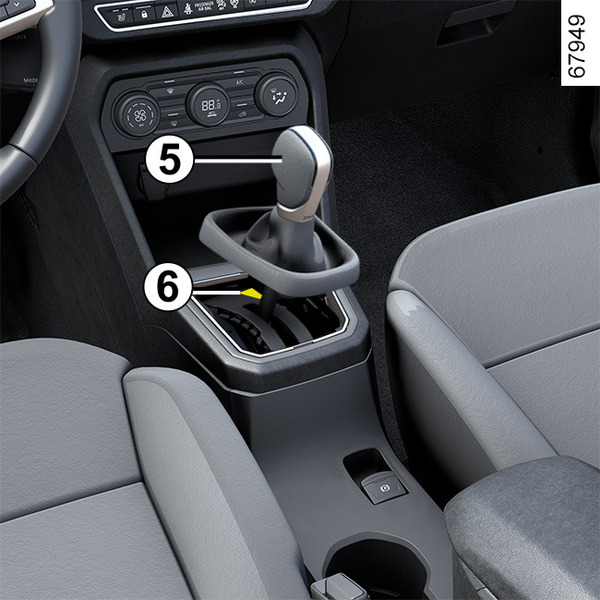
When setting off, if the lever is locked in position P when you press the brake pedal (e.g. battery fault), it is possible to manually release the lever to unblock the drive wheels. To do this, unclip the base of the gaiter and press the push button 6 while simultaneously pressing the button 5 on the lever to unlock the lever and shift to N position.
Contact your approved Dealer as soon as possible;