Dacia Duster
Selector lever 1
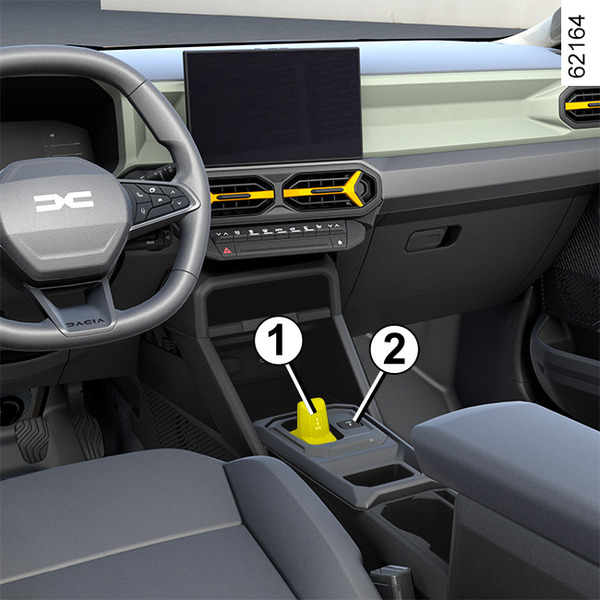
R: reverse gear
N: neutral
D: automatic mode
B: forward gear with increased regenerative braking (depending on the vehicle)
P: parking, button 2
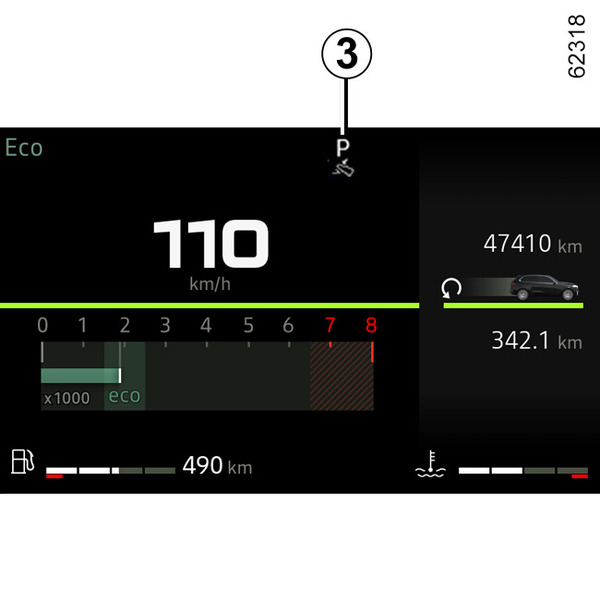
The 3 display on the instrument panel indicates the gear lever position engaged 1.
warning
Check that the P indicator light on the instrument panel and the indicator light built into the button 2 are displayed before leaving the vehicle.
Risk of loss of immobilisation of the vehicle
Operation
With the vehicle stationary and the selector lever 1 in P position, start the vehicle.
On the Hybrid version, the READY message appears on the instrument panel.
With your foot on the brake pedal (the warning light 4 disappears from the display), exit P position and engage D position.
The lever must only be shifted to D, B or R position while the vehicle is stationary, your foot is on the brake and the accelerator pedal is released.
tip
The READY warning light on the instrument panel indicates that the Hybrid system is in operation and ready for driving Ignition-starter switch on a vehicle with key, Ignition-starter switch on a vehicle with card.
Operation
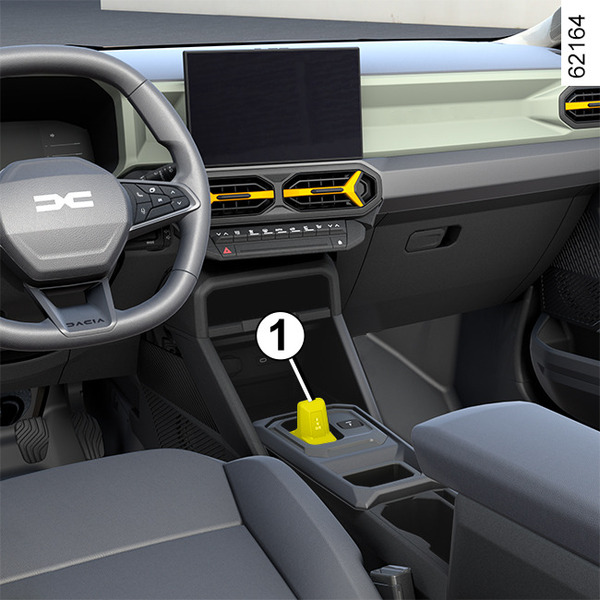
Shift the selector lever 1 one or two notches forwards or backwards to engage the desired position (R, N, D or B), then release the lever and it will return to its stable position.
The position engaged lights up on the instrument panel.
If certain conditions prevent shifting from one position to another, the requested position flashes on the instrument panel.
To engage position P
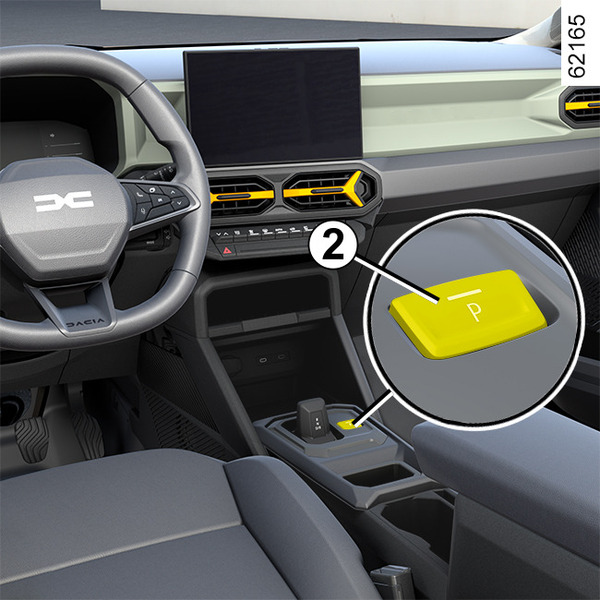
With the vehicle stationary and the engine running or the ignition on, press the button 2 to engage P position. The warning light on button 2 appears in orange once the Park P position is engaged on the gearbox.
To disengage position P
With the vehicle stationary and the engine on, press the brake pedal and, move the 1 selector lever forwards or backwards according to the position desired. The 2 button warning light switches off.
If the brake pedal is not fully pressed, the "Press brake pedal" message and
 warning light are displayed on the instrument panel.
Note:
- if the driver opens their door to leave the vehicle and P position has not been engaged, a beep sounds and the "
P not engaged" message is displayed on the instrument panel; - the warning light
appears each time the brake pedal must be pressed to change the automatic gearbox lever position.
To engage neutral
With the vehicle stationary and the engine running, to engage N position, shift the selector lever 1 a notch forwards or backwards according to the gear engaged.
Driving in automatic mode
With the vehicle stationary and the engine running, shift the selector lever 1 two notches backwards to engage D position.
If one of the conditions is not applied, D flashes for around five seconds and the "Press brake pedal" message is displayed on the instrument panel for approximately 15 seconds.
In the majority of driving conditions, you will no longer have to use your gear lever: the gears change "automatically", at the right time, to a suitable engine speed because the automated system takes the vehicle's load, road profile and the selected driving style into account.
Note: with the engine running and the vehicle travelling at between 0 and 5 mph (0 and 8 km/h), in N or R position, you will have to press the brake pedal in order to engage D position. This is useful during parking manoeuvres requiring a number of alternate forward and reverse movements.
Economical driving
When driving, always leave the lever in position D, keeping the accelerator pedal lightly depressed to ensure automatic gear changes at a lower engine speed.
Accelerating and overtaking
Depress the accelerator pedal briskly and fully (so that it goes beyond the kickdown point).
This will enable you to change down to the optimum gear within the engine range.
Driving in mode B
This mode enables driving with greater regenerative engine braking.
When releasing the accelerator pedal, the vehicle uses regenerative braking to slow down.
Thus the electric motor generates a higher electrical current which enables the traction battery to be recharged.
In B mode, the regenerative braking performance will be reduced if the battery is cold or fully charged.
warning
The engine brake should under no circumstances be used as a substitute for the brake pedal.
To select reverse gear
With the vehicle stationary and the engine running, shift the selector lever 1 two notches forwards to engage R position.
If the brake pedal is not pressed, a beep will sound, the R position display will flash for around five seconds on the grid shown on the instrument panel and the "Press brake pedal" message will be displayed for around 15 seconds.
Note: with the engine running and the vehicle moving at between approximately 0 and 5 mph (8 km/h), in N or D position you do not need to press the brake pedal to engage R position. This is useful during parking manoeuvres requiring a number of alternate forward and reverse movements.
Gear change paddles 4 and 5
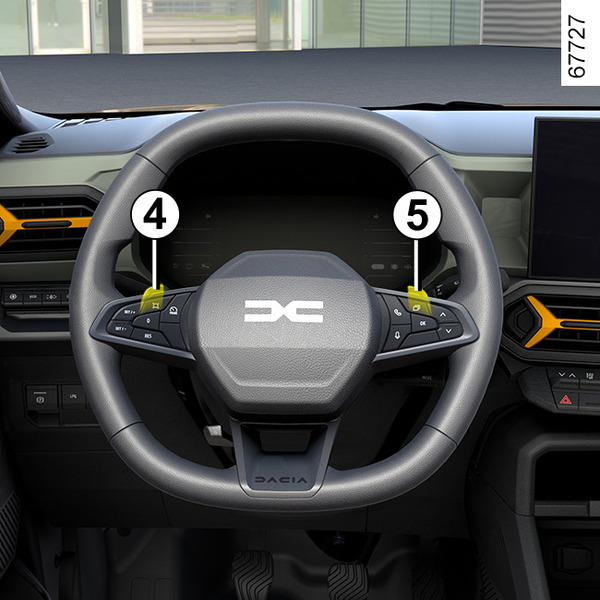
Depending on the vehicle, paddles 4 and 5 can be used to change gear when the selector lever 1 is in D position.
4: change to a lower gear.
5: change to a higher gear.
The P, N and R positions cannot be accessed using the paddles.
Driving in manual mode
When driving in D position, you can switch to manual driving mode using paddles 4 and 5 on the steering wheel. Depending on the vehicle, two manual driving modes are available:
- the "temporary" manual mode can be used to force gear shifting by briefly pressing one of the two paddles. The driving mode D and the gear engaged appear on the instrument panel.
Note: the gearbox automatically returns to automatic mode D if the gear engaged is no longer optimal to vehicle performance or if no action has been taken on a paddle for a certain amount of time.
- permanent manual mode is activated by pressing and holding either of the paddles. The driving mode M and the gear engaged appear on the instrument panel.
Note: depending on the vehicle, the return to automatic mode is carried out by pressing and holding the right-hand paddle or by moving the one-touch lever 1 one or two notches backwards.
In all situations:
- to shift down through the gears, press the left-hand paddle;
- to move up through the gears, press the right-hand paddle.
Note: depending on the display, the "+" and "˗" or
 and
and
 indicators will suggest that you shift up or down a gear.
Special cases
In certain driving conditions (resulting in, for example, engine protection, activation of the electronic stability control (ESC), etc.), the automatic system may change the gear automatically.
Likewise, to prevent incorrect manoeuvres, a gear change may be refused by the automatic system: in this case the gear display flashes for a few seconds as a warning.
Special circumstances
- If the road type or weather conditions (steep uphill slopes, sudden downhill slopes, deep snow, sand or mud) make it difficult to stay in automatic mode, depending on the vehicle, it is advisable to switch to manual mode using the paddles. This will prevent the "automatic gearbox" from changing gears repeatedly when driving uphill, and permit engine braking on long descents.
- To avoid the engine stalling in very cold weather, wait a few seconds before disengaging P or N position and shifting the lever to D/B or R.
Parking the vehicle
On vehicles equipped with lever 1, P position is automatically engaged along with the electronic parking brake (if the vehicle is equipped), when:
- the engine is stopped;
- the driver's seatbelt is unfastened and the vehicle is stopped;
- the driver's door is opened and the vehicle is stopped.
P is displayed on the instrument panel and the P button lights up
As P position is automatically engaged when the engine is stopped, you may have to engage N position in some situations, for example in some car washes:
- with the engine running, press button P, shift the selector lever 1 a notch forwards or backwards then switch off the engine;
- with the engine off and the ignition on, move the selector lever 1 a notch forwards or backwards then switch-off the engine.
The next time the engine is restarted, P position is engaged automatically according to the cases described earlier.
tip
The P position must only be engaged when the vehicle is stationary.
tip
When facing uphill, to remain stopped, do not keep your foot on the accelerator.
Risk of overheating the automatic gearbox.
warning
For safety reasons, do not switch off the ignition before the vehicle has come to a complete standstill.
Maintenance period
Refer to the maintenance document for your vehicle or consult an approved Dealer to check whether the automatic gearbox requires scheduled maintenance.
If it does not need to be serviced, there is no need to top up the oil.
Operating faults
- When driving, if the "WARNING: Check Gearbox" message appears on the instrument panel, it indicates a fault.
Contact your approved Dealer as soon as possible;
- When driving, if the "WARNING: Gearbox Overheating" message appears on the instrument panel, stop as soon as possible to let the gearbox cool down and wait for the message to disappear;
In the event of engine failure or an electrical fault (battery fault) affecting operation of the automatic gearbox, ensure that the vehicle is properly immobilised.
warning
In the event an impact to the underside of the vehicle (e.g.: striking a post, raised kerb or other street furniture) this may result in damage to the vehicle (e.g.: twisted axle), the electrical circuit or the traction battery.
Do not touch the circuit elements or any fluids or liquids.
To prevent any risk of accident, have your vehicle checked by an authorised dealer.
Risk of serious injury or electric shock and risk to life.